2nd August 2003
Amended 20th March 2026
Since I wrote my original article I have received comments from various people, either via personal e-mail or through postings in the PHP newsgroup, concerning the efficacy of my endeavours. Some people ask intelligent questions while others say "your work is no good because it cannot do so-and-so". These people either haven't studied my work or cannot work out how it is done because I use a technique which is totally different from theirs. I cannot help being different because it is only by being different that I have a chance to be better, but I can explain some of the finer points of my approach in the hope that it may bring enlightenment to a few confused minds.
NOTE: Although I do not use any javascript in the core framework I have provided the ability for developers to add javascript into their own application subsystems should they so desire. Please refer to Can I add javascript to my application? for details.
Before I answer this, what exactly is a Front Controller? Is his book Patterns of Enterprise Application Architecture Martin Fowler offers this definition:
The term 'Web handler' refers to the logic which examines each incoming HTTP request to gather just enough information to know what to do with it while the 'command hierarchy' is some kind of organisational structure which the Front Controller can refer to, to decide what to do next, based on the information gathered by the 'Web handler'.
As a design pattern the Front Controller is described as:
The Front Controller design pattern defines a single component that is responsible for processing application requests. A front controller centralizes functions such as view selection, security, and templating, and applies them consistently across all pages or views. Consequently, when the behavior of these functions need to change, only a small part of the application needs to be changed: the controller and its helper classes.
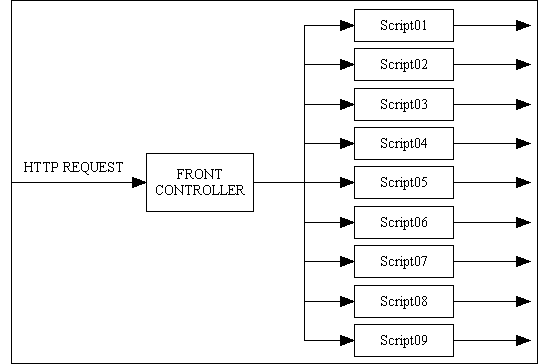
This can be represented by the structure shown in Figure 1:
A Front Controller would be invoked using a URL such as http://www.blah.com/controller.php?action=blah which will then do something, such as redirect to another script, depending on the value of the action parameter. Note that some people like to use the name index.php instead of controller.php, but the effect is the same.
In a compiled language you may have many different modules which are compiled separately from source files into binary object files which then have to be linked together to form a single executable program file. There are two types of module in this process:
When you run a program from the command line it will always begin its processing from the same place which is commonly known as the MAIN procedure. The command line may contain an argument which may be interpreted as "action=foobar" which can be used in the MAIN procedure to automatically call a subprogram which performs that particular action. In a web application the code which converts the contents of the "action" argument into a specific subroutine call is known as a ROUTER which is described as follows:
The router is the first component of the application to receive requests from users. When the application starts up, the router registers all the available endpoints (or routes) to an array. When a user sends a request to the server, the router first analyzes the URL provided in the request. It then compares this URL to the array of registered endpoints to determine whether there is a match. If the router finds a match, it knows which function or controller to execute in response to the request.
The big problem with this mechanism is that you have to hard code a list of endpoints in order to map each action to a particular subroutine call. You cannot simply add a new subroutine to the mix and have the router automagically detect it and call it. Compiled languages are statically typed, so control cannot be passed to a subroutine without an explicit call, and when the link process is run each subroutine call must be satisfied by a matching endpoint in a binary file otherwise the link process will fail.
PHP is dynamically typed, not statically typed. This means that any type checking is performed at run time and not compile/link time.
PHP does not require all the modules within an application to be compiled and linked into a single executable file. Each module can be a standalone script which can be activated directly by the web server from the URL provided by the browser. All syntax checking is performed at run time. So if I have an application with 4,000 different modules I do not need:
http://www.blah.com/controller.php?action=foobar // with 4,000 variations of 'foobar'
as I can go directly to the relevant script using:
http://www.blah.com/path/to/script.php // path to a file within the file system
Within program code it is possible to jump from the current script to a different script using the header() function, such as in the following example:
<?php
header("Location: path/to/script.php");
exit;
?>
If the specified script.php file cannot be found in the file system the web server will generate a "404 file not found" error.
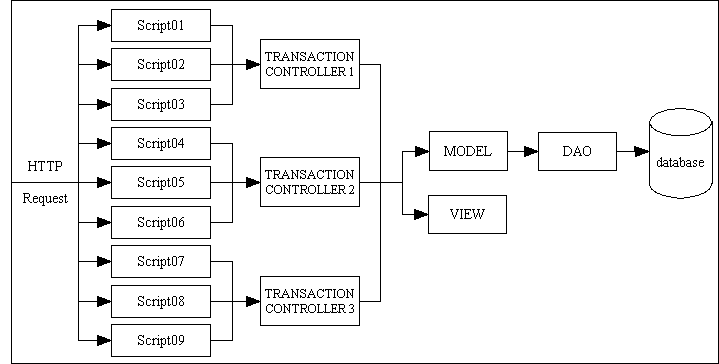
You should be able to see here that all the processing of a front controller and a router is already handled by the web server, so writing code to do it yourself would be redundant and a violation of YAGNI. In the RADICORE framework each module within the application, which I refer to as a task (user transaction), has its own script in the file system which can be accessed directly by the web server. This results in the structure shown in Figure 2:
This structure works as follows:
One argument put forward for using a front controller is that it becomes easy to perform 'standard' processing before invoking each individual page. This argument is pretty weak considering that it is also possible to perform any 'standard' processing as the very first action within each page (transaction) controller as soon as it has been activated. Provided that this 'standard' processing is performed before the page controller performs any other actions the result is the same.
A Front Controller may be used by some people to solve their particular problems, but as far as I am concerned it is not the only solution which is available in PHP, and it is certainly not the best solution, especially when I don't have those problems in the first place:
As I can achieve all the commonality and reusability I desire without using a Front Controller I consider its use to be superfluous, redundant, unnecessary and a complete waste of time. I am not the only one who shares this opinion - take a look at the following:
First, here are some definitions:
$foo = $object->getFoo();
$object->setFoo($foo);
After working with PHP for a short while I noticed that data coming from the client arrives in the format of an associative array (refer to $_POST and $_GET). I discovered that I could pass the whole array into the object with a single method, as in
$object->insertRecord($_POST);
Inside the class it is just as easy to examine a variable with
$this->array['name']
as it is with
$this->name
without any loss of functionality. This avoids the need to unpick the array and pass in each field one at a time, which uses less code and which is therefore more efficient. It also means that the component which feeds the data into an object can do so with a single generic method instead of requiring knowledge of the particular setters within that object. This is how I put the principal of polymorphism into practice.
Here is an example of code written the 'traditional' way within a controller that accesses an object. Note that it provides a classic example of tight coupling which should be avoided.
<?php

$client = new Client();
$client->setUserID    ( $_POST['userID']   );
$client->setEmail     ( $_POST['email']    );
$client->setFirstname ( $_POST['firstname']);
$client->setLastname  ( $_POST['lastname'] );
$client->setAddress1  ( $_POST['address1'] );
$client->setAddress2  ( $_POST['address2'] );
$client->setCity      ( $_POST['city']     );
$client->setProvince  ( $_POST['province'] );
$client->setCountry   ( $_POST['country']  );

if ($client->submit($db) !== true)
{
    // do error handling
}
?>
This is the code that I use in my controller. Note that it provides an example of loose coupling which is to be encouraged.
<?php

$dbobject = new Client;
$dbobject->updateRecord($_POST);
$errors = $dbobject->getErrors();

?>
What are the benefits of my method?
I am not the only one who thinks this way. Take a look at Why getter and setter methods are evil.
Similarly the data coming out of the database, which is just a collection of rows and columns, can easily be converted into an associative array, as in
$result = mysql_query($query, $link);
// convert result set into a simple associative array for each row
while ($row = mysql_fetch_ass($result)) {
    $array[] = $row;
} // while
As the data array which is retrieved by an object does not need to be unpicked into individual fields it means that the receiving component can achieve this with a single generic method, as in
$array = $object->getData($where);
Nothing is done with this data array except to pass it as-is to a function which simply writes it out to an XML file. This means that the component which receives data from an object can do so with a single generic method instead of requiring knowledge of the particular getters within that object.
In my infrastructure the transaction controllers can feed data into and out of an object without any knowledge of the individual items of data contained within that object. This means that my transaction controllers are not tied to any individual object and can be used on any object. The level of reusability for my generic controllers is therefore far higher than in alternative systems where each individual object needs its own controller as it needs a different collection of getters and setters.
In article More on Getters and Setters the author explains why the use of getters and setters may expose implementation details which in the OO world is not considered to be 'a good thing'. In my method I do not need to know the internal representation of a field - a string, a date, an integer, a float, et cetera - as everything goes in and out as a string. Everything in the $_POST array is a string, and everything I put into the XML file is a string. Any necessary conversion between one data type and another is done within the object using information defined within the object.
This topic is also discussed in Getters and Setters are EVIL.
Having experienced first hand the benefits of the 3 Tier architecture I wanted to completely separate the business logic from the presentation logic, so I looked for some sort of templating system to generate the HTML output. I had heard of several HTML templating systems for PHP (such as Smarty) but I chose XSLT for the following reasons:
During the development of my infrastructure I found that there was nothing I wanted to do with XML/XSL that could not be done (although sometimes it took several attempts to find the right approach). It was also very useful that the order in which I retrieved data from the XML file during the XSL transformation process was not restricted by the order in which that data was written to the XML file in the first place. This meant that I could re-sequence the output without having to re-sequence the input.
I also found it very easy to put common code in reusable files, and with a subsequent enhancement I found that instead of having a separate XSL stylesheet for each database table where the table names, field names and field labels were hard-coded I could use a common stylesheet and supply the table names, field names and field labels as part of the XML data. This is documented in Reusable XSL Stylesheets and Templates.
For another opinion on this very subject I invite you to take a look at Proprietary template systems versus the standard - XSLT.
Do you mean different component types, such as Models, Views, Controllers and DAOs (as shown in this small diagram or this larger diagram), or do you mean the number of components of each type? If it is the latter then how many would you think I would need to deal with an application that has 400 database tables and 4,000 user transactions? The answer may surprise you:
It is only by breaking down the whole thing into small parts that you can create parts that can be reused, and it is the number of reusable parts that makes an infrastructure more efficient for the developer. Although my infrastructure looks complicated with its fourteen different components it is important to note that it is only the "hook" methods inside each table (Model) class that require effort from a developer. Everything else is either generated by the framework or built into the framework. The process for creating components is documented in FAQ 36.
If you think that the RADICORE framework contains a large number of components then you should be surprised to see what some of the popular front-end frameworks contain. It is not uncommon for these over-engineered bloated monsters frameworks to load dozens of files and instantiate dozen of classes just to build the index page. I have seen one particular big-name framework load and instantiate 100 classes just for the index page! WTF!!! I have even seen an open source library which does nothing but send emails, but requires over 100 classes to do so.
As far as I am concerned if you cannot draw a structure diagram - one that identifies all the classes - on a single A4 sheet of paper, then your structure is far too complicated and you should throw it away and start again.
An application must provide the ability for the user to run a component for each task (user transaction) in order to help him do his job. While some programmers prefer to create a small number of large components each of which can perform several tasks, ever since the mid-1980s I prefer to create a large number of small components each of which performs just one task. This is discussed further in Component Design - Large and Complex vs. Small and Simple. In my main ERP application, which now has over 4,000 tasks, each of these tasks has its own unique component script which is quite small as all it does is identify other sharable components which, when combined, perform the necessary processing for the user.
For screens which show multiple occurrences (rows) from the database it is generally not a good idea to show all available occurrences as that may be a huge number. This will result in a huge screen which the users will probably find to be unmanageable. It is therefore good practice to break down the total number of occurrences into smaller chunks of, say, 10 or 20. These chunks are often referred to as 'pages', hence the term 'pagination'. This facility makes use of the LIMIT and OFFSET clauses of the sql SELECT statement and is described in Pagination - what it is and how to do it. There is a default page size ($rows_per_page) defined for use within each multi-line screen, but this can be overridden by hyperlinks on the navigation bar.
The actual stages are performed in the following sequence:
$numrows - the total number of rows retrieved for this page, which may be less than the value in $rows_per_page.$pageno - the page number actually retrieved, which may be less than the one requested if records have been deleted.$lastpage - the last page number that is available using the current selection criteria.$pageno and $lastpage will be written out to the XML file, and during the XSL transformation process a standard XSL stylesheet will use this information to create the pagination area in the HTML output.
The data in the XML file will resemble the following:
<pagination>
  <page id="main" numrows="12" curpage="2" lastpage="2"/>
</pagination>
A sample of the XSL template used for pagination can be found here.
http://www.domain.com/script.php?page=3.// obtain the required page number (optional) if (isset($_GET['page'])) { $dbobject->setPageNo($_GET['page']); } // if
After a script has run for the first time the contents of each object is serialised into the $_SESSION array so that it can be retrieved, unserialised and reused for all subsequent invocations. This means that any settings (page number, sorting, selection criteria, et cetera) which are established will be reused until they are changed.
As you can see the process is quite straightforward, but it does require some action in the presentation layer as well as some action in the data layer. There are some people who insist that this process should take place entirely in the presentation layer, but I find the notion totally impractical and without merit.
For screens which show multiple occurrences (rows) from the database it is often useful to be able to sort the details in a different order, either by a different column, or descending instead of ascending. This ability is provide in my infrastructure by means of the following:
http://www.domain.com/script.php?orderby=name1.// obtain the 'orderby' field (optional) if (isset($_GET['orderby'])) { $dbobject->setOrderBy($_GET['orderby']); } // if
setOrderBy() method will load the field name into variable $orderby, and the variable $order will toggle between 'ascending' and 'descending'.$orderby and $order will be passed down to the DML object where, if not blank, will be built into the sql SELECT statement.$orderby and $order ('asc' or 'desc') will be added to the <params> area of the XML file. This information will be used by a standard XSL stylesheet to insert a gif image after the selected column heading in the HTML output.After a script has run for the first time the contents of each object is serialised into the $_SESSION array so that it can be retrieved, unserialised and reused for all subsequent invocations. This means that any settings (page number, sorting, selection criteria, et cetera) which are established will be reused until they are changed.
By default the sql SELECT statement which is created when using the getData($where) method on a database object will be as follows:
$query = "SELECT * FROM $this->tablename $where_str"
If a value has been supplied in the $where parameter then $where_str will contain WHERE ..., otherwise it will be empty. As you can see this will result in all columns being retrieved from a single table, but what happens if the developer wants something more complicated?
If any relationships with parent tables have been defined in the Data Dictionary then it may not be necessary to insert any custom code as the framework can use the $parent_relations array to automatically construct an SQL query containing JOINs to all the foreign tables, as described in Using Parent Relations to construct sql JOINs. It is also possible to take this automatically extended query and append manual extensions as described in How to manually extend the automatically extended sql SELECT statement.
The ability to create more complicated sql SELECT statements is provided as follows:
class Default_Table
{
   var $pageno;          // used as OFFSET
   var $rows_per_page;   // used as LIMIT
   var $sql_select;      // list of column names
   var $sql_from;        // table names in a JOIN statement
   var $sql_where;       // fixed portion of WHERE clause
   var $sql_groupby;     // contents of GROUP BY clause
   var $sql_having;      // contents of HAVING clause
   var $sql_orderby;     // contents of ORDER BY clause
   var $sql_orderby_seq; // contents of ORDER BY clause
   ...
// identify extra parameters for SELECT statement
$sql_select = 'person.*, pers_type.pers_type_desc';
$sql_from   = 'person '
             .'LEFT JOIN pers_type ON (person.pers_type_id = pers_type.pers_type_id)';
$sql_groupby = '';
$sql_having  = '';
$sql_where   = '';
$sql_orderby = 'person_id';
If you use any alias names then please identify them using the 'AS' keyword, as in 'something AS alias'. Although the use of 'AS' is optional in some DBMS engines, it is required in Radicore so that it can more easily detect than an alias is being used.
Note that it is also possible to put these changes in the database table class instead, as described in step (6) below.
$dbobject->sql_select  = &$sql_select;
$dbobject->sql_from    = &$sql_from;
$dbobject->sql_where   = &$sql_where;
$dbobject->sql_groupby = &$sql_groupby;
$dbobject->sql_having  = &$sql_having;
// the following values may be supplied by the user
if (isset($_GET['pagesize'])) {
    $dbobject->setRowsPerPage($_GET['pagesize']);
} // if
if (isset($_GET['page'])) {
    $dbobject->setPageNo($_GET['page']);
} // if
if (isset($_GET['orderby'])) {
    $dbobject->setOrderBy($_GET['orderby']);
} // if
$where = $_SESSION['where'];  // created by previous page
$data  = $dbobject->getData($where);
$sql_where (fixed) and $where (variable) are combined into a single string, then all these variables are passed to the DML object using code similar to the following:
    function _dml_getData ($where)
    // Get data from the specified database table.
    // Results may be affected by $where and $pageno.
    {
        $DML = $this->_getDBMSengine();

        $DML->pageno           = $this->pageno;
        $DML->rows_per_page    = $this->rows_per_page;
        $DML->sql_from         = $this->sql_from;
        $DML->sql_groupby      = $this->sql_groupby;
        $DML->sql_having       = $this->sql_having;
        $DML->sql_orderby      = $this->sql_orderby;
        $DML->sql_orderby_seq  = $this->sql_orderby_seq;
        $DML->sql_select       = $this->sql_select;
        $DML->sql_where        = $this->sql_where;

        $array = $DML->getData($this->dbname, $this->tablename, $where);

        $this->errors   = array_merge($DML->getErrors(), $this->errors);
        $this->numrows  = $DML->getNumRows();
        $this->pageno   = $DML->getPageNo();
        $this->lastpage = $DML->getLastPage();

        return $array;

    } // _dml_getData
SELECT statement with the following structure:
$query = 'SELECT ' .$select_str
        .' FROM ' .$from_str
        .' ' .$where_str
        .' ' .$group_str
        .' ' .$having_str
        .' ' .$sort_str
        .' ' .$limit_str;
where each
$..._str is a string constructed from the relevant variables passed down by the calling database object. Note that some of these may be empty. The end result will (should?) always be a valid sql SELECT statement.
The SELECT query can also be customised as described in the following:
By default each field will appear in the HTML output as a textbox control, but this can be changed to a dropdown list or radio group quite easily. To achieve this it is necessary to have the XML file contain data similar to the following:
<?xml version="1.0"?>
<root>
  <person>
    <person_id size="8" pkey="y" required="y">FB</person_id>
    <pers_type_id size="6" required="y"
                           control="dropdown"
                           optionlist="pers_type_id">ANON</pers_type_id>
    <first_name size="20" required="y">Fred</first_name>
    <last_name size="30" required="y">Bloggs</last_name>
    ....
  </person>
  <lookup>
    <pers_type_id>
      <option id=" "></option>
      <option id="ACTOR">Actor/Artiste</option>
      <option id="ANON">Anne Oni Mouse</option>
      <option id="BORING">Boring Person</option>
      <option id="CARTOO">Cartoon Character</option>
      ....
    </pers_type_id>
  </lookup>
</root>
Notice the following:
Sample XSL code can be located here:
To set the control type to dropdown or radio group you must do the following:
<tablename>.dict.inc file. This should then contain values similar to the following:
$fieldspec['pers_type_id'] = array('type' => 'string',
                                   'size' => 6,
                                   'required' => 'y',
                                   'control' => 'dropdown',
                                   'optionlist' => 'pers_type_id');
To supply values for the lookup element in the XML file you must do the following:
    function _cm_getExtraData ($where, $fieldarray)
    // Perform custom processing for the getExtraData method.
    // $where = a string in SQL 'where' format.
    // $fieldarray = the contents of $where as an array.
    {
        // get contents of foreign table PERS_TYPE and add to lookup array
        $pers_type = RDCsingleton::getInstance('x_pers_type');
        $array = $pers_type->getValRep('pers_type_id');
        $this->lookup_data['pers_type_id'] = $array;

        return $fieldarray;

    } // _cm_getExtraData
The code inside this method is used to communicate with a foreign table and obtain its contents for inclusion in an array of lookup (picklist) data. The term ValRep is short for Value+Representation where Value is what is used internally and Representation is what is displayed to the user.
   function _cm_getValRep ($item=NULL, $where=NULL)
   // get Value/Representation list from this table
   {
      $array = array();

      if (strtolower($item) == 'pers_type_id') {
         // get data from the database
         $this->sql_select      = 'pers_type_id, pers_type_desc';
         $this->sql_orderby     = 'pers_type_desc';
         $this->sql_orderby_seq = 'asc';
         $data = $this->getData($where);

         // convert each row into 'id=desc' in the output array
         foreach ($data as $row => $rowdata) {
            $rowvalues = array_values($rowdata);
            $array[$rowvalues[0]] = $rowvalues[1];
         } // foreach

         return $array;
      } // if

      return $array;

   } // _cm_getValRep
If the data for the dropdown list is not supplied from the contents of a database table but from a fixed list (such as signs of the zodiac) then code similar to the following will be required instead:
    function _cm_getExtraData ($where, $fieldarray)
    // Perform custom processing for the getExtraData method.
    // $where = a string in SQL 'where' format.
    // $fieldarray = the contents of $where as an array.
    {
        // get list for star_sign and insert into lookup array
        $array = $this->getValRep('star_sign');
        $this->lookup_data['star_sign'] = $array;

        return $fieldarray;

    } // _cm_getExtraData
_cm_getValRep() with contents similar to the following:-
   function _cm_getValRep ($item=NULL)
   // get Value/Representation list from this table
   {
      $array = array();

      if (strtolower($item) == 'star_sign') {
         $array = getLanguageArray('star_sign');
         return $array;
      } // if

      return $array;

   } // _cm_getValRep
Note that this uses the getLanguageArray() function which is part of my Internationalisation (I18N) facility. This will supply user text in the language of the user. The entry in each <subsystem>/text/<language>/language_array.inc file should look something like the following:
$array['star_sign'] = array('ARI' => 'Aries',
                            'AQU' => 'Aquarius',
                            'CAN' => 'Cancer',
                            'CAP' => 'Capricorn',
                            'GEM' => 'Gemini',
                            'LEO' => 'Leo',
                            'LIB' => 'Libra',
                            'PIS' => 'Pisces',
                            'SAG' => 'Sagittarius',
                            'SCO' => 'Scorpio',
                            'TAU' => 'Taurus',
                            'VIR' => 'Virgo');
Note that the lookup array need not contain a blank entry to signify "no selection" as this can be inserted automatically by the framework, as described in FAQ 75.
The information which decides on which output control is to be used for each field is held within the $fieldspec array within the database table class, but what is defined within this array can be regarded as being the default value as it can be changed at runtime. It is therefore possible to change the HTML control for any field to suit whatever circumstances are encountered.
Note that dropdown lists and radio groups will only allow the user to make a single selection. If multiple selections are required then take a look at How to incorporate a dropdown list with multiple selections.
There may be some circumstances in which a field that can normally be amended by the user must be made read-only or even hidden completely from view. As all the information regarding each database field from its validation rules to its display format is held with the $fieldspec array within each database table class then it is a simple matter to change the contents of this array.
To make these settings the default you should do the following:
<tablename>.dict.inc file. This should then contain values similar to the following:
    $fieldspec['field1']              = array('type' => 'string',
                                              'size' => 20,
                                              'noedit' => 'y');

    $fieldspec['field2']              = array('type' => 'string',
                                              'size' => 16,
                                              'nodisplay' => 'y');
These keywords will then be included in the XML file as attributes for their respective fields. Code within a standard XSL template will detect the existence of these attributes and take the appropriate action.
To change these settings temporarily during the execution of a particular script you may use code similar to the following:
  $this->fieldspec['field1']['noedit'] = 'y';
  $this->fieldspec['field2']['nodisplay'] = 'y';
To clear these settings at runtime you may use code similar to the following:
  unset($this->fieldspec['field1']['noedit']);
  unset($this->fieldspec['field2']['nodisplay']);
While both contain hyperlinks (or buttons) which will enable you to jump to another task (or transaction) within the system there is a difference between them.
The Menu bar has the following characteristics:
The Navigation bar has the following characteristics:
Primary validation is used to verify that when user input is inserted into an SQL query that it will not be rejected by the database. Each field or column in the database has a particular data type, such as date, time, number, et cetera, so this process checks that the value for a field conforms to its data type. If it is not then the value is returned to the user with a suitable error message and never sent to the database.
This type of validation is handled automatically in the data validation class by using the field specifications contained within the $fieldspec array within each database table class. This data is obtained from the contents of the the table structure file.
Secondary validation is that which cannot be handled by my standard validation class, such as comparing the contents of one field with another, so must be handled by custom code within the database table class. It is also possible to extend this custom validation to perform lookups on other database tables.
Unlike primary validation which is carried out automatically by the framework, secondary validation is the processing of business rules which have to be manually defined by the developer. This is done by inserting code into the relevant customisable hook method which has been defined in the abstract table class but which can be overridden within any concrete table subclass. These hook methods are part of the Template Method Pattern.
For example, if you want to check that a field contains a date, then this can be performed in primary validation. If you want to check that a date is not in the past, or is not earlier than another date, then this will require secondary validation.
When a controller script accesses a database table class to insert or update a record, standard code which is inherited from the generic table class will, after performing all standard validation, pass control to one or more customisable methods.
For a pictorial representation of the processing flow of various transactions please take a look at UML diagrams for the RADICORE Development Infrastructure.
The prefix '_cm_' is used to signify a method which is defined within the superclass but which does nothing. In order to achieve anything this method must be copied into the individual subclass where it can then be filled with custom code. The customised version in the subclass will then override the empty (or dummy) version in the superclass.
These dummy (or "hook") methods have the following definitions:
    function _cm_commonValidation ($fieldarray, $originaldata)
    // perform validation that is common to INSERT and UPDATE.
    {
        return $fieldarray;
    } // _cm_commonValidation

    // ****************************************************************************
    function _cm_validateInsert ($fieldarray)
    // perform custom validation before insert.
    {
        return $fieldarray;
    } // _cm_validateInsert

    // ****************************************************************************
    function _cm_validateUpdate ($fieldarray, $originaldata)
    // perform custom validation before update.
    {
        return $fieldarray;
    } // _cm_validateUpdate

    // ****************************************************************************
    function _cm_validateDelete ($fieldarray, $parent_table, $rownum)
    // verify that the selected record can be deleted.
    // ($parent_table and $rownum are only used in a cascade delete)
    // if anything is placed in $this->errors the delete will be terminated.
    {
         return $fieldarray;
    } // _cm_validateDelete
Here is an example of one containing customised code:
    function _cm_commonValidation ($fieldarray, $originaldata)
    // perform validation that is common to INSERT and UPDATE.
    {
        if ($fieldarray['start_date'] > $fieldarray['end_date']) {
            $this->errors['start_date'] = 'Start Date cannot be later than End Date';
            $this->errors['end_date']   = 'End Date cannot be earlier than Start Date';
        } // if

        return $fieldarray;

    } // _cm_commonValidation
Note that two input arrays are made available:
$originaldata - data from the database (before being changed by the user).$fieldarray - containing data from the screen (after being changed by the user).The 'before' and 'after' sets of data are for those situations where action need only be taken when a field value is actually changed, as shown in the following example:
        if ($fieldarray['foobar'] != $originaldata['foobar']) {
            if (<condition>) {
                $this->errors['whatever'] = 'Another error message';
            } // if
        } // if
Note that with the implementation of my Internationalisation feature it is possible to obtain a message in the user's language using code similar to the following:
$this->errors[] = getLanguageText('e1234');
It is also possible to define secondary validation in separate classes which can be shared among several application subsystems. Please refer to Extending the Validation class for more details.
Please also refer to FAQ14 to see how these error messages are handled.
Within each database table class there is a standard variable called $errors which should be used to hold all error messages. As more than one error message may be generated this variable should be treated as an array and not a string, as shown in FAQ13.
Error messages which are related to particular fields should be inserted as an associative array, as follows:
$this->errors['fieldname'] = 'error message';
These messages will be shown in the screen body immediately below the associated fields, as shown in Figure 3. If the field name does not appear in the screen body the message will be shown in the general message area at the bottom of the screen, as shown in Figure 4.
Error messages which are not related to particular fields should be inserted as an indexed array, as follows:
$this->errors[] = 'error message';
These messages will be shown in the general message area at the bottom of the screen, as shown in Figure 4.
If you access another object from within the top-level object you may wish to have any error messages clearly shown as having come from that internal object. This can be done using option (2) in the code sample below:
    $dbobject = RDCsingleton::getInstance('internal-class');
    $data = $dbobject->doStuff($data);
    if ($dbobject->errors) {
        either (1): $this->errors = array_merge($this->errors, $dbobject->errors);
            or (2): $this->errors[$dbobject->getClassName()] = $dbobject->errors;
    } // if
If you use option (1) above and the fieldname (array key) exists within the screen then it will appear in the screen area as shown in Figure 3. Note that this may overwrite an error message generated for the same fieldname within the top-level object. If the fieldname does not exist within the screen, or you use option (2) above, then the message will appear in the general message area as shown in Figure 4.
During the construction of the XML file as the value for each individual field is copied from the database object the $errors array is examined for an entry with a key which matches the field name. If one is found it is added to the XML file as an error attribute. Any error messages which are left over after all the fields have been processed will be added as separate lines to the message area. This is shown in the following example:
<root>
  <person>
    ....
    <start_date size="12"
                required="y"
                error="Start Date cannot be later than End Date"
                >02 Jan 2006</start_date>
    <end_date size="12"
              error="End Date cannot be earlier than Start Date"
              >02 Jan 2005</end_date>
    ....
  </person>
  <message>
    <line>This message is not attached to any field</line>
  </message>
</root>
During the XSL transformation process as each field is written to the HTML output the contents of the error attribute, if present, will appear immediately below the field value as shown in Figure 3.
Figure 3 - Error messages which are associated with fields in the screen
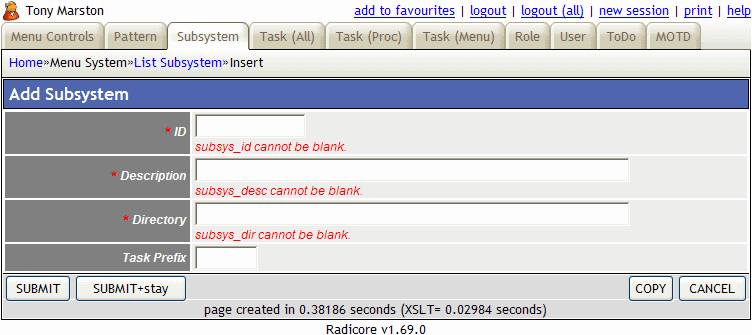
The contents of the general message area will be displayed at the bottom of the screen, as shown in Figure 4.
Figure 4 - Error messages which are not associated with fields in the screen.

Referential integrity refers to the rules that need to be applied when dealing with a relationship between two tables. This comes in two flavours - foreign key integrity and delete integrity.
| Foreign Key Integrity | If Table B (the child table) has a foreign key that points to a field in Table A (the parent table) referential integrity would prevent you from adding a record to Table B that cannot be linked to Table A. This is handled by the fact that foreign key values are never keyed in directly - they are either chosen from dropdown lists or popups or passed down as context from the previous script. |
| Delete Integrity | If a parent table has related entries on a child table then some action may need to be taken when deleting, or attempting to delete, an entry from the parent table. There are three possibilities:
The CASCADE and NULLIFY selections have two options each: 'framework' (performed by the framework) or 'FK constraint' (performed by a Foreign Key Constraint in the database). The 'framework' option will be slower as it will read each child record, update it, and record the change in the AUDIT database. The rules required for each relationship must be defined in the $child_relations array within each table structure file. |
Note that I do not rely on the database engine to deal with referential integrity, so the fact that MySQL does not (currently) have any method of enforcing referential integrity is of absolutely no consequence. Even if I were to use a database engine that had such capabilities I would probably avoid them, for the following reasons:
A candidate key is a unique key which is in addition to the primary key. Each table must have a primary key, but candidate keys are entirely optional. Any number of candidate keys may be defined, and each key may be comprised of any number of fields.
Dealing with candidate keys in the RADICORE infrastructure is straightforward - just identify the candidate keys in the $unique_keys array within the table structure file (this is handled automatically by the dictionary IMPORT and EXPORT functions) and the standard code within the DML class will take care of the rest as follows:
SELECT count(*) from $tablename WHERE ... with a WHERE clause constructed from the current record data. The code looks something like this:
    // there may be several keys with several fields in each
    foreach ($this->unique_keys as $key) {
        $where = NULL;
        foreach ($key as $fieldname) {
            if (empty($where)) {
                $where  = "$fieldname='{$fieldarray[$fieldname]}'";
            } else {
                $where .= " AND $fieldname='{$fieldarray[$fieldname]}'";
            } // if
        } // foreach
        $this->query = "SELECT count(*) FROM $tablename WHERE $where";
        $count = $this->getCount($dbname, $tablename, $this->query);
        if ($count <> 0) {
            // set error message for each field within this key
            foreach ($key as $fieldname) {
                $this->errors[$fieldname] = 'A record already exists with this key.';
            } // foreach
            return;
        } // if
    } // foreach
A popup is a type of picklist. When options are to be chosen from a foreign table and there are too many to display in a radio group or a dropdown list, then the only alternative is to use to another form instead of a control or widget within the current form. The popup form will display the contents of the foreign table and allow the user to choose either a single entry, or in some cases multiple entries.
A popup form is identical to a LIST form, but with the addition of a CHOOSE button in the action bar.
The availability of a popup in a form is signified with a popup button  situated to the right of the data field. By pressing this the current form is suspended and a new form, the popup form, will appear in its place.
By default the user cannot enter any text before activating the POPUP form, but this behaviour can be amended using the information provided in FAQ 81.
If the SELECT column of the popup form contains radio buttons the user may only select a single entry, but if it contains checkboxes then multiple selections will be allowed. The user selects the entry or entries required and presses the CHOOSE button. This will cause the selection details to be passed back to the previous form where they will be processed.
In order to populate a field using the popup control you must perform the following steps:
CONCAT(field1, ' ', field2) AS foreign_descWhen this information is exported from the Data Dictionary it will appear in the
<tablename>.dict.inc file similar to:
$this->parent_relations[] = array('parent' => 'foreign_table',
                                  'parent_field' => 'foreign_desc',
                                  'fields' => array('primary_key' => 'foreign_key'));
<tablename>.dict.inc file similar to:
$fieldspec['foreign_id'] = array('type' => 'integer',
                                 'size' => 4,
                                 'required' => 'y',
                                 'control' => 'popup',
                                 'task_id' => 'task_identity',
                                 'foreign_field' => 'foreign_desc');
When the form containing the popup is processed the generated XML document will contain something which is similar to the following:
  <foreign_id size="4"
              control="popup"
              foreign_field="foreign_desc"
              task_id="task#<zone>#task_identity">5</foreign_id>
  <foreign_desc noedit="y">Description from foreign table</foreign_desc>
The HTML which is generated for this control will look similar to the following:
  <div class="popuptext">
    <input type="hidden"
           name="foreign_id"
           value="5"/>Description from foreign table</div>
  <div class="popupbutton">
    <input type="image"
           name="task#<zone>#task_identity"
           src="images/popup.gif"
           alt="Call popup form to obtain value"/>
  </div>
Note that <zone> will be replaced with the zone name within the current screen, which could be something like 'main', 'outer' or 'inner'.
Whenever a popup button is pressed the following processing takes place:
task#. This tells it that either a popup button or navigation button has been pressed. The characters which follow task# provide the identity of the zone ('main', 'outer' or 'inner') and the task which is to be run.$where string to be passed to the popup form, and defining any settings which can be passed to the popup form.$where string was passed to it when retrieving data from the database, and will use the select_one setting to determine if the select column should be populated with check boxes (when select_one=FALSE) or radio buttons (when select_one=TRUE).choose_single_row has been set then that row will automatically be selected without waiting for the user to press the CHOOSE button.$selection string which will be returned to the calling form. This string will be in the format of the WHERE clause of an SQL query, and can deal with single selections or multiple selections where the primary keys are comprised of single or multiple fields, as shown in the following examples:
field1='value1'
field1='value1' AND field2='value2'
(field1='value1' AND field2='value2') OR (field1='value3' AND field2='value4') OR ...
By default only those fields which form the primary key will be included in the $selection string, but sometimes it may be useful to return a non-key field as well. This can be achieved by using the _cm_getPkeyNames() method to temporarily alter the list of key fields before the $selection string is constructed.
task_id set to $return_from so that it can initialise the field identified in foreign_field.foreign_field.foreign_field displayed in front of the popup button.By default the output from each table class contains values which are only from the database table with which it is associated. This output may include calculated fields such as those created by means of CONCAT or a similar function. There may be occasions when it is desired to incorporate values from other database tables, such as to replace a foreign key with a description from the foreign table. In order to gather information from more than one database table it is necessary to perform what is known in the database world as a JOIN, and within this framework a JOIN can be performed in any of the following ways.
In this method the table object reads data from its own table, which results in an array of zero or more entries, but before this array is passed back to the presentation layer it is modified to include additional data from one or more other tables. To do this the database object must iterate through its array of database data, and for each occurrence it must fetch an additional array of data from another database table (using another database object), then merge this additional array with the original array. This could be achieved with code similar to the following:
    function _cm_getForeignData ($fieldarray)
    // Retrieve data from foreign entities.
    {
        require_once 'tree_node.class.inc';
        $dbobject = new Tree_Node;

        foreach ($fieldarray as $row => $rowdata) {
            if (!empty($rowdata['node_id']) and empty($rowdata['node_desc'])) {
                // get description for selected node
                $dbobject->sql_select = 'node_desc';
                $foreign_data = $dbobject->getData("node_id='{$rowdata['node_id']}'");
                // merge with existing data
                $fieldarray[$row] = array_merge($rowdata, $foreign_data[0]);
            } // if
        } // foreach

        return $fieldarray;

    } // _cm_getForeignData
Note that in most cases such code is redundant by virtue of the fact that the framework can use the contents of the $parent_relations array (which is constructed using data entered via the Add/Update Relationship task) to generate and execute the relevant code automatically at runtime by calling the getForeignData() method.
Also note that it is not very efficient to obtain data from parent tables after the child table has been retrieved, especially if there are multiple occurrences of the child table and multiple parent tables. It is far more efficient to get the database to perform all this processing in a single operation by constructing an SQL query which contains the relevant JOIN clauses, as documented in How to handle a JOIN in the database.
When it is necessary to obtain data from more than one table the most efficient method is to construct an SQL query which contains the relevant JOIN clauses so that the database can retrieve the data in a single operation and return that data in a single result set. Within this framework there are two methods of constructing such a query:
Yes. When you access a database table through its own table class the name of the database is built into the class and does not have to be specified again. When the database table object communicates with the DML object it will supply the table name and database name as well as the table data. The DML object will use this information to select the correct database. It is therefore possible within the same transaction to access a number of database table objects where each table exists within a different database.
When using a JOIN with an sql SELECT statement you must remember to use the format databasename.tablename otherwise the database engine will look for the table within the database associated with the current database table object.
Yes. It is normal practice for an installation to have all its databases in a single database server, and the identity of this server is defined in a single place in the CONFIG.INC file as $GLOBALS['dbms']. Whenever a database table class needs to communicate with the database it does so by communicating with a DML object for the specified DBMS engine. This object handles the connection to that DBMS engine, and the construction and execution of all SQL queries. Regardless of how many database table classes are used in a script there will only ever be a single instance of the DML object for a particular DBMS engine.
In my development environment I have the same data held on MySQL, PostgreSQL, Oracle and SQL Server, and it is possible for me to switch from one server to another simply by changing the value for $GLOBALS['dbms'] within the CONFIG.INC file.
However, it is also possible for an installation to have different databases on different servers, and to switch from one DBMS engine to another on a per database basis instead of per installation. In order to achieve this the following steps are necessary:
CONFIG.INC file.As a single RADICORE installation is comprised of several subsystems, this procedure will allow each subsystem to have its database handled by a different DBMS engine. It is also possible for a single script to access more than one database, with each of those databases served by a different DBMS engine, but this does impose the following limitations:
When accessing a MySQL database which is earlier than version 4.1 you use the MySQL functions, but to access version 4.1 and above you will need to use the Improved MySQL Extension instead. This could present some difficulties to developers of lesser ability, but due to the fact that my infrastructure design is based on the 3-Tier Architecture where all data access is through a Data Access layer all I have to do is switch a single component, my DML class, and everything is tickety-boo, hunky-dory, and smelling of roses.
Because it would be unusual for a PHP installation to have both the MySQL functions and Improved MySQL Extension installed at the same time it is possible to detect which is available at runtime and to create an object from the relevant class. I have amended the code described in FAQ 20 as follows::
    if ($engine == 'mysql') {
        if (function_exists('mysqli_connect')) {
            // use 'improved' mysql functions
            require_once "dml.mysqli.class.inc";
        } else {
            // use standard mysql functions
            require_once "dml.mysql.class.inc";
        } // if
    } else {
        require_once "dml.$engine.class.inc";
    } // if
This means that when I change my version of MySQL to 4.1 or above I do not have to take any further action as my code will detect the change and automatically switch to the correct functions. So when someone tells you that implementing the 3-Tier Architecture is an unnecessary investment just ask them how much effort it will take them to upgrade their software to use the new extension.
I originally built this infrastructure to run with PHP 4, so I used the DOM XML functions to construct my XML files and the XSLT (Sablotron) functions to perform the XSL Transformations. Now that PHP 5 is here I discover that these two extensions have been moved out to the PECL repository, and I have to use the DOM and XSL extensions instead.
This could present some difficulties to developers of lesser ability, but as I had the foresight to put the function calls to these extensions in a set of user-defined functions within their own include() file I found that all I had to do was create a new version of this include() file to contain the calls to the alternate functions. I thus ended up with one file for PHP 4 and another for PHP 5. As it is possible to detect at runtime which version of PHP is being used it is an easy process to load the file which is relevant to that PHP version. The code that I use is similar to the following:
  // detect which version of PHP is being used
  if (version_compare(phpversion(), '5.0.0', '<')) {
      require 'include.xml.php4.inc';
  } else {
      require 'include.xml.php5.inc';
  } // if
Each of these two files contains the same user-defined function names, so none of the code which calls these functions needs to be changed. The important thing is that the contents of these user-defined functions is relevant to the version of PHP which is being used. I can now switch my application between PHP 4 and PHP 5 at the drop of a hat without having to worry about any incompatibilities.
The short anser is that it provides all of the boilerplate code which may be used by any concrete table class when it deals with methods which are called by any of the reusable Controllers. This code is stored in an abstract class so that it can be shared using inheritance instead of being duplicated.
When I started to teach myself to access a database with PHP using samples found in various books and online tutorials I noticed that in all cases each of the sql SELECT, INSERT, UPDATE and DELETE statements was individually hard-coded for each database table. After generating these statements for a small number of tables myself I asked a simple question - would it be possible to automate the generation of these statements?
When you consider that each of these sql statements is nothing more than a string variable which is passed to the database engine, and that PHP's string manipulation functions are very powerful, it did not take me long to find the answer.
Take a look at the structure of the various statements:
INSERT INTO <tablename> SET fieldname='value', fieldname='value', ...
UPDATE <tablename> SET fieldname='value', fieldname='value', ... WHERE primarykey='value'
DELETE FROM <tablename> WHERE primarykey='value'
SELECT <select> FROM <from> <where> <group> <having> <sort> <limit>
As the data I pass into the INSERT, UPDATE and DELETE methods is an associative array of name=value pairs you should see that it is a simple exercise to iterate through this array to construct the SET fieldname='value' portion of each statement. As the $fieldspec array within each table structure file identifies the primary key field(s) it is just as simple to construct the WHERE primarykey='value' portion.
The SELECT statement is a little more complicated as there are potentially more components. In my getData() method the where is supplied as an optional argument, but the select, from, group, having, sort and limit portions are object variables which are set with appropriate values by the calling script. These are then processed at runtime and merged into a single string. This is described in more detail in FAQ 8.
The purpose of my generic table class can be summarised as follows:
The purpose of my DML class (or Data Access Object) is to isolate the construction and execution of all SQL queries from objects in the business layer (sometimes referred to as 'domain' objects). This means that I can switch from one DBMS engine to another simply by switching to an alternative DML class.
When I first produced my generic table class it also included all calls to the MySQL functions to communicate with the database. I knew that at some point in the future I may want to use a different database engine, such as PostgreSQL or Oracle, so I wanted a mechanism which would make this switch as simple and painless as possible.
The first step was to extract all the database function calls and put them into a separate class. As these function calls deal with the Data Manipulation Language I called it the DML class. As the first of these was for MySQL I named it dml.mysql.class.inc. I then changed my generic table class to pass control to my DML class whenever it wanted to communicate with the database.
Instead of being passed a complete SQL query for execution I decided it would give me greater flexibility if the final assembly of each query were to be left to entirely to the DML object. Thus it is only SQL fragments that are passed to the DML object where they are assembled immediately before being executed. An example of how this is done for a SELECT is shown in FAQ 8. Example for INSERT, UPDATE and DELETE are shown in Using PHP Objects to access your Database Tables (Part 1).
The advantage that this particular method has given me over other methods I have seen is that should a particular query need to be assembled slightly differently for any DBMS engine then I only have to adjust the code in a single place - within the DML class for that particular DBMS engine. In other infrastructures dealing with such a change may mean applying updates to multiple components.
Whenever I wish to use a different database engine all I have to do now is as follows:
dml.<engine>.class.inc.$dbms_engine variable in my generic table class to contain the <engine> name.The code I use to load the relevant class file is described in FAQ 20.
Another advantage of this design is the fact that I have been able to incorporate a audit logging facility into all my applications simply by modifying the code within my DAO. This is far more efficient than having to modify individual table classes one by one.
Notice that this code also deals with the switch between the 'original' and 'improved' MySQL functions, as documented in FAQ 21.
As has been stated in FAQ 20 this DML class isolates all database function calls within a single object, which makes the switching from one database engine to another very easy. It is also possible to access different database tables through different engines within the same transaction.
The generic table class contains code which is common to every database table, but it cannot be instantiated into an object because it does not contain such details as database name, table name, table structure, validation rules, et cetera. This type of class is known as an abstract class, and it needs the addition of a subclass before it can be instantiated into a usable object.
The implementation details for each individual database table are therefore supplied in separate database table classes (subclasses) which extend the generic table class (superclass) and combine with the generic code through the process of inheritance. All the knowledge required to access a database table is contained or 'encapsulated' within its database table class.
Whenever a component needs to communicate with a database table all it need do is create an object from that table's class and then call one of the standard methods and everything is handled within that object, either by the generic code within the superclass or the custom code within the subclass.
There are some people who say that it is 'not good OOP' to have a separate class for each database table, but I wholeheartedly disagree.
Some people seem to thinks so as they each break down the application into 3 separate areas or layers, but if you examine their descriptions carefully you will see the differences:
As you can see there is some overlap between the two, but not an exact match. As there is no rule in either architecture that says there can be only one script (or program or module) in each area, it is possible to split any of these areas down into smaller parts for convenience (that is why some people refer to 3-Tier as N-Tier where 'N' can be any number). It is therefore possible to create a development infrastructure which contains the features of both architectures, as shown in the following diagram:
Figure 5 - The MVC and 3-Tier architectures combined
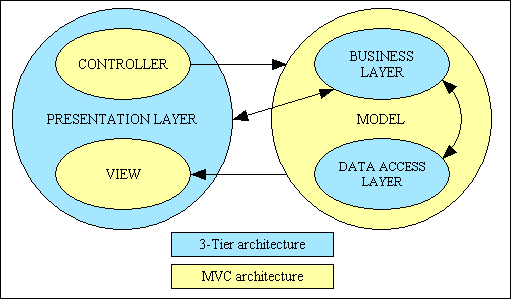
Here is another diagram which shows how the two patterns overlap:
Figure 5a - MVC plus 3 Tier Architecture
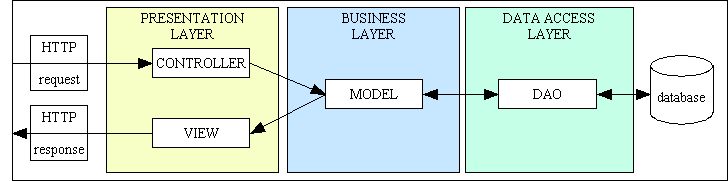
By combining both of these architectures it is therefore possible to create an application infrastructure which has more features and advantages than either one on its own.
In a screen which deals with two database tables in a parent-child relationship, such as a LIST 2 screen, there is no problem if they are different tables as the table names are used to identify which data goes where in the screen. But what happens if the relationship is actually between a table and itself? How can you keep the data from the parent and child parts separate?
Although it is possible to reference the same table through both a $parent and $child object within the PHP code this will cause a problem when trying to build the screen during the XSL transformation as the two entity names within the XML data will be the same. This will result in both sets of data being written to both areas in the screen instead of each set of data being written out to its own area.
The solution is to change one of the table references to a different name, but how can this be done? The solution in a previous language was to create a reference to a database table using an alias or subtype or subclass, and I have built a similar solution into my infrastructure which is described in Using subclasses to provide alias names.
The important thing to note is that when transferring data out of an object into the XML data what I actually use is the class name and not the physical table name. In order to reference a database table using an alias name all I have to do is create a subclass from the original database table class. Here is an example taken from my sample application:
Contents of file tree_node_snr.class.inc:
<?php
require_once 'tree_node.class.inc';
class Tree_Node_Snr extends Tree_Node
{
}
?>
When I reference an object from the tree_node_snr class I will actually be referencing the same database table as an object from the tree_node class. When the data is written to the XML file one set of data will be labelled tree_node_snr and the other tree_node, thus it will be easy to keep the two sets of data separate from one another.
You will notice in the above example of extending a class into a subclass all I am doing is supplying an alternative class name - I am not changing any properties or methods, although I could if I wanted to. It would be possible for me to supply new properties and methods, or even to provide replacement properties and methods to override those which exist in the superclass.
On some web applications that I have seen the way to navigate from a parent LIST screen to a child screen is to click on a detail line where every field in the line, or even the whole line, has been coded as a hyperlink. Each hyperlink will jump to a child screen with the details of the selected entry pre-loaded. This process involves a single step whereas in my infrastructure it is two stages - select an entry, then press a button. Why is this? My reasons are as follows:
My method has the following advantages:
This information is posted back to the parent script which then does the following:
(field1='value' AND field2='value').(field='value1') OR (field='value2').It would be possible for me to use a combination of hyperlinks for one child screen and buttons for the others, but this would be inconsistent and probably confusing to the users. As the poor dears are often confused enough I do not wish to add to their burden.
This situation arose while I was building a prototype for a web-base survey application. A survey could have any number of questions, and the answer to each question could be one of the following:
This means that when building the HTML output for the screen I need to know what type of answer is expected so that I can generate the correct HTML tags. In some development infrastructures this may be a complex process, but in my infrastructure it is incredibly easy. This is made possible because of the following facets of my design:
$fieldarray which is an associative array of data obtained from the database via the DML class.$fieldspec which is an array of specifications for each field within that database table. This is defined separately within each database table class.$errors which is an array of error messages, indexed by field name, which may be generated at run-time.$fieldspec array identifies which HTML control is to be used for each field. This information is inserted into the XML document as a series of attributes for the field in question. During the XSL transformation as each field is being processed it uses the field attributes to decide which HTML control to use.This means that the HTML control which is to be used for each field is defined with the $fieldspec array of each database table class, therefore to change the type of control all you have to do is change the contents of this array. This can be done using code similar to the following:
  function _cm_getExtraData ($where, $fieldarray)
  // Perform custom processing after the getData method.
  {
    ...

    switch ($fieldarray['answer_type']) {
      case 'M':
        // answer is multiple choice from a dropdown list
        $this->fieldspec['answer_text']     = array('type' => 'string',
                                                    'size' => 12,
                                                    'required' => 'y',
                                                    'control' => 'dropdown',
                                                    'optionlist' => 'answer_id');
        break;
      case 'N':
        // answer is a number
        $this->fieldspec['answer_text']     = array('type' => 'integer',
                                                    'unsigned' => 'y',
                                                    'size' => 6,
                                                    'required' => 'y');
        if (isset($min_value)) {
          $this->fieldspec['answer_text']['minvalue'] = $min_value;
        } // if
        if (isset($max_value)) {
          $this->fieldspec['answer_text']['maxvalue'] = $max_value;
        } // if
        break;
      default:
        // answer is free-format text
        $this->fieldspec['answer_text']     = array('type' => 'string',
                                                    'control' => 'multiline',
                                                    'rows' => 5,
                                                    'cols' => 50,
                                                    'size' => 255,
                                                    'required' => 'y');

    } // switch

    ...

    return $fieldarray;

  } // _cm_getExtradata
Also note the following:
Can it be done as easily as that in your application?
The reason that I do not subscribe to this theory can be explained using the following diagram:
Figure 6 - The false 3-Tier Architecture
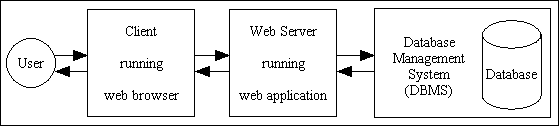
Although there may appear to be 3 tiers or layers you should notice that the web application exists in a single place, the web server. What exists outside of this area is not actually part of the application.
The location of the logic within a web application can be represented in the following diagram:
Figure 7 - All application logic in a single component
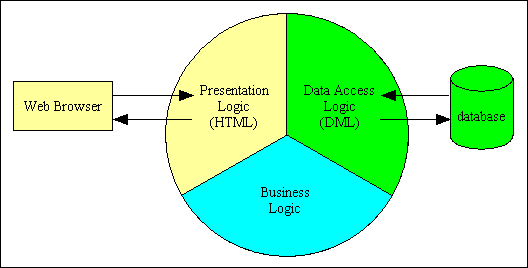
The three areas of logic can be broken down as follows:
If all these pieces of application logic exist within a single component then that component is 1-Tier, pure and simple. In order to become 3-Tier each area of logic must be contained within a separate component, as shown in the following diagram:
Figure 8 - Application logic in 3 components
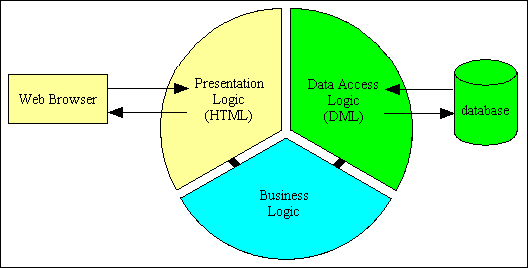
The above diagram clearly shows that the application code is split into 3 distinct and separate components which inter-communicate at run-time. Note that there is no direct communication between the presentation layer and the data access layer. Each layer is independent of the other, and any layer can be modified without necessarily having to modify any other, this arrangement can truly be called 3-Tier.
A more extensive article on this subject can be found at What is the 3-Tier Architecture?
In a recent Sitepoint blog someone stated that the 3 Tier architecture seemed to be an expensive option as:
It's main function (independence of user interface, business rules and data storage/retrieval) only helps when migrating or extending to another script-language/data engine/platform. But this only happens very very few times in an Application Lifetime.
Your view of the benefits of the 3 Tier Architecture is very narrow as in reality they are not restricted to changes in the scripting language, database engine or platform.
The main advantages of the 3 Tier Architecture are often quoted as:
Being able to change from one database engine to another by changing just one component is not just a fancy expensive option that is rarely used. Take the case of MySQL, for example. For versions up to 4.0 you must use the mysql_* functions, but for 4.1 and above you must use the improved mysqli_* functions. How complicated would that be if you had hundreds of scripts to change instead of just one? You must also consider the case where a supplier creates an application which is then run on customers own machines with the database of their choice. If it is coded so that it only runs with MySQL but they actually want PostgreSQL, Oracle or SQL Server or whatever, then how difficult would it be to cater for the customer's needs?
Having presentation logic separated from business logic has other advantages besides a switch to a totally different user interface device (for example, from client/server to the web). In the first place the creation of efficient, artistic and user-friendly web pages requires more than a passing knowledge of (X)HTML and CSS (and perhaps javascript) which a lot of PHP coders are without. The people with these skills may have little or no abilities with PHP, so by having separate layers you can have a different set of experts to deal with each layer. Another more common requirement is to have the ability to change the style of a web application with relative ease. By ensuring that all output is strict XHTML with all style specified in an external CSS stylesheet it is possible to change the entire 'look' of an application by changing a single CSS file.
In my infrastructure all my XHTML output is produced from a small set of generic XSL stylesheets, which means that should I need to make changes to my 450+ screens that cannot be done by altering the CSS file then all I have to do is change my generic XSL stylesheets, which are currently about 10 in number. You may think that such changes are rare, but what about when the time comes to convert your existing web application from HTML forms to XFORMS, the latest W3C standard? I can do that by changing 10 XSL stylesheets. Can you?
In the same Sitepoint blog someone stated:
The two seem inexorably tied together in a practical and realistic sense. After all, what is your business logic without data to work with, and at that, should your business logic really be able to handle ANY data you pass to it? Is that healthy?
My framework is built around the 3-Tier Architecture in which the application code is split into 3 areas of responsibility:
Note here that the term "logic" refers to program code and not the data on which that code operates. Data Access Logic is therefore that program code which references the APIs for the DBMS which is currently being used. You will not find any of these APIs, such as mysqli_query, pg_query, oci_execute or sqlsrv_query, in any business layer component, therefore there is no data access logic in the business layer. When the business layer wishes to communicate with the database it does not do it directly by calling the relevant API itself, instead it calls a separate Data Access Object to do it indirectly.
The primary purpose of having a separate object in the data access layer (sometimes known as a Data Access Object or DAO) is that it should be possible to switch the entire application from one data source to another simply by changing this one component. Thus if I want to switch my application from MySQL to PostgreSQL (or Oracle, or whatever) I simply change my DAO. The components in the business layer are totally unaffected by this change.
All my table classes exist within the Business layer and do not have any direct contact with either the user or the database. Data is either input by the user and validated before it is sent to the DAO, or fetched via the DAO before it is passed back to the user. The Business layer is database-agnostic and contains absolutely no code which is tied to a particular DBMS. It is also UI-agnostic in that the requests may come from a variety of sources (a user via an HTML form, input from a CSV file, or a web service request) and output in a variety of different ways (HTML, CSV, PDF, XML or whatever). The fact that data passes through the Business layer, after being processed by code which enforces the business rules, and is then handled by separate components is not a new and peculiar concept that I have invented myself.
Here is a more detailed explanation of my implementation:
insertRecord(), updateRecord() and deleteRecord() methods, but as well as the validated contents of the $_POST array it is also given a second array which contains all the table structure details. Using these two arrays it is easy to construct the relevant SQL query string before calling the relevant database API.In this way my business object contains business rules, but no calls to database APIs, and my DAO contains calls to database APIs but no business rules. This is clear separation of logic.
Switching from one DBMS to another is simple to achieve in my infrastructure. In my generic table superclass I have a variable called $dbms_engine which is set to 'mysql', 'postgresql', 'oracle', 'sqlsrv' or whatever. This will then apply to all database tables unless overridden in any individual subclass. When the business object wants to talk to the data access object it first needs to instantiate an object from a class which is defined within a separate include() file. The name of this file is in the format 'dml.<engine>.class.inc' where <engine> is replaced by the contents of variable $dbms_engine. I have a separate version of this include() file for every DBMS that I use. All I need to do before accessing a new DBMS is to create a new version of the 'dml.<engine>>.class.inc' file and I'm up and running.
Another advantage of this mechanism is that it would even be possible to talk to different database tables through different DBMS engines within the same transaction. How's that for flexibility?
This question came about because each of my database table classes in the business layer contains information in the $fieldspec array which is processed by the DML object in the data access layer.
Where is the separation of logic if the business entity knows both the business logic and has knowledge of the structure of the associated data storage mechanism?
You clearly do not understand the difference between logic (code) and information (data). The fact that my business entity "knows" about the structure of the database table which it represents is not the same as data access logic. Data access logic is that program code which constructs SQL queries and sends them to the DBMS via the relevant API, and that code exists in a completely separate DAO component. The business entity contains code which validates the data and enforces any business rules. Data validation cannot be achieved without knowledge of what columns exist within that business entity, and what their data types are. For a more detailed explanation please read Information is not Logic just as Data is not Code.
Each database table class contains both business rules in the form of custom code and a description of the table's physical structure as described in the $fieldspec array. This is meta-data, which is data, not code or logic. By containing all this information within a single class I am adhering to one of the fundamental principles of OOP which is encapsulation.
Although this information is defined within a business object it is not used to access the persistent data store (i.e. database) until it is passed to my Data Access Object (DML class). This uses the information given to it - the table structure meta-data and some user data - to construct the relevant query and then pass it to the specified database engine via the relevant API.
There is nothing in the principles of OOP that says I cannot define information in one object, then pass it to another for processing. It is where this information is actually processed which is important. My $fieldspec array actually contains information which is used in three different places:
If I were to define this information in three separate places surely this would break encapsulation?
Remember that my data access object contains no information about any database table whatsoever, so this information has to be passed to it from an external source. This does not make the external source part of the data access object, now does it? Similarly the XSL stylesheet, which is used to construct the XHTML output, is useless without an XML file containing the data. This data originates from the business layer, but that does not make the business layer part of the XSL stylesheet, now does it?
If you study the Model-View-Controller design pattern you will see that information comes out of the model but has to be processed by the view before it is displayed to the user. Using your argument because the information is processed within the view it must also originate from within the view. Does that make sense? I think not.
If you are prepared to treat the term logic as where information is processed rather than where information originates you will see that my usage of the term 'separation of logic' is entirely justified whereas yours is questionable.
If you have a User class that performs some business logic that doesn't interact with the database, wouldn't you want a separate class that mapped a user to the database, either inserting or deleting or what-have-you?
I disagree with this idea, for the following reasons:
A better way to do it would be to have all properties and methods defined within a single class, and if a particular method requires to access the database then it should do so. If this involves communicating with a separate 'mapper' class (or in my case a data access object), then so be it. The important thing is that the calling script should not know or even care about how a function is implemented. This allows for the implementation to be changed without requiring the calling script to have knowledge of any such change, or being required to change the way in which the method is invoked to accommodate the change.
If you look at the description for a Data Mapper from Martin Fowler's Patterns of Enterprise Application Architecture (PoEAA) you should notice that this type of solution is only required when the object schema and the relational schema don't match up. As I do not have this problem with the two schemas I do not see why I need this solution. Each table class "knows" the structure of the database table which it represents by means of metadata (data about data) which is loaded into the object from the contents of its associated <tablename>.dict.inc file when the object is instantiated. This file is exported from the Data Dictionary using data which is imported directly from the database schema. If the database structure changes for any reason I simply rerun the import/export functions and my software is automatically synchronised with the database. I could put the contents of the <tablename>.dict.inc file into a separate class, but what would be the point? What would I gain?
I looked at a few samples of existing code before I built my infrastructure, but as none of them worked the way I wanted them to I decided that the best solution was to build my own entirely from scratch.
Here is a sample of code from the PEAR manual:
<?php
// Create a valid DB object named $db
// at the beginning of your program...
require_once 'DB.php';

$db =& DB::connect('pgsql://usr:pw@localhost/dbnam');
if (DB::isError($db)) {
    die($db->getMessage());
}

// proceed with query
$result =& $db->query("select * from clients");

// Always check that $result is not an error
if (DB::isError($result)) {
    die ($result->getMessage());
}
....
?>
There are two things I do not like with this approach:
One problem is where do you put all this additional code? Within each object in the business layer? Not a good idea as the construction of SQL query strings does not really belong there - it should be in the data access layer. The typical answer to this problem I have seen others use is to create an additional object in the data access layer between each business object and the Data Access Object (DAO). This produces a structure similar to the following:
Figure 9 - DAO with additional SQL objects
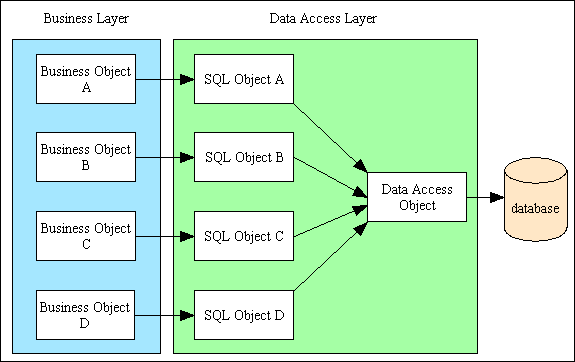
I dislike this idea because there are too many SQL objects, and the code in each object is more or less the same, with the only difference being the table and column names, which are hard-coded. I wanted something more generic than this, so I found a way to eliminate all the SQL objects altogether. This produces a much leaner and meaner structure similar to the following:
Figure 10 - DAO without additional SQL objects
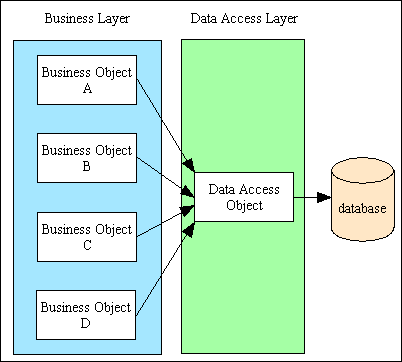
With this structure instead of the SQL queries being assembled outside of the DAO then passed in as a single string to be executed I pass in all the individual fragments that will be used in the SQL query (see FAQ 8). With this mechanism if the fragments need to be adjusted or assembled differently for any particular DBMS engine then I only have to change the code in a single place - the DAO for that particular engine - and not in every SQL object.
Note that some people would say that my system of layering is broken as I allow SQL fragments to exist in any object in any layer, not just the data access layer. The only requirement of the 3 Tier Architecture is that no layer other than the data access layer may access the database. I interpret the word 'access' to mean execute an SQL query using an API which connects to a physical database and returns a result set. The fact that an object in the presentation layer has a variable which contains a fragment of SQL does not mean that it is 'accessing' the database. It is merely holding a piece of data in a variable. It is not until these various fragments have been passed to the DAO that they are finally assembled into a complete SQL query and executed, therefore I do not consider that I am breaking any rules.
The code to establish a connection with the database has also been moved to within the DAO. This means that ALL the API's which communicate with any particular DBMS engine are contained within a single object and not scattered around the system. This obviously makes it simpler to cater for another DBMS engine which has a different set of API's as there is only one object to change instead of multiple objects.
This degree of control, flexibility and simplicity was not obtainable from any 'off the shelf' database abstraction layers, so that is why I created my own. This decision made it very easy for me to incorporate my audit logging facility into all my applications as it could be achieved by modifying the code within a single object, my DAO, instead of the individual table objects. It also enabled me, at a later date, to add hooks into my Workflow subsystem so that I could either create a new workflow case (an instance of an active workflow) when one was required, or to detect that an update task was covered by a current workflow case which needed to be updated.
This information is now supplied on the Tutorials page with some videos on the Videos page.
The $fieldspec array should only contain fields which actually exist within the database otherwise when SQL statements are constructed within the data access object the inclusion of invalid field names would result in a fatal error. But what happens when you want to accept input into a field which does not exist in the database?
The answer is that you make temporary modifications to the $fieldspec array so that when a component in the presentation layer asks for field specifications it gets the amended array instead of the original.
Note that the inclusion of non-database fields in the $fieldspec array is not necessary if the field is display only as the default behaviour is to display such fields as plain text. Modification of the $fieldspec array is only necessary in the following circumstances:
For example, suppose when a user enters a new password you want him to re-enter that password into a second field so that you can trap spelling mistakes. You would need to put code similar to the following in the _cm_changeConfig() method:
// create 'new_password' field
$fieldarray['new_password1'] = '';
$this->fieldspec['new_password1']['type'] = 'string';
$this->fieldspec['new_password1']['size'] = $this->fieldspec['user_password']['size'];
$this->fieldspec['new_password1']['password'] = 'y';
$this->fieldspec['new_password1']['required'] = 'y';

// get user to repeat input to avoid mistakes
$fieldarray['new_password2'] = '';
$this->fieldspec['new_password2']['type'] = 'string';
$this->fieldspec['new_password2']['size'] = $this->fieldspec['user_password']['size'];
$this->fieldspec['new_password2']['password'] = 'y';
$this->fieldspec['new_password2']['required'] = 'y';
In this example a calculated field is defined so that the formatData() method will automatically format the value with the correct number of decimal places:
$this->fieldspec['order_value'] = array('type' => 'numeric',
                                                  'precision' => 11,
                                                  'scale' => 2,
                                                  'blank_when_zero' => 'y',
                                                  'noedit' => 'y',
                                                  'nondb' => 'y');
Note the use of the nondb option. This is used to prevent a field with that name from being qualified with a table name if it appears in the $where, $search or $orderby variables as this would cause the generated SQL query to be invalid.
A subclass is where a particular class definition "extends" that of a previously defined class, known as a superclass. The subclass automatically inherits all the properties and methods of its superclass, but is allowed to add additional ones of its own. In the case of class methods if one in the superclass is redefined in the subclass, then the subclass method is used at runtime while the superclass method is ignored. It is possible for a subclass to have its own subclass, and so on and so on, to produce a class hierarchy which is many levels deep.
To the OO zealot a subclass is considered obligatory as soon as it is recognised that an object may come in different flavours. For example, you have a USER class with a variable called USER_TYPE to differentiate between 'supervisor', 'team leader', 'worker', 'dogsbody' et cetera. The zealot will, without further thought, immediately extend the USER class into a separate subclass for each possible value of USER_TYPE.
I do not. Why? Because I create my classes around database tables, and there is only one USER table which holds data for all users regardless of their type. USER_TYPE is nothing more than an attribute, a piece of data, on the USER table. There may be an additional table called USER_TYPE which is linked to USER in a one-to-many relationship, but that is an entirely different table with its own class definition. With this approach I am able to add to or remove from the list of USER_TYPEs without having add to or remove from my catalog of classes. I do not have to create a separate class for each possible value for an item of data.
The OO zealot then comes up with an argument like this:
What happens if each user type has a different set of permissions which allows or denies access to different functionality within the application? Doesn't this mandate the use of separate subclasses?
Not in my book. What you are talking about can be covered by a data structure similar to the following:
Figure 11 - Structure of a permissions system
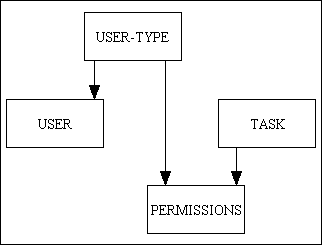
Note that in the RADICORE framework the USER-TYPE table is called ROLE and the PERMISSIONS table is called ROLE_TASK.
As there are four separate database tables there are four separate classes. When you wish to combine the data from several tables you either perform an SQL JOIN or you employ object composition. Obtaining the permissions for a user requires nothing more than the following statement:
SELECT * FROM permissions WHERE user_type='whatever'
This returns an array of data, and what happens next depends on the contents of that array. Although the data may be different, the code required to obtain and process that data is exactly the same regardless of the value of USER_TYPE, therefore a separate subclass for each value of USER_TYPE is, in my opinion, a total waste of time.
As a general rule the only time I create subclasses is with database tables. I place all the common and reusable code in an abstract table class which is then inherited by every concrete table (Model) class. The abstract class can perform its operations on any database table, but it does not know which one. This missing information is supplied as metadata which is loaded into the object when it is is instantiated. This means that 100% of the standard boilerplate code is inherited from the abstract class while each subclass need only contain the non-standard business rules which can be defined in any of the specially prepared "hook" methods. This means that I do not have any deep inheritance hierarchies.
There is one reason where I may extend a table subclass into another subclass, and that is where I want the same table class to execute different custom code when being accessed by different tasks (known as task-specific behaviour). One method would be to put all the different code into the same class then to execute it conditionally based on the task or script identity, but this becomes messy if there are large amounts of different code to execute. It could also lead to problems should the task or script be subject to a change in name. An alternative procedure I have used with great success is to create a subclass of the table class to contain all the code which is specific to a particular task, then have the component script refer to this subclass instead.
My approach to subclasses can be summarised as follows:
A typical database table class, which extends the abstract table class, looks like the following:
<?php
require_once 'std.table.class.inc';
class foobar extends Default_Table
{
    // ****************************************************************************
    // class constructor
    // ****************************************************************************
    function __construct ()
    {
        // save directory name of current script
        $this->dirname     = dirname(__file__);

        $this->dbname      = 'foo';
        $this->tablename   = 'foobar';

        // call this method to get original field specifications
        // (note that they may be modified at runtime)
        $this->fieldspec = $this->loadFieldSpec();

    } // __construct

// ****************************************************************************
} // end class
// ****************************************************************************
?>
To create a subclass of 'foobar' called 'foobar_jnr' is as simple as the following:
<?php
require_once 'foobar.class.inc';
class foobar_jnr extends foobar
{

// ****************************************************************************
} // end class
// ****************************************************************************
?>
Any method which you define within the subclass will then be executed instead of a method with the same name than exists in the superclass. Please note the following:
There may be a situation where a transaction has a screen with two zones, which means that the controller will require the names of two classes which will provide the data for each of those zones. Although it is possible for the controller to use a single class to create objects for both zone #1 and zone #2, when the data within each of those objects is transferred to the XML document before being processed by the XSL transformation there needs to be some mechanism to identify which data goes into which zone. If the identifier is the table name, then having both zones supplied with data from the same table would cause an immediate problem.
Take the situation where there is a table called PERSON which contains the details of lots of people. Some of the people may be the parents of some of the other people, so there may be a transaction which shows a single entry from the PERSON table in zone #1 as the parent, and potentially multiple entries from the PERSON table in zone #2 as the children of that parent. If the XML document contains two entries which both exist under the <person> node then which one is the parent and which one is the child? Which entry goes into zone #1 and which entry goes into zone #2?
My solution is not to use the table name as the identifier in the XML document but to use the class name instead, although for the initial database table class they are one and the same. By creating a subclass I start with something which is an exact copy of the original, but with a different name, so using my example above I could create a subclass called person_snr for accessing the parent details and another called person_jnr for any children. In this way the XML document contains entries which have different identifiers, namely <person_snr> and <person_jnr>, so there is no confusion as to what goes where.
A subclass which provides an alias name can be constructed from the following template:
<?php
require_once '#tablename#.class.inc';
class #aliasname# extends #tablename#
{

    // ****************************************************************************
    // This is a subclass of #tablename#
    // ****************************************************************************

// ****************************************************************************
} // end class
// ****************************************************************************

?>
Generally speaking when I create a table subclass I keep the original table name and add a suffix which can come in one of the following flavours:
_snn which is an underscore, the letter 'S' and a 2-digit number._xxxx which is an underscore followed by a mnemonic such as 'jnr', 'snr', 'source' or 'target'.I use the _snn suffix where I have a set of code which only needs to be executed on particular occasions, not every occasion, as described in How do you deal with task-specific behaviour?
I use the _xxxx suffix where the screen needs to have multiple data areas (zones) which come from the same database table but need to have separate identities in the XML file so that the XSL stylesheet knows which data goes into which zone, as described in Using subclasses to provide alias names. For example, when dealing with a hierarchy which has a senior and a junior relationship I would probably use subclass names such as node_id_snr and node_id_jnr. When dealing with movements between one location and another I would probably use subclass names such as location_from and location_to.
Note that instead of using PHP's own get_class() function to obtain the name of a class I use my own user defined function (UDF) called getClassName() instead. This will examine the suffix on the class name, and if it is _snn it will return the table name without any suffix. This means that the table name that you use in the screen structure file must exclude any _snn suffix, but include any other variation.
The answer is because it is a data processing system, a system that processes data. In pre-computer days all business data was handled on sheets of paper, but as it is now handled more efficiently and effectively with computers the name has been elevated to Information Technology (IT). The definition of a "system" is something which transforms input into output
, as shown in Figure 12:
Figure 12 - a system

A system has two main parts - what gets processed and how it gets processed. A factory can be regarded as a "system" as raw materials go in, they are assembled or manufactured, and finished goods come out. A computer system has two parts - the hardware, which is comprised of physical pieces of electronics, and the software in the form of programs which supply the instructions which are carried out on the hardware. It is still a system as data goes in, is processed, and data comes out. Sometimes the "processing" part of the system is nothing more than saving the data in a high-speed high-capacity storage mechanism (a database) so that it can be be quickly retrieved and displayed to the user in more or less the same format that it went in. In other cases the data may be transformed or manipulated in some way before it is stored, and/or transformed or manipulated in some way before it is output. This would give rise to the situation shown in Figure 13:
Figure 13 - a data processing system
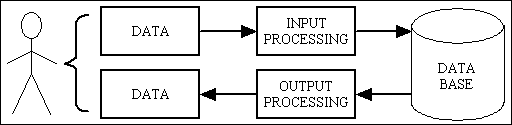
A computer does not have any intelligence of its own, it is just a fast idiot that can do nothing execept what it was programmed to do. It therefore relies completely on the quality of the instructions given to it in its software, and that in turn relies on the expertise of its prgrammers. Being an effective programmer is not as simple as writing code in the same way that a typist hammers out letters on a keyboard. It is not as simple as following a set of rules and the results will be guanteed, it requires someone who can take an instruction manual that a human being can understand and translate it into an instruction manual that a computer can understand. A programmer has to break a problem down into a logical structure, then build a model of that structure inside a computer using an appropriate programming language.
Object Oriented Programming is about writing programs which are oriented around objects so that they can take advantage of Encapsulation, Inheritance and Polymorphism to increase code reuse and decrease code maintenance. This requires a mental process called abstraction in order to separate the similar from the different, the abstract from the concrete, so that the similar can be placed in reusable modules and the different can be placed in unique modules.
Everybody knows that the main selling point of OOP is that You can model the real world!
, but when you are writing a database application you are not writing software which communicates with entities in the real world, you are writing software which communicates with entities in a database, and those entities are called "tables". When dealing with entities such as Product, Customer and Order you are not communicating with those physical entities in the real world, you are communicating with representations of those entities inside a database.
You should also know that the main building block in OOP is the class from which you can instantiate objects. A class is a capsule (from which the term encapsulation is derived) which contains both data (properties) and the operations (methods) which can act upon that data. According to the Evans Classification there are only two types of domain object which you can create:
While each database table (entity) is responsible for a different set of data which has its own business rules it is subject to the same set of Create, Read, Update and Delete (CRUD) operations as every other table. These operations represent the similarities while the data and the business rules represent the differences. This is why I moved those operations into an abstract superclass so that they could be shared with each concrete subclass using inheritance. This is far better than having those operations duplicated within each table class. By having each concrete table class sharing exactly the same methods as every other table class this provides the opportunity for large volumes of polymorphism. This then means that any objects which call those methods are not tightly coupled to a single table class, they are loosely coupled and can work with any table class. Instead of having to create a separate Controller for each Model this enabled me to create a series of reusable Controllers which can operate on any Model where the identity of the Model is supplied at run time using a form of Dependency Injection. Not only does this approach work very well, it also provides large amounts of pre-written and reusable modules instead of forcing the developer to write large amounts of duplicated and non-reusable code. This still does not prevent my critics from lambasting my efforts which complaints such as:
These classes are not based around operations, therefore you have not achieved proper separation of responsibilities, therefore your whole design is bad!
This just proves that you do not understand how to apply the process of abstraction and separate the abstract from the concrete, the similar from the different. The similar can be moved to an abstract class as common table methods and shared via inheritance while the differences are confined to each concrete subclass which provides the values for the common table properties.
When I first saw examples of how other PHP programmers went about validating user input from each HTML form I was amazed at how much code was duplicated each time. Being a lazy programmer I wanted to find a better way, and being a competent programmer I quickly found it.
For many years I have worked with programming languages which used data dictionaries which removed the need to write reams of code to validate user input. It was enough to say FieldA is a date
, FieldB is a number
, FieldC is a whatever
and the language would automatically check that the user's input conformed to those specifications.
PHP does not come with a dictionary, so how easy would it be to emulate one? Fortunately in my database class I was already using a simple field list which identified all the fields which existed on a particular database table and I had already extended it to identify which fields were part of the primary key. It was therefore a simple step to change the fieldlist array into an array of field specifications.
The next step was to write a procedure which would take the user's input (The $_POST array), compare it with the field specifications and throw out an error if anything was wrong. This procedure is automatically accessed from within the code that is inherited from the generic table class therefore no additional code is necessary.
In order to validate user input the developer needs to amend the relevant database table class as follows:
The $where variable is used as the WHERE clause in an sql SELECT statement to provide selection criteria when retrieving data from the database. This is used as an argument on the getData() method in all database table objects. Dynamic selection criteria is provided by the user at runtime, and can be provided in any of the following ways:
(field1='a' and field2='b') OR (field1='c' and field2='d') ...
In order to extract the primary key details for each of the selected occurrences it is important that the select_list actually contains all the primary key fields, even though they may not be displayed on the screen.
This string will be written to the $_SESSION array, then control will be passed to the child component identified by that particular navigation button. Here the selection string will appear in $GLOBALS['selection']. The child component will use this as its $where string before accessing the database.
If the child component can only show one selected entry at a time it will use LIMIT 1 with a varying value for OFFSET in the sql SELECT statement combined with a set of scrolling links which will allow the user to move backwards and forwards through the selected occurrences.
The RESET button on the action bar cannot be used to clear this selection criteria.
The child component may also have a search button which will allow additional selection criteria to be defined. This will be used in conjunction with, not instead of, any selection criteria which was provided by the parent component.
It is also possible for the parent screen to be a non-list screen, such as ENQUIRE 1, which means that the $where string which is passed to the child component will be the primary key of the current record.
field1 LIKE '%a' AND field2 LIKE 'b%' ...
This string will be written to the $_SESSION array, then control will be passed back to the previous form, which will usually be a LIST screen with multiple occurrences. Here the search string will appear in $GLOBALS['search']. When this LIST screen is activated the page controller will insert this string into the database object before calling the getData($where) method where the $search and $where strings will be merged into one before being used to access the database.
The search screen can be activated as many times as is required in order to modify the selection criteria.
The RESET button on the action bar can be used to clear any additional selection criteria provided from a search screen. This will cause the original selection criteria to be reinstated, the current page to be reset to 1, and any column sorting to be reset.
Selection criteria can either be dynamic, as shown here, but it can also be static, or even a mixture of the two.
Firstly, it is important to understand that an infrastructure (aka 'framework') is not an application such as would be written for end users, it is the 'glue' that holds an application together. The infrastructure contains components which are not specific to any particular application, but which perform standard tasks that can be used by any application. Although an infrastructure may contain components which resemble those of an end-user application, such as online maintenance screens, these are usually only accessible by a system administrator.
Some people may say that each application requires a separate infrastructure due to its specific requirements, but my response would be that they have not reached the correct level of abstraction in identifying which is 'application independent' and which is 'application specific'. It is possible to create a single infrastructure which can be the controlling framework for any number of applications. I know this for the simple reason that in the past 20 years I have designed and built such infrastructures in 3 different languages.
NOTE: Application components which are written to operate within a particular infrastructure cannot usually be ported to another infrastructure without extensive modification as they may contain calls to infrastructure components which either do not exist in that other infrastructure or which may operate differently.
Before you can start building a sophisticated infrastructure you need to identify those functions which can safely be extracted and re-used by other applications. My own experience has produced the following list:
In my current PHP application framework for writing web applications certain architectural decisions have enabled me to provide even more standardised and reusable components. After having spent a lifetime writing 1-Tier and 2-Tier components I have been converted to the benefits of the 3-Tier Architecture. This aims to split application code into the following areas of responsibility:
In my infrastructure the Data Access layer contains a single object which handles all communication with a particular database engine. I can therefore switch from one database engine to another (for example, from MySQL to PostgreSQL or Oracle) simply by switching a single Data Access Object (DAO).
The Business layer contains a separate object for each entity within the application. All of these objects are created as subclasses of a superclass. It is the superclass which handles all communication between the Presentation and Data Access layers. This means that all standard code is inherited from the superclass and does not have to be redefined within each subclass.
Being familiar with XML and XSL before learning PHP I decided to use these technologies to create all HTML output as it enabled me to perform standard processing via reusable XSL stylesheets. This meant that I was effectively splitting my Presentation layer into 2 separate parts - a PHP controller and an XML/XSL view. As the components in the Business layer fit the description of the Model I was also effectively implementing a version of the Model-View-Controller (MVC) design pattern. Over a period of time I managed to refactor the code to such an extent that I eventually ended up with a standard set of controllers and XSL stylesheets which could be reused many times over. This is preferable to having to create customised versions of the controllers and stylesheets for each individual transaction.
This level of reusability means that when defining components (transactions, aka tasks) the following functions are automatically provided and do not require additional effort by the developer:
Question: With so much processing dealt with by standard code what is left for the developer to do?
Answer: As little as possible.
Each application has its own set of entities, and each of these entities will require its own component (class/object) in the business layer in which the business rules and task-specific behaviour can be defined. As has been stated previously processing which is common to all business objects is inherited from a standard superclass therefore does not have to be recoded.
All communication with the database is handled by the Data Access Object coupled with standard code within the business layer superclass, therefore does not have to be recoded.
This just leaves some small components in the Presentation layer. In order to actually 'do' something with a business object, such as List, Search, Create, Read, Update or Delete, it is necessary to define a transaction (task) script. This is a simple script which identifies just 3 things:
The view portion is actually defined within a separate script as the Search, Create, Read, Update and Delete transactions all share the same screen structure. The view script is again quite simple as all it does is specify the following:
Question: How is the developer supposed to know which controller and which XSL stylesheet to use for a particular transaction?
Answer: Consult Transaction Patterns for Web Applications.
This document identifies a standard set of transaction patterns (aka templates or dialog types) which are broken down by structure and behaviour. Each of these templates makes use of a particular controller and a particular XSL stylesheet. Each template has a unique name, such as LIST1, LIST2, ADD1, UPDATE1, et cetera, and this identity is built into the controller and stylesheet names:
std.<name>.inc for controllersstd.<name>.xsl for XSL stylesheetsThese two files take care of structure and behaviour while the remaining aspect - content (the table and column names) - is provided by the view script.
As you can see the effort required to build application components is concentrated mostly in the business layer where the business objects, business rules and application-specific behaviour are defined. Apart from small transaction scripts and view scripts all other processing is standard and is supplied by standard components within the infrastructure library. Plugging a new component into the infrastructure requires the use of a few maintenance screens:
This means that the developers do not have to waste time in writing, testing and debugging code that is already provided as part of the infrastructure. This in turn means shorter development times, lower costs and quicker time-to-market (TTM).
THAT is the benefit of an infrastructure such as mine.
There are several different technologies used within this infrastructure, and each has its own attitude towards the difference between upper and lower case.
The golden rule is that unless you really, really, REALLY know what you are doing then all identities (column names, keywords, etc) should be defined in lowercase otherwise a lookup may not find anything, and unless you know about the case sensitivity problem you will never be able to identify why something is being ignored even though it is definitely there.
Begin rant...
This is one of those areas in computing that really makes me see red. I have been in this business since the early 1970s and for the vast majority of that time there was no such thing as case-sensitivity. Neither the early mainframe operating systems nor their computer languages had any problem with being case-insensitive, and the same situation was passed down through all the mini-computers and micro-computers (now called 'personal computers') and the various software that I worked on. All of the text editing or document processing software that I used was case-insensitive. In those cases where case-sensitivity was recognised as being important it was provided as an option (check out the 'match case' option in Microsoft's Notepad, Wordpad and WinWord). It was not until the arrival of Unix that case sensitivity became a problem. Then people with knowledge of nothing but Unix began to create programming languages, and this disease called 'case-sensitivity' began to propagate and infest the software universe.
Why do I blame the authors of Unix? Because Unix was not written by professionals for professionals, it was written by amateurs for amateurs. I count academics working in an academic environment as amateurs for the simple reason that they are not earning a living in providing solutions for 'real world' situations. These amateurs either did not realise that case-sensitivity would cause a problem, or they did not have the technical ability to write case-insensitive software, so they labelled this 'bug' as a 'feature' and left it at that.
If you consider my attitude to be unjustified, then answer these two simple questions:
End rant...
Yes. This is all documented in Internationalisation and the Radicore Development Infrastructure (Part 1) and Part 2.
A POPUP form is the same as a LIST form, but with the addition of a CHOOSE button in the action bar. The SELECT column enables the user to mark one or more rows as 'selected' before pressing a button in order to 'do something' with the selected row(s). By pressing any button in the navigation bar the selection will be passed down to a child form, but by pressing the CHOOSE button in the action bar the selection will be returned to the previous form.
In a LIST form the SELECT column will contain checkboxes so that multiple selections can be made. In a POPUP form the SELECT column may contain checkboxes, or it may contain radio buttons which will allow only a single entry to be selected.
As mentioned in FAQ 17 the default behaviour for POPUP forms is to allow a single selection only using the default code in the _cm_popupCall() method. If multiple selections are to be allowed then the line
$settings['select_one'] = TRUE;must be changed to
$settings['select_one'] = FALSE;
Yes, but they will have no effect unless the stylesheet is programmed to deal with those parameters.
In my original implementation any parameters were specified during the XSL Transformation process, but I later decided to build them into the <params> element of the XML document so that they could be both visible and easily amendable during testing.
If any parameters are required they can be loaded into the $xsl_params array which is defined within the generic table class. Any entries will then be extracted from the object and automatically inserted into XML document by the standard code. Once inside the XML document the existence of any parameters can be detected by code within the XSL stylesheet and the appropriate action taken.
Here is an actual working example:
$dbouter->xsl_params = array('outer_noedit' => 'y');
buildXML():
$xsl_params = array_merge($xsl_params, $object->xsl_params);
$xsl_params array are written out to the XML document by function addParams2XMLdoc().<xsl:call-template name="display_vertical"> <xsl:with-param name="zone" select="'outer'"/> <xsl:with-param name="noedit" select="//params/outer_noedit"/> </xsl:call-template>If the parameter
outer_noedit exists (and regardless of its value) this will instruct the stylesheet to make all fields in the 'outer' zone to be non-editable or display-only. Without this setting any fields in this zone would be editable. This allows a single stylesheet to be used for different situations.
A database transaction is identified by issuing a START TRANSACTION (or equivalent) before attempting any database updates, and issuing either a COMMIT if the update was successful or a ROLLBACK if there was any failure.
For online tasks a database update can only take place when the SUBMIT button is pressed on a relevant form. This uses the POST method to send a request to the web server. As the handling of all GET and POST methods is done within the various page controller scripts which already contain a call to the model to update the database, it is a minor matter to surround this call with additional calls to startTransaction() and commit()/rollback() methods, as demonstrated in the following code snippet:
if ($_SERVER['REQUEST_METHOD'] == 'POST') {
    $dbobject->startTransaction();
    // update this data in the database
    $fieldarray = $dbobject->updateRecord($_POST);
    if ($dbobject->errors) {
        $errors[] = $dbobject->getErrors();
    } // if
    $messages = $dbobject->getMessages();
    if (empty($errors)) {
        $errors = $dbobject->commit();
    } // if
    if (!empty($errors)) {
        $dbobject->rollback();
    } //if
} // if
The startTransaction() method shown here is defined within the abstract table class from which all individual table classes are extended. This obtains an optional list of tables to be locked from $this->lock_tables or, if this is empty, by calling the the $this->_cm_getDatabaseLock() method. If this list is not empty and $this->lock_standard_tables is TRUE the framework will automatically append a group of framework tables to the list.
The $this->row_locks variable can be used to specify the type of lock which is to be used on any table which is read during a database update. Depending on the DBMS you are using you may wish to also use $this->row_locks_supp.
The transaction isolation level may be adjusted by using $this->transaction_level.
When the subsequent call to the startTransaction() method within the DML class is made this will communicate those lock settings to the physical database. As there is a different DML class for each database engine each class contains the code which is specific to that engine. The commit() and rollback() methods are handled in a similar manner.
For background/batch tasks the calls to startTransaction(), commit() and rollback() must be handled manually.
By default the only database locking built into this infrastructure takes place during the execution of the updateRecord() method. Immediately prior to the database update is a call to _dml_ReadBeforeUpdate() which re-reads the specified record to determine what fields, if any, have changed. If nothing has been changed then no database update is required. This is also necessary so that the 'before' and 'after' details can be passed to the Audit Logging module. During construction of the sql SELECT string in _dml_ReadBeforeUpdate() the clause 'FOR UPDATE' is appended so that the specified record is locked for the duration of the current database transaction.
If this default locking is insufficient then two alternatives are available:
Table locking can be specified within the _cm_getDatabaseLock() method which can be copied from the abstract table class into the table class and modified as required. The default code is as follows:
function _cm_getDatabaseLock ()
// return array of database tables to be locked in current transaction.
{
    $this->transaction_level = null;
    //$this->transaction_level = 'SET TRANSACTION ISOLATION LEVEL READ UNCOMMITTED';
    //$this->transaction_level = 'SET TRANSACTION ISOLATION LEVEL READ COMMITTED';
    //$this->transaction_level = 'SET TRANSACTION ISOLATION LEVEL REPEATABLE READ';  // *DEFAULT*
    //$this->transaction_level = 'SET TRANSACTION ISOLATION LEVEL SERIALIZABLE';

    $lock_array = array();

    // the format of each $lock_array entry is one of the following:
    // $lock_array[] = 'tablename'         (within current database)
    // $lock_array[] = 'dbname.tablename'  (within another database)
    // $lock_array['READ'][] = '...'       (for a READ lock)
    // $lock_array['WRITE'][] = '...'      (for a WRITE lock)

    switch ($GLOBALS['mode']){
        case 'insert':
            // $lock_array[] = $this->tablename;
            break;
        case 'update':
            // $lock_array[] = $this->tablename;
            // $lock_array[] = 'x_tree_level AS t2';
            // $lock_array[] = 'x_tree_node';
            break;
        case 'delete':
            // $lock_array[] = $this->tablename;
            break;
        default:
            $lock_array = array();
    } // switch

    return $lock_array;

} // _cm_getDatabaseLock
To turn on table locking simply insert a list of tables into $this->lock_tables or alternatively use the _cm_getDatabaseLock() method. Note that it is possible to load the array with different details depending on the current mode. Note also that two types of table locks are supported:
$lock_array[] = '...' will set a WRITE lock.$lock_array['READ'][] = '...' will set a READ lock.The actual sql query which sets the lock is constructed and issued using the _setDatabaseLock() method in the DML class.
Row locking can be turned on in the following ways:
$this->row_locks to 'SR' (shared) or 'EX' (exclusive) locking in _cm_pre_updateRecord().$object->row_locks to 'SR' (shared) or 'EX' (exclusive) locking before calling the getData() or getData_raw() method on that object before updating it.This has the effect of appending the relevant lock statement to every sql SELECT which is issued via the getData() method during that database transaction.
If a database table is read during the processing of a database transaction (i.e. between a 'start transaction' and 'commit/rollback') and no table locks have been specified then the default behaviour is to change the SQL 'select' statement to append 'LOCK IN SHARE MODE' (MySQL) or 'FOR UPDATE' (PostgreSQL) so that the same record cannot be updated by anyone else during this database transaction.
This is where the same object is used by several tasks, but where different behaviour (i.e. different code) is required in each task.
In most cases each different task uses a different controller to communicate with the table object, and each of these controllers uses a particular set of methods, with some methods being shared by several controllers. For example, the ADD 1 controller uses the getInitialData() and insertRecord() methods while the UPDATE 1 controller uses the getData() and updateRecord() methods, but a lot of controllers use the initialise() method.
However, there may be circumstances when different tasks use the same controllers and hence the same methods, but where different code needs to be executed. There are two possible solutions to this dilemma:
The problem with this approach is that it becomes cumbersome when there are large amounts of code inside several conditions. Errors can creep in such as executing a block of code when you shouldn't, or not executing a block of code when you should.
Because they represent different things. The script_id is the identity of a file in the file system while the task_id is the identity of a record in the MENU database. Although each task_id always has an associated script_id there is no reason why they should be the same, so in my framework they are not. This arrangement gives me the ability to run the same script with different task settings, thus changing its behaviour. If the differences in behaviour between one task and another are very slight, this saves the effort of having to create a complete new script for just a minor difference.
For example, in the RBAC system there is a script called mnu_task_list.php which will read records from the MNU_TASK table and display them. However, entries on this table are categorised by task_type and I may want the list automatically restricted to one task_type or another. I can achieve this by creating different tasks which access the same script, but which supply that script with different options at runtime, as follows:
| task_id | description | options |
|---|---|---|
| mnu_task(list1) | List Task (All) | |
| mnu_task(list2)a | List Task (Procedures) | task_type='PROC' |
| mnu_task(list2)b | List Task (Menus) | task_type='MENU' |
The options can be supplied via the Update Task screen in any of the following fields:
| Selection (fixed) | The contents will be made available in the $where string, but will not be cleared by the RESET button nor altered in any SEARCH screen. |
| Selection (temporary) | The contents will be made available in the $where string, but will be cleared if the RESET button is pressed, and may be altered in any SEARCH screen. |
| Settings | The contents will be made available as variables, not as part of the $where string. It is therefore up to the application code to detect these and take the necessary action. |
Although there is no substitute for an IDE with an integrated debugger which will allow you to step though the code as it is being executed, to examine or change variables, and to set breakpoints, this framework does provide some means of providing information that may be useful prior to stepping through the code line by line. These are as follows:
Each HTML screen is produced by performing an XSL transformation on an XML document, so if there is a problem with a screen the first place to look should be the contents of the XML document. This is created in memory and discarded after the XSL transformation, but under certain conditions it can also be written out to a disk file for examination later:
CONFIG.INC file so that the variable $GLOBALS['log_xml_document'] is set to TRUE. This will cause each XML document to be written out to a disk file with the name /<subsystem>/xsl/<script_id>.xml for all sessions.log_xml_document value just for the current session.If the data you want to appear in the screen is not in the XML document, then you need to look in your code to see what data is being selected within each database object.
If the data is in the XML document, then you need to examine the screen structure script to see if you have instructed the system to display it in the screen. Have you specified the correct table and column names? Have you spelled them correctly? Have you used the correct case?
If you think that the wrong data is being retrieved from the database the first place to look should be the actual SQL query which was used by the framework. This is especially useful in those situations where the query is generated by the framework instead of being defined manually. There are several ways to see what SQL queries are being issued:
CONFIG.INC file so that the variable $GLOBALS['log_sql_query'] is set to TRUE. This will cause each SQL query for each script to be written out to a disk file for all sessions.log_sql_query value just for the current user's session./<subsystem>/sql/logs/<script_id>.<user_id>.sql. Note that this will create a separate file for each user.=>Count=N [S=<start_time>, F=<finish_time>, E=<elapsed_time>]. Note that all times will include milliseconds. As well as showing the time taken to execute each query it will also enable you to calculate the time taken by the PHP code between queries.If you want to check what changes are being made to the database the first place to look should be the contents of the Audit Log. This will show all changes - inserts, updates and deletes - to all tables though one of the following routes:
By default a SEARCH screen will only allow the user to enter a single value for each field. If you want the user to be able a range of values then a little customisation is required. In the following example a table has a field called DATE, but I want separate fields for DATE_FROM and DATE_TO to appear on the screen.
    if ($GLOBALS['mode'] == 'search') {
        // add extra (non-database) fields to search screen
        $this->fieldspec['date_from'] = array('type' => 'date',
                                              'size' => 12);
        $this->fieldspec['date_to']   = array('type' => 'date',
                                              'size' => 12);
    } // if
This serves the following purposes:
$structure['main']['fields'][1][] = array('label' => 'Date From');
$structure['main']['fields'][1][] = array('field' => 'date_from');
$structure['main']['fields'][1][] = array('label' => 'To');
$structure['main']['fields'][1][] = array('field' => 'date_to');
date_from LIKE '2006-03-01' AND date_to LIKE '2006-03-21'into something which refers to the proper field name of DATE, such as:
date BETWEEN ('2006-03-01' AND '2006-03-21')This can be done using code similar to the following:
if (!empty($this->sql_search)) {
    // convert from string to an associative array
    $fieldarray = where2array($this->sql_search, false, false);
    // deal with values which have ranges
    if (!empty($fieldarray['date_from']) OR !empty($fieldarray['date_to'])) {
        $fieldarray['trn_date'] = rangeFromTo($fieldarray['date_from'], $fieldarray['date_to'], true);
        unset($fieldarray['date_from']);
        unset($fieldarray['date_to']);
    } // if
} // if
It is possible for a database table to contain both a START_DATE and an END_DATE to signify that the record is only "live" between those two dates. It may therefore be useful to have a mechanism which will allow the user to quickly enter selection criteria to limit the selection to those entries which are one of the following:
The RADICORE framework has the following facilities to help deal with this situation:
curr_or_hist in your screen structure script then this dropdown list will magically appear.
curr_or_hist='C/H/F' string into valid SQL as follows:
curr_or_hist='H' will be replaced with end_date < '$today'curr_or_hist='C' will be replaced with start_date <= '$today' AND end_date >= '$today'curr_or_hist='F' will be replaced with start_date > '$today'curr_or_hist='A' (for ALL records) will be removed, not replaceddate(current) will set curr_or_hist='C'date(historic) will set curr_or_hist='H'date(future) will set curr_or_hist='F'This will allow the user to redisplay the contents of the current screen with new selection criteria with a single click.
Any selection criteria can be removed by pressing the RESET button on the action bar. This is equivalent to setting curr_or_hist='A'.
curr_or_hist='C' into the Selection (temporary) field.If you use field names other than START_DATE and END_DATE then you should define them as alias names in the Data Dictionary, otherwise the setCurrentOrHistoric() and currentOrHistoric functions will have to be performed manually.
Other languages or tools with which you may be familiar may have naming conventions or practices which are not recognised by RADICORE. You should therefore make yourself familiar with the RADICORE Programming Guidelines so that any incorrect assumptions can be identified.
Before you start building components for a new project/subsystem you should follow these simple steps. This will ensure that the files for your new components are not jumbled up with those of any existing subsystems.
NOTE: The previous steps can now be performed automatically. Please refer to Radicore Tutorial - Initialisation Procedure.
<tablename>.class.inc - this is the class definition through which all access to the table will be channelled.<tablename>.dict.inc - this contains the specifications for all columns, keys and relationships for the table.Should the physical structure of any database table change in the life of a project then the details in the data dictionary can be brought into line simply by rerunning the import columns function which will detect and deal with any amendments, deletions ad additions. The amended details can then be exported out to the application which will cause the <tablename>.dict.inc file to be overwritten. The <tablename>.class.inc will not be touched as it may contain custom code.
Once you have completed these preliminary steps you can then start to build user transactions for your new project. See FAQ 36 for details.
It is a common requirement to want to lock users out of the system so that important maintenance tasks can be performed, such as backing up the database or upgrading the software. If anybody tries to access the system during this period it could cause problems. Sending people a polite request via email will often be ignored, either deliberately or accidentally, so a more foolproof method is required.
The method employed in RADICORE allows the system administrator to schedule a shutdown period in advance, for one or more days in the week, and to automatically kick all users back to the LOGON screen during the designated time period on the designated days. It is also possible to display a warning message for a period beforehand so that no-one can complain that they were kicked out of the system without any warning.
The shutdown periods can be defined in the Update Menu Control data screen using the following fields:
| Shutdown Start | Time | Optional. This identifies the start of the shutdown period. |
| Shutdown End | Time | Optional. This identifies the start of the shutdown period. |
| Shutdown Warning | Time | Optional. This identifies the start of the warning period. |
| Shutdown Days | Boolean | Optional. These identify the days on which the shutdown times are effective. There is a separate checkbox for each day of the week. |
The shutdown period is only active on those days where the relevant checkbox is switched ON. All these times are deemed to be in the same day, so it it not possible to have a mixture of times which are before and after midnight as this would span two separate days. All these times will be in the time zone of the server.
If anybody accesses the system during the period between SHUTDOWN_WARNING and SHUTDOWN_START they will see the following message:
System will be shutting down between <shutdown_start> and <shutdown_end>
Note that the times displayed will be converted to the time zone of the client.
If anybody except an administrator accesses the system during the period between SHUTDOWN_START and SHUTDOWN_END they will be kicked back to the LOGON screen with the following message:
System has been shut down. It will be available at <shutdown_end>
Note that the time displayed will be converted to the time zone of the client. In order to identify the correct value when he/she is not logged on a cookie named timezone_client will be created at each successful logon, and this value will be used in any time zone conversions.
An administrator (one belonging to the 'GLOBAL' role) will see the shutdown message but will not be kicked back to the LOGON screen.
RADICORE provides a framework for running transactions "online" (i.e. via a web server), but what about running them in "batch" (i.e. via the command line), such as for a cron job? This may be necessary for a process which runs for longer than the max_execution_time for web pages. While running a PHP script from the command line is possible, it does require a little preparation as a PHP instance run from the command line does not have the same variables set as is available from a web server. In order to get around this the following procedure should be followed:
radicore directory create file batch.ini from batch.ini.defaultbatch.ini to provide values for the following:
radicore/default/batch.php into your subsystem's folder and rename it as appropriate. It should look something like this:
<?php

$stdout = '../logs/#tablename#.html';
$csvout = '../logs/#tablename#.csv';
$pdfout = '../logs/#tablename#.pdf';

ini_set('include_path', '.');
require 'std.batch.inc';

batchInit(__FILE__);

// custom code starts here

// custom code ends here

batchEnd();

?>
You will need to edit this file to change the value for #tablename#, and to inset the code to perform the necessary processing.
stdout, or the file specified in the $stdout variable, so that you can check whether it worked or it failed.Here is an example which can be found in radicore/xample/fix-last-addr-no(batch).php:
<?php

$stdout = '../logs/fix_last_addr_no.html';

ini_set('include_path', '.');
require 'std.batch.inc';

batchInit(__FILE__);

// this checks that person.last_addr_no = count(person_addr.person_id)

$dbobject = RDCsingleton::getInstance('x_person');

$dbobject->sql_select = 'x_person.person_id, x_person.last_addr_no, count(address_no) as count';
$dbobject->sql_from   = 'x_person LEFT JOIN x_person_addr USING (person_id)';
$dbobject->sql_groupby = 'x_person.person_id, x_person.last_addr_no';
$dbresult = $dbobject->getData_serial();
$dbobject->startTransaction();
$count = 0;
while ($row = $dbobject->fetchRow($dbresult)) {
    if ($row['last_addr_no'] <> $row['count']) {
        $row['last_addr_no'] = $row['count'];
        echo '<p>Updated person_id ' .$row['person_id'] .', last_addr_no=' .$row['count'] .'</p>';
        $dbobject->skip_validation = true;
        $row = $dbobject->updateRecord($row);
        check_errors($dbobject);
        $count++;
    } // if
} // while

$dbobject->commit();

echo "<p>$count records updated</p>\n";

batchEnd();

?>
Note the use of the getData_serial() and fetchRow() methods. This will allow you to fetch the applicable rows one at a time instead of being given the entire collection in a single array. This will enable you to fetch a row and process it before fetching the next row.
Here is an example which does the same processing as an online task:
<?php
//*****************************************************************************
// this outputs INVENTORY_ITEM data to a CSV file in a background process
//*****************************************************************************

$stdout = '../logs/inventory_item(csv).html';
$csvout = '../logs/inventory_item.csv';

ini_set('include_path', '.');
require 'std.batch.inc';

batchInit(__FILE__);

// custom code starts here
$table_id = 'inventory_item_s03';   // table name
require 'std.output1.inc';          // activate page controller
// custom code ends here

batchEnd();

?>
If you wish to start a batch job from a web page then please refer to FAQ119.
A virtual table does not actually exist, therefore contains no data, but sometimes it can be convenient to create a virtual table during the life of a particular user transaction so that the transaction can operate in a more user-friendly fashion.
For example, take the situation where only two tables exist on the database, but a particular transaction would operate better if there were three. Such a situation exists in the Classroom Scheduling prototype where the following table structure exists:
Figure 14 - The physical database structure
There is a separate entry for each classroom which is keyed on ROOM_ID. The schedule table contains data which is keyed on ROOM_ID, DAY_NO (1=Monday, 2=Tuesday, etc), START_TIME and LESSON_ID, and therefore contains data for the whole week. But suppose I wanted to show each day's schedule separately instead of having all the different days mixed together? This would best be implemented using the following table structure:
Figure 15 - The virtual database structure
This can be achieved in the RADICORE framework by using an object for the mythical "DAY" table which constructs its data at runtime instead of reading it from a database table. This can be done with the following steps:
crs_schedule_x01.$this->primary_key = array('room_id', 'day_no');This will allow the transaction controller to pass the correct information from the "DAY" object to the "SCHEDULE" object.
if (!empty($where)) {
    // store $where string in its component parts
    $where = $this->setScrollArray($where);
} // if

return $where;
This populates $this->scrollarray with data. Entries will be retrieved from this array instead of being retrieved from the database. This is because the entries do not exist in the database.
$this->skip_getdata = TRUE;

// retrieve a single entry from the constructed array
$where = $this->getScrollItem($this->pageno);

// convert from string to an associative array
$array = where2array($where);

$this->fieldarray   = array();
// merge with $where passed down from parent object
$this->fieldarray[] = array_merge($where_array, $array);

// create $where string for child object
$where = array2where($this->fieldarray[0]);

return $where;
This tells the abstract table class not to bother trying to populate $this->fieldarray with data from the database as it is going to be obtained from $this->scrollarray. Entries will be picked out one at a time using $this->pageno as the key.
// get array of day numbers
$array = $this->getValRep('day_no');

// create array of WHERE clauses, one for each day of the week
$array2 = array();
foreach ($array as $dayno => $dayname) {
    $array2[$dayno]['day_no']      = $dayno;
} // foreach

return $array2;
As you can see the RADICORE framework does not care where the data inside an object comes from. It can be retrieved from the database, constructed in memory, or even a combination of the two. This allows the user's view of the data to be customised without being restrained by the physical structure of the database.
By default all web pages are served using the HTTP protocol which means that all communication between client and server is in plain text. This has security implications, especially when a web page is used to enter a user's identity and password, as it makes it possible for anyone who can eavesdrop on a line to read that information in plain text.
The solution is to switch to a secure protocol for those pages which contain sensitive information. This will cause the request to be encrypted before it is transmitted, then decrypted when it is received by the web server. This means that an eavesdropper will see encrypted text and not plain text. The use of this secure protocol is signified by the prefix HTTPS instead of HTTP in the browser's address window. Note that it is not usual to have every page on a website transmitted using HTTPS as the overhead of encrypting and decrypting each and every page is considered too great. Instead everything is HTTP except those pages which contain sensitive information.
So how does RADICORE handle the switch between HTTP and HTTPS? The answer comes in two parts:
http with https is not good enough as the following possibilities exist:
(a) https://www.yourdomain.com/
(b) https://secure.yourdomain.com/
(c) https://secure.sharedserver.com/~yourdomain/
In RADICORE point (1) is addressed by setting variables in the CONFIG.INC file. If there is no secure server then these variables must remain blank, as in:
$GLOBALS['http_server']         = '';
$GLOBALS['https_server']        = '';
$GLOBALS['https_server_suffix'] = '';
If a secure server is available then these variables must be set differently depending on the server name.
For option 1(a) use the following:
$GLOBALS['http_server']         = 'www.yourdomain.com';
$GLOBALS['https_server']        = 'www.yourdomain.com';
$GLOBALS['https_server_suffix'] = '';
For option 1(b) use the following:
$GLOBALS['http_server']         = 'www.yourdomain.com';
$GLOBALS['https_server']        = 'secure.yourdomain.com';
$GLOBALS['https_server_suffix'] = '';
For option 1(c) use the following:
$GLOBALS['http_server']         = 'www.yourdomain.com';
$GLOBALS['https_server']        = 'secure.sharedserver.com';
$GLOBALS['https_server_suffix'] = '/~yourdomain';
Provided that a secure server has been identified in point (1) above, point (2) is satisfied in the following ways:
$GLOBALS['use_https'] = TRUE can be set in the CONFIG.INC file.FAQ #9 shows how to implement a standard dropdown list which allows the user to make a single selection, but what if you want to allow multiple selections? Fortunately this type of control is catered for in HTML, so all that is needed is the right code to bring it into play. To achieve this it is necessary to have the XML file contain data similar to the following:
<?xml version="1.0"?>
<root>
  <person>
    <person_id size="8" pkey="y" required="y">FB</person_id>
    <favourite_food control="multidrop"
                    optionlist="favourite_food"
                    rows="5">
      <array key="0" value="1" />
      <array key="1" value="3" />
      <array key="2" value="4" />
    </favourite_food>
    ....
  </person>
  <lookup>
    <favourite_food>
      <option id="1">Eggs</option>
      <option id="2">Bacon</option>
      <option id="3">Chips</option>
      <option id="4">Beans</option>
      <option id="5">Sausages</option>
      <option id="6">Mushrooms</option>
      <option id="7">Tomatoes</option>
      <option id="8">Hash Browns</option>
      <option id="9">Toast</option>
      <option id="10">Fried Bread</option>
      ....
    </favourite_food>
  </lookup
</root>
Notice the following:
The text that goes which each id is obtained from the file <subsystem>/text/<language>/language_array.inc which is defined in the following format:
$array['favourite_food'] = array('1' => 'Eggs',
                                 '2' => 'Bacon',
                                 '3' => 'Chips',
                                 '4' => 'Beans',
                                 '5' => 'Sausages',
                                 '6' => 'Mushrooms',
                                 '7' => 'Tomatoes',
                                 '8' => 'Hash Browns',
                                 '9' => 'Toast',
                                 '10' => 'Fried Bread');
Different versions of the same file can exist in different <language> sub directories to provide different language translations. This facility is described in more detail in Internationalisation and the Radicore Development Infrastructure.
When using MySQL the datatype which allows multiple values is SET. Notice here that the SET contains the id and not the textual value for each entry. MySQL will ensure that only entries from that list can be used.
MySQL:

CREATE TABLE `person` (
  ....,
  `favourite_food` SET('1','2','3','4','5','6','7','8','9','10') default NULL,
  ....,
  PRIMARY KEY  (`person_id`)
);
PostgreSQL does not have the SET datatype, but the nearest equivalent is the ARRAY which will accept multiple values in a single field. Notice that it is not possible to define what the possible range of values is, nor the maximum number of entries, just the datatype of those entries.
PostgreSQL:

CREATE TABLE person (
  ....,
  favourite_food varchar(2)[],
  ....
);
When the table structure is exported from the Data Dictionary the entry for multi-dropdown fields will look something like the following:
    $fieldspec['favourite_food'] = array('type' => 'set', <!-- or 'array' for PostgreSQL -->
                                         'control' => 'multidrop',
                                         'optionlist' => 'favourite_food',
                                         'rows' => 5);
For common instructions on how to implement dropdown lists and radio groups please refer to FAQ #9.
When viewed in input or edit mode the control will look similar to Figure 16. Each entry which has been selected will be highlighted. Note that the number of entries which can be displayed at any one time (the size of the scrollable area) is governed by the rows parameter. Different browsers have different defaults for size, but setting this value will cause all browsers to behave the same.
Figure 16 - a Dropdown list with multiple selections

Note that when viewing a dropdown list which is not editable the scroll bar is frozen, which means that it is not possible to check if any entries outside the current scroll area have been selected. For this reason I do not display the dropdown control but instead simply output the selected entries as a simple string with a comma delimiter between each entry, as shown in Figure 17:
Figure 17 - a read-only list of multiple selections

This is described in the User Guide to the Menu and Security System - Appendix F.
Even though the core framework does not use javascript (for reasons stated in Why don't you use javascript?), developers now have the ability to add javascript into their own application subsystems should they so desire. The techniques used are documented in RADICORE for PHP - Inserting optional JavaScript.
By default the output from each task is sent to the client browse as HTML, but there are transaction patterns available which will use other formats.
All HTML output is produced from an XSL transformation which uses the instructions contained within an XSL stylesheet and the data contained within an XML document. This has two points of great significance:
If you are testing a new HTML screen and it does not contain the expected fields then the very first place to look is the XML document. Although these are constructed in memory and usually discarded immediately after use, there is a way to have them written out to disk so that their contents can be examined later. Please refer to FAQ 51 for details. The data from an application database should be easy to spot as it uses the same table names and column names, as shown in the following XML fragment:
<table1>
  <column1 attribute1="attr1" attribute2="attr2">value1</column1>
  <column2>value2</column2>
  ............
  <columnN>valueN</columnX3>
</table1>
<table1>
  ............
</table1>
<anothertable>
  ............
</anothertable>
Note the following about this XML fragment:
table1 and anothertable. An XML document can contain data from many different tables.table1 table. An XML document can contain any number of occurrences for each table.How does this data get written into the XML document? Each transaction pattern uses one or more database objects, and when these have finished their processing the contents of their internal data arrays will be extracted and written to the XML document according to the following rules:
name=value pairs, so it is a simple process to iterate through the array and write each value out to the XML document with the same name. Whatever is found in the array will be written out to the XML document.noedit attribute set.The RADICORE framework uses a small number of generic and reusable XSL stylesheets which do not contain any hard-coded table or field names. In order to determine which piece of data goes where each XML document contains a separate structure element which is obtained from a screen structure file. The XML structure element looks similar to the following:
<structure>
  <main id="person">
    <row>
      <cell label="ID"/>
      <cell field="person_id" />
    </row>
    <row>
      <cell label="First Name"/>
      <cell field="first_name"/>
    </row>
    <row>
      <cell label="Last Name"/>
      <cell field="last_name"/>
    </row>
    <row>
      <cell label="Initials"/>
      <cell field="initials"/>
    </row>
      ....
  </main>
</structure>
This is processed by the XSL stylesheet as follows:
main, outer, middle, inner, parent or child. The structure element must therefore identify which database table goes into which zone. In the above example the zone called main will be populated with data from the person table.rows each of which contains a number of cells. Each cell will either contain a label or data for a named field. Note that the structure element above contains all the necessary row, cell, label and field details that it needs to construct the HTML output.Please note the following:
ENUM fields are peculiar to MySQL, so they should not be used if you ever plan to port your database to another DBMS engine.
An ENUM field is constructed using a DDL statement similar to the following:
ALTER TABLE `foobar` ADD `enum_field` ENUM( 'red', 'green', 'blue' ) NULL ;
In order to update this field you must supply a value which is either 'red', 'green' or 'blue', and MySQL will store the index number which is either 1, 2 or 3. The index number of 0 is reserved for an empty value.
The best way to present the user with the available choices is with a dropdown list as described in FAQ #9. You then need the following code in your _cm_getExtraData() method:
    function _cm_getExtraData ($where, $fieldarray)
    {
        // get values for enum_field and insert into lookup array
        $array = $this->getValRep('enum_field');
        $this->lookup_data['enum_field'] = $array;

        return $fieldarray;

    } // _cm_getExtraData
This will also require the following code in your _cm_getValRep() method:
    function _cm_getValRep ($item, $where)
    // get Value/Representation list as an associative array.
    {
        $array = array();

        if ($item == 'enum_field') {
            $array = $this->getEnum($item);
            return $array;
        } // if

        return $array;

    } // _cm_getValRep
This will go to the database to obtain the array of values using code similar to the following:
    function getEnum ($dbname, $tablename, $fieldname)
    // get the contents of an ENUM field and return it as an array.
    {
        $this->connect($dbname) or trigger_error($this, E_USER_ERROR);

        // obtain 'enum' values for the specified column
        $this->query = "SHOW COLUMNS FROM $tablename LIKE '$fieldname'";
        $result = mysql_query($this->query) or trigger_error($this, E_USER_ERROR);

        $query_data = mysql_fetch_array($result);

        // convert the 'enum' list into an array
        // 1st, extract everything between '(' and ')'
        if (eregi("('.*')", $query_data['Type'], $enum)) {
            // 2nd, remove all single quotes
            $enum = ereg_replace("'", "", $enum[1]);
            // 3rd, insert dummy entry so that real entries start at 1
            $enum = ',' .$enum;
            // last, turn list into an indexed array
            $enum_array = explode(',', $enum);
        } // if

        mysql_free_result($result);

        return $enum_array;

    } // getEnum
This will return an array in the format:
array(0 => '', 1 => 'red', 2 => 'green', 3 => 'blue');
Note that the real values start with the index number of 1. Index 0 represents a blank/null value.
If you wish to populate the dropdown list with text in different languages then you must replace
$array = $this->getEnum($item);
with:
$array = getLanguageArray('enum_field');
This will require an entry in your text/<language>/language_array.inc file similar to the following:
$array['enum_field'] = array('red' => 'rouge',
                             'green' => 'verte',
                             'blue' => 'bleu');
Alternatively, instead of defining the ENUM field with actual descriptions, as in:
star_sign ENUM('Aries', 'Aquarius', 'Cancer', 'Capricorn', ... , 'Virgo'),
you can define it with keys to an array, as in:
star_sign ENUM('ARI', 'AQU', 'CAN', 'CAP', ... , 'VIR'),
The relevant descriptions can be obtained from an entry in your text/<language>/language_array.inc file as follows:
$array['star_sign'] = array('ARI' => 'Aries',
                            'AQU' => 'Aquarius',
                            'CAN' => 'Cancer',
                            'CAP' => 'Capricorn',
                            ...,
                            'VIR' => 'Virgo');
After passing through the logon screen the user is taken immediately to the menu/home page which will show a series of options in the menu bar, but the options that each user sees are configurable and not fixed. The RADICORE framework contains the following configuration methods:
Installation instructions are available here. They are also available in the readme.txt file which is included in the downloadable zip file.
There is a design document available at An activity based Workflow Engine for PHP which describes how Petri Nets form the basis of RADICORE's Workflow system. There is also a User Guide for all the maintenance screens.
In the download package at radicore/workflow/docs/workflow-examples.html is a document which describes sample workflows which have been created, and which are shown in Figure 18:
Figure 18 - list Workflow entries
In order to test any of these you will need to install the XAMPLE subsystem.
Note that there can be no more than one active workflow for the same start task, so only one of these should be made 'active' at any one time. This is done by setting its end date in the future instead of the past. This means that you can switch from one workflow example to another without have to delete the 'old' definition and add in the 'new' one.
When a task which has been nominated as a workflow start task is processed this will cause a workflow case to be initiated. If that task is the start task in more than one workflow then anything other than the first workflow will be ignored.
RADICORE is for building restricted-access administrative web applications, not open-access web sites, and is based on years of experience with developing administrative applications for the desktop. Such applications are by their very nature governed by strict security protocols - nobody can access any part of the system until they pass through a login screen, and even then they can only access those parts of the system for which permission as been explicitly granted.
Because of this every page request undergoes the same validation checks before being allowed to proceed:
In order to cater for anonymous users both of these checks would have to be turned off, which could open up a huge security hole.
If you really require anonymous access to the data which is maintained by the RADICORE system then the solution is simple - create your own set of pages which do not include the RADICORE security checks. You can still reuse the existing components in the business layer and data access layer, but you will have to create a completely different set of components for the presentation layer which avoid the use of RADICORE's page controllers. This will also give you the opportunity to create HTML output without the use of XML documents and XSL stylesheets.
Bookmarking a page is the act of capturing the state of a session at a particular moment in time so that the same page can be replayed at another time, perhaps even by a different person on a different computer. Such things are quite common for open-access web sites, but they are quite rare for restricted-access administrative web applications, and completely unknown for administrative desktop applications.
RADICORE does not support bookmarking for the simple reason that session state is not carried around in any URL, it is maintained in data files on the server using PHP's session handling functions. This is why, for example, when you select one or more entries in a LIST screen and press a navigation button to pass control to a child screen that you do not see any reference to what has been selected in the URL. It is not considered good practice to expose any primary key details in any URLs as this may present a security threat. This is why RADICORE keeps details of all selections on the server by recording them in the $_SESSION array instead of sending them to the client in any URL.
RADICORE was designed to be the front-end for administrative web applications which have restricted access, not web sites which are open-access and which can be viewed by the whole world. The use of session data which is maintained on the server plays a vital role in RADICORE's security mechanism:
As the use of bookmarks would compromise and conflict with vital security requirements their use is not supported in RADICORE.
Other information regarding RADICORE's use of server-side session data is described in the following documents:
Also known as: How can I maintain data consistency with concurrent updates?
When a user employs a standard update transaction (e.g. Update1) this will read the specified database record, show the current values on the screen so that changes can be made, then apply those changes to the database when the user presses the SUBMIT button. However, It is possible for a second user to update the same record in that time interval between the 'read' and the 'update' of the first user, and if they have changed the same field to different values then the values in the earlier update would be overwritten by those in the later update.
This is normal behaviour. If it causes a problem the first question that should be asked is "Why are two users trying to update the SAME fields on the SAME database record to different values?" This clearly points to some sort of breakdown in the administrative procedures.
If there is a genuine need to force the system to prevent simultaneous updates of the same database record then this option can be turned ON for particular database tables by following this procedure:
When the updateRecord() method is processed and $fieldarray contains a value for rdcversion then this value will be appended to the primary key in the $where string which is passed to the _dml_ReadBeforeUpdate() method. If the value for rdcversion has changed then the record which matches that $where string will not be found, causing the update to be aborted and the error message "Could not locate original <tablename> record for updating" to be displayed.
If the field rdcversion exists on the table but no current value is supplied in $fieldarray then there is no value which can be appended to the $where string, and the check for a simultaneous update cannot be performed. This can occur if the SELECT string which is used to read the original data from the database before the update does not include the rdcversion field.
The $where variable is used as the WHERE clause in an sql SELECT statement to provide selection criteria when retrieving data from the database. This is used as an argument on the getData() method in all database table objects.
By default when a task is activated from a menu screen it does not have any selection/search criteria, so it will select every available record on its particular database table. Selection criteria can subsequently be defined by pressing the SEARCH button in the navigation bar, which activates a SEARCH screen. This enables the user to enter whatever criteria is desired to filter the data so that only those records which match the selection criteria are displayed.
In some cases it may be useful to have selection criteria which is preset for the task and which can be used without user intervention. Several methods are possible:
<?php
$table_id = 'mnu_task';                     // table name
$screen   = 'mnu_task.list.screen.inc';     // file identifying screen structure

$sql_where = "pattern_id='ADD1'";

require 'std.list1.inc';                    // activate page controller
?>
The contents of $sql_where is fixed for the task and cannot be altered by the user.
$where string. This selection criteria will be fixed for the component.
The RESET button on the action bar cannot be used to clear this fixed selection criteria.
Additional selection criteria may be provided from a separate search screen.
The advantage of this approach is that it is possible to have several different tasks all using the same component script but with different selection criteria, as documented in FAQ 50.
$where string. This temporary selection criteria will be used for the initial activation of the component, but may be changed.
The RESET button on the action bar will clear this temporary selection criteria.
Any selection criteria provided by a search screen will be used instead of, not in addition to, this temporary selection criteria.
Example: A table contains columns named start_date and end_date which means that individual records can be one of the following:
Without any selection criteria the task will show all available records regardless of their dates, but suppose the user preferred a default view of "current", but with the ability to change it? This can be done by setting Selection (temporary) on the task data to curr_or_hist='C'. This is a reserved word in the RADICORE framework which is used to set the correct selection criteria for tables which contain fields to hold start and end dates, as described in FAQ 53. However, this selection criteria is temporary, not fixed, which means that it can be replaced with different criteria - either by using a separate SEARCH screen, or a navigation button as shown in FAQ 72 - or even cleared altogether.
If the same task has initial values defined at both the USER level and the ROLE level then the USER values will take precedence.
The RESET button on the action bar cannot be used to clear this fixed selection criteria.
Additional selection criteria may be provided from a separate search screen.
If the same task has initial values defined at both the USER level and the ROLE level then the USER values will take precedence.
The RESET button on the action bar cannot be used to clear this fixed selection criteria.
Additional selection criteria may be provided from a separate search screen.
Selection criteria can either be static, as shown here, but it can also be dynamic, or even a mixture of the two.
The purpose of a SEARCH screen is to allow the user to specify selection criteria which can be passed back to the previous screen for inclusion in the WHERE clause of an SQL query. However, it is also possible to create a task which passes back pre-defined selection criteria without any user intervention. All that is required is a component script such as the following:
<?php
require_once 'include.general.inc';

initSession();      // initialise session

// send search criteria back to the previous script
$prev_script = getPreviousScript();
$prev_task   = getPreviousTask($prev_script);
$_SESSION[$prev_script][$prev_task]['search'] = "<selection criteria goes here>";
$this->scriptPrevious(null, 'OK');
?>
The selection criteria is any number of valid expressions which can appear in the WHERE or HAVING clause of an sql SELECT statement.
This task can then be added to another task's navigation bar so that the selection criteria can be incorporated into the parent task with a single button click. Different tasks can be created to return different selection criteria.
By default all field values in the HTML output are displayed using the same attributes (as defined in the screen structure file) but it may be useful in certain circumstances to change the attributes for certain fields at runtime to highlight a particular condition, such as displaying all negative financial value in red for example. It is possible to change the display attributes for any field in any row by adding the relevant CSS class name to the $css_array argument in the _cm_formatData() method, as in the following example:
function _cm_formatData ($fieldarray, &$css_array)
  // perform custom formatting before values are shown to the user.
  // Note: $css_array is passed BY REFERENCE as it may be modified.
  {
      if ($fieldarray['count'] <= 50) {
          $css_array['count'] = 'whatever';
      } // if

      return $fieldarray;

  } // _cm_formatData
This means that in any row where the value of field count is less than or equal to 50 then that value in the HTML output will be enclosed in a <DIV> with the specified class name, as in the following:
<td><div class="whatever">49</div></td>
Of course the condition can be whatever you want, and the CSS class name can be whatever you want. It is possible to specify multiple class names if there is a space as a separator between each name, as in "class1 class2". The CSS class(es) should be specified in the style_custom.css file which belongs to that subsystem so that it does not conflict with any custom CSS styles for other subsystems.
This feature will also work with PDF output in List View and Detail View provided that the CSS class name has also been defined as a style in the PDF Style File. Note that it it not possible specify multiple class names with PDF output, so the value "class1 class2" will not be valid.
See also How can I change how a field (or a column of fields) is displayed?
They can be found at RADICORE Programming Guidelines. There is also a document regarding Database Design.
Lookup arrays are used to populate dropdown lists or radio groups. They may be hard-coded into the application. obtained from a database table, or from a language_array.inc file. Each array should contain the non-blank entries which are to be used in that dropdown list or radio group, but sometimes a blank entry is required to indicate that no choice has yet been made. This can be done automatically by the framework when the lookup array is loaded into the XML document by adding an entry with a null key and a suitable description as follows:
Blank entries will NOT be added to multi-choice dropdown lists, or ENUM fields which already contain an entry for index 0, or arrays which already contain an entry with a key of ' ' (single space character), so the framework needs to check the control type of the field before it knows whether to insert a blank entry or not. The name of the lookup array need not be the same as the field into which that array will be loaded, so the framework will determine the field name, and hence the control type, as follows:
The only data types I have tested across the various databases are the ones that I have actually used within the various RADICORE applications. These are all covered within the data access classes which I have written, starting with MySQL, then PostgreSQL and Oracle. The data types are as follows:
Some databases do not support a BOOLEAN data type, in which case a CHAR(1), or in the case of MySQL a TINYINT(1) field, can be used instead. After the table details have been imported into the Data Dictionary this data type can be updated to BOOLEAN before the table details are exported to the application. Once a field has been identified as BOOLEAN in the Data Dictionary it is then possible to identify the values to be used as TRUE and FALSE by the application. For numeric fields this is usually 1 and 0, but for string fields this can be YES/NO, Y/N, or T/F.
Both MySQL and PostgreSQL have separate data types for storing DATE only, TIME only or DATE+TIME combined, but Oracle has a single DATE datatype to cover all three. After the table details have been imported into the Data Dictionary this data type can be updated to either DATE, TIME or DATETIME before the table details are exported to the application. This will enable the data to be validated and displayed in a consistent manner.
If you have a table which contains fields called START_DATE and END_DATE to indicate when that entity is live or when it has expired, you may wish to take a look at FAQ 53 and Dealing with null End Dates.
Auto-increment columns are available in all three databases, but with different implementations:
When the table details are imported into the Data Dictionary the AUTO_INCREMENT keyword will automatically be detected and passed into the <tablename>.dict.inc script.
<tablename>_<colname>_seq and automatically fills in the next number from this sequence when an INSERT operation is performed. The number assigned can be obtained by the application by executing the SELECT currval('<sequence>') query.
When the table details are imported into the Data Dictionary the use of the SERIAL or BIGSERIAL data types will cause the AUTO_INCREMENT option to be passed into the <tablename>.dict.inc script.
CREATE TABLE foobar (
  foobar_id number(10) NOT NULL,
  ....,
  PRIMARY KEY  (foobar_id)
);
CREATE SEQUENCE foobar_seq;
GRANT SELECT,INSERT,DELETE,UPDATE ON foobar TO PUBLIC;
GRANT SELECT,ALTER ON foobar_seq TO PUBLIC;
The next number must extracted manually from this sequence and inserted into the relevant column with an SQL query similar to the following:
INSERT INTO foobar (foobar_id, ...) VALUES (foobar_seq.nextval, ...)
The number assigned can be obtained by the application by executing the SELECT <sequence>.currval query.
When the table details are imported into the Data Dictionary the code will look for the following:
<tablename>_seq.If both are found then the AUTO_INCREMENT option will be set and passed into the <tablename>.dict.inc script.
Because the RADICORE framework uses a different class file for each database engine the differences in implementation for AUTO_INCREMENT columns are handled within each class file and do not require any coding within the application.
Because I can.
Some people like to tell me that I can't do something because it breaks their rules, but as I do not follow their rules why should I care? Besides, I am results-oriented and not rules-oriented, so I prefer to choose a solution that produces the best results, not one which adheres to an arbitrary set of rules.
Because I don't have to.
Some people seem to think that what they have been taught is the only way, the one true way, and that anyone who does something different is a deviant or a heretic. My decades of experience has taught me that there is usually more than one solution for a problem, and once I have found a simple solution that works I see no reason why I should switch to a different solution in which I have absolutely no confidence. That's the main reason why I don't use any of the following:
A POPUP screen is used instead of a dropdown list where the number of selectable options is too large. It is exactly the same as a LIST screen, but includes a CHOOSE button in the action bar. This allows the user to select one or more entries in the screen, and when the CHOOSE button is pressed that selection is passed back to the previous screen. If only a single selection is possible the SELECT column will contain radio buttons. If multiple selections are possible it will contain checkboxes.
A POPUP2 screen is modelled on a LIST2 screen, which means that it deals with two tables which have a one-to-many relationship. It is first necessary to select an occurrence from the ONE table before associated occurrences from the MANY table can be made available for selection. This will cause a problem as by default the WHERE string is empty when a popup screen is called, therefore the POPUP2 will terminate with the message "Nothing selected from popup screen" as it cannot retrieve anything from the MANY table until an occurrence on the ONE table has been selected. There are two different ways to solve this problem:
    function _cm_popupCall ($popupname, $where, $fieldarray, &$settings)
    // if a popup button has been pressed the contents of $where amy need to
    // be altered before the popup screen is called.
    // NOTE: $settings is passed BY REFERENCE as it may be altered.
    {
        if ($popupname == 'x_tree_structure(popup)') {
            $where = "tree_type_id='ORG'";
        } // if

        // allow only one entry to be selected
        $settings['select_one'] = true;

        return $where;

    } // _cm_popupCall
    function _cm_initialise ($where)
    // perform any initialisation for the current task.
    {
        if (empty($where)) {
            if (isset($GLOBALS['return_from'])) {
                if ($GLOBALS['return_from'] == 'rq_request(popup1)') {
                    // nothing selected from popup screen
                    $this->scriptPrevious($GLOBALS['errors']);
                } // if
            } // if
            $pattern_id = getPatternId();
            if (strtolower($pattern_id) == 'popup2') {
                // request_id has not been supplied yet, so get it now via a popup
                $this->scriptNext('rq_request(popup1)');
            } // if
        } // if

        return $where;

    } // _cm_initialise
This will cause the POPUP2 screen to be suspended before it is displayed, and activate a POPUP1 screen instead. When a selection has been chosen in the POPUP1 screen it will be passed back to the POPUP2 screen which will display that selection in the ONE area, thus allowing the user to make a second selection from the MANY area.
It is also possible to put the POPUP1 screen in the navigation bar of the POPUP2 screen so that the user can change the selection that appears in the ONE area of the POPUP2 screen.
This is referring to the column headings in LIST screens which are shown as hyperlinks, which will cause the data to be retrieved and sorted on that column. The comment "not sorted as I expect" refers to the possibility that after sorting on a particular column the values in that column on successive rows do not appear to be in sequence. This is quite possible in valrep (value/representation) situations where the value obtained from the database is converted into a different representation before being displayed to the user. This is common where dropdown lists or radio groups are involved as the value held on the database is a short code while the representation is a longer string.
For example, take the situation where an application deals with days of the week. Here it is quite normal for the database table to hold a 1 digit DAY_NUMBER while the text for DAY_NAME is provided within the application, possibly with a different translation for different languages. This produces the following:
| DAY_NUMBER (value) | DAY_NAME (representation) |
|---|---|
| 0 | Monday |
| 1 | Tuesday |
| 2 | Wednesday |
| 3 | Thursday |
| 4 | Friday |
| 5 | Saturday |
| 6 | Sunday |
As all sorting is performed within the database by adding an ORDER BY clause to the sql SELECT statement the default behaviour is to sort on DAY_NUMBER rather than DAY_NAME. This is because the database contains a field called DAY_NUMBER but knows nothing about DAY_NAME.
In situations where the representation is obtained from another database table, where the value is a foreign key which links to a foreign table, it is possible to sort on either the value or the representation, depending on which of these two columns has been nominated in the screen contents.
When a relationship is defined within RADICORE's Data Dictionary it is possible to nominate a field on the parent/senior table which will automatically be retrieved when the child/junior table is accessed. This is because the framework has the information it needs to construct the following SQL query:
SELECT child.*, parent.foreign_desc
FROM child
LEFT JOIN parent ON (parent.primary_key=child.foreign_key)
This makes it possible for the database to sort on either the value (FOREIGN_KEY) or the representation (FOREIGN_DESC).
The default behaviour within RADICORE is to automatically replace the contents of FOREIGN_KEY with the contents of FOREIGN_DESC when the HTML output is being constructed, so even though the user is seeing the contents of FOREIGN_DESC the field name is still FOREIGN_KEY. If the column sorting hyperlink is pressed the field name which is passed down to the Data Access Object for inclusion in the ORDER BY clause of the sql SELECT statement is FOREIGN_KEY and not FOREIGN_DESC. This is why the record sequence after the sort may not be what was expected.
To change the behaviour of the sort the solution is simple - go to the relevant screen structure file and replace FOREIGN_KEY with FOREIGN_DESC. Although this will display the same information to the user it will cause the field name on the screen and therefore in the column sorting hyperlink to be different.
By default when a popup control is used for a field on an input form all the user sees is the popup button in the field's data area as shown in Figure 19:
Figure 19 - Default POPUP display

The user clicks on the popup button, the popup form is displayed, the user makes a selection and presses the CHOOSE button, which causes the selection to be passed back to the previous form.
By default no selection criteria is passed to the POPUP form, but this behaviour can be overridden by placing code in the _cm_popupCall() method.
In order to display the popup field as a text box in which the user can enter data it will be necessary to add 'allow_input' => 'y' to the field's attributes in the $fieldspec array. This can be done in the _cm_changeConfig() method using code similar to the following:
    function _cm_changeConfig ($where, $fieldarray)
    // Change the table configuration for the duration of this instance.
    // $where = a string in SQL 'where' format.
    // $fieldarray = the contents of $where as an array.
    {
        if ($GLOBALS['mode'] == 'insert') {
            $this->fieldspec['discount_code']['allow_input'] = 'y';
        } // if

        return $fieldarray;

    } // _cm_changeConfig
This will produce the result shown in Figure 20:
Figure 20 - POPUP display which allows user input

In order to pass any value entered by the user to the POPUP form you will need to modify the _cm_popupCall() method using code similar to the following:
    function _cm_popupCall ($popupname, $where, $fieldarray, &$settings)
    {
        // clear out the contents of $where
        $where = '';

        // allow only one entry to be selected (the default)
        $settings['select_one'] = true;

        if ($popupname == 'pro_price_component_discount(popup1)') {
            // replace $where for this popup
            $where = "discount_code='{$fieldarray['discount_code']}'";
        } // if

        return $where;

    } // _cm_popupCall
By default the POPUP form will use whatever is passed in $where as selection criteria before displaying the list of qualifying entries, then wait for the user to select an entry and press the CHOOSE button. It is possible to alter the behaviour of the POPUP form so that no screen is displayed - instead it will issue an SQL SELECT using the contents of $where and return the result immediately, either 'record found' or 'record not found'. This can be done by inserting code into the _cm_post_getData() method similar to the following:
    function _cm_post_getData ($rows, &$where)
    {
      	if (count($rows) == 1) {
      	    $GLOBALS['settings']['choose_single_row'] = true;
      	} elseif (count($rows) < 1) {
      	    // "Nothing retrieved from the database"
      	    $this->errors[] = getLanguageText('sys0085');
      	} // if

        return $rows;

    } // _cm_post_getData
Note that if you have set the value of foreign_field for that popup item to a different field, so that it displays a description instead of the key, then you will have to insert another line into _cm_changeConfig similar to the following:
$this->fieldspec['discount_code']['foreign_field'] = 'discount_code';
If you do not do this then the key field which is returned from the popup will be converted into the value for foreign_field, and when you press the SUBMIT button the key field will contain the wrong value, which in turn could lead to further errors (such as a database error if the value does not conform to the field specifications).
Within any form a popup task is tied to a particular field by means of the task_id entry in the $fieldspec array, as shown in the following example:
$fieldspec['foreign_id'] = array('type' => 'integer',
                                 'size' => 4,
                                 'required' => 'y',
                                 'control' => 'popup',
                                 'task_id' => 'task_identity',
                                 'foreign_field' => 'foreign_desc');
If you try to use the same task_id with more than one field in the same screen zone the framework will always link it to the first field and completely ignore any others. Note that if the screen contains more than one zone (such as 'outer' and 'inner') then the same task_id can be used in both zones as the button name will include the zone name as described in FAQ17a.
The solution is simple - use a different task_id with each different field so that a particular task_id is only ever linked with a single field.
Note that this does NOT mean that you have to create another PHP script for each different popup task. It is a feature of the RBAC system that the script_id (the name of the PHP script) is separate from the task_id (the key to the MNU_TASK table), so it is possible, as described in FAQ 50, to have more than one task referring to the same PHP script. It is a simple procedure to view the current task details, press the COPY button, go into the 'Add Task' function, press the PASTE button, then change the task_id value to make it unique. It would also be a good idea to change the task description to be more meaningful, as shown in the following example:
| script_id | task_id | task_description |
|---|---|---|
| location(popup1).php | xxx_location(popup1) | Choose Location |
| location(popup1).php | xxx_location(popup1)from | Choose FROM Location |
| location(popup1).php | xxx_location(popup1)to | Choose TO Location |
This should result in a $fieldspec array containing something like the following:
$fieldspec['location_id_from'] = array('type' => 'integer',
                                       'size' => 4,
                                       'required' => 'y',
                                       'control' => 'popup',
                                       'task_id' => 'xxx_location(popup1)from',
                                       'foreign_field' => 'location_desc_from');

$fieldspec['location_id_to']   = array('type' => 'integer',
                                       'size' => 4,
                                       'required' => 'y',
                                       'control' => 'popup',
                                       'task_id' => 'xxx_location(popup1)to',
                                       'foreign_field' => 'location_desc_to');
This arrangement actually presents us with the following problems:
location_id='..', but this needs to be converted into either location_id_from or location_id_to in order to be of use in the current function.location_desc_from or location_desc_to in order to be of use in the current function.Both of these problems can be solved by having the relationships defined correctly in the Data Dictionary so that when the table structure is exported it contains entries similar to the following:
$this->parent_relations[] = array('parent' => 'location',
                                  'alias' => 'location_from',
                                  'parent_field' => 'location_desc AS location_desc_from',
                                  'fields' => array('location_id_from' => 'location_id'));

$this->parent_relations[] = array('parent' => 'location',
                                  'alias' => 'location_to',
                                  'parent_field' => 'location_desc AS location_desc_to',
                                  'fields' => array('location_id_to' => 'location_id'));
This information can be used in the popupReturn() method as follows:
'parent' => 'location'
'parent_field' => 'location_desc AS location_desc_from'
'fields' => array('location_id_from' => 'location_id')location_id as returned by the popup into location_id_from so that it can be processed within the context of the current table.SELECT location_desc AS location_desc_from FROM location WHERE location_id='..'
If the automatic conversion of field names does not work as expected it can be overridden with code in the _cm_popupReturn() method.
If the automatic lookup on the foreign table does not work as expected it can be overridden with code in the _cm_getForeignData() method.
Navigations buttons provide a means of transferring control from the current function to a new function, while allowing some sort of context to be passed to the new function.
No coding is required to make an entry appear in the navigation bar as it is all controlled from the contents of the RBAC database. Each navigation button identifies a different child task that is somehow associated with the current parent task. The steps for maintaining a parent task's navigation buttons are as follows:
When any PHP script is executed the final function of the page controller is to build the XML file which is passed to the XSL transformation process in order to create the HTML output which is sent to the client browser. Part of this processing involves reading the NAVIGATION_BUTTON table for the current task in order to build the contents of the navigation bar. Any task in this list which is not accessible to the current user will be removed from the list and therefore not displayed. This avoids the annoying situation where the user sees a button and presses it, only to be told that he does not have permission to press that button.
This is described in Appendix I of the User Guide to the Menu and Security (RBAC) System.
It may be completely obvious, but it should be pointed out that it would not be a good idea to create a navigation button for a child task which is unable to use the context which is passed down from the parent task. For example, if the parent task passes down a $where/$selection string containing values for field names which do not exist on the child table, and the child task is unable to convert that string into anything which it can use, then the child task will always fail to read anything from the database.
Unless given instructions to the contrary the default sql SELECT statement which is constructed during the execution of the getData() method will be as follows:
SELECT * FROM <tablename> WHERE ....
SELECT mnu_nav_button.*,
       mnu_task_snr.task_desc AS task_desc_snr,
       mnu_task_jnr.task_desc AS task_desc_jnr
FROM mnu_nav_button
LEFT JOIN mnu_task AS mnu_task_snr ON (mnu_task_snr.task_id=mnu_nav_button.task_id_snr)
LEFT JOIN mnu_task AS mnu_task_jnr ON (mnu_task_jnr.task_id=mnu_nav_button.task_id_jnr)
WHERE mnu_nav_button.task_id_snr='mnu_dialog_type(list)'
If it becomes necessary to take this automatically constructed query and extend it even further, for example to include some JOINs to tables which are not identified in the $parent_relations array, or to include some aggregate columns, then there is a slight problem. The best place to put this customisation would be the _cm_pre_getData() method, but this is called BEFORE the _sqlForeignJoin() method which uses the contents of $parent_relations to construct the query, and _sqlForeignJoin() will NOT be called if $this->sql_from is not empty.
The best way to solve this problem is to manually call _sqlForeignJoin() in the _cm_pre_getData() method, then extend the result as necessary, as shown in the following example:
    function _cm_pre_getData ($where, $where_array, $fieldarray=null)
    {
        if (empty($this->sql_from)) {
            // construct default SELECT and FROM clauses using parent relations
            $this->sql_select  = null;
            $this->sql_from    = null;
            $this->sql_groupby = null;
            $this->sql_having  = null;
            $this->sql_from    = $this->_sqlForeignJoin($this->sql_select, $this->sql_from, $this->parent_relations);

            // add code to obtain item count
            $this->sql_select .= ", (SELECT COUNT(*) FROM stockcheck_dtl"
                                 ." WHERE stockcheck_dtl.stockcheck_id=stockcheck_hdr.stockcheck_id) AS item_count";
            // add code to obtain facility_name
            $this->sql_select .= ', facility_name';
            $this->sql_from   .= ' LEFT JOIN facility ON (facility.facility_id=stockcheck_hdr.facility_id)';
        } // if

        return $where;

    } // _cm_pre_getData
In some cases (such as within the LINK entity of a LINK1 pattern) you will need to change the call to $this->_sqlForeignJoin() with a call to $this->_sqlAssembleWhere() as in:
$where_str = $this->_sqlAssembleWhere($where, $where_array);
If you wish to perform the same functionality in another object then this can be done using code similar to the following:
    $dbobject = RDCsingleton::getInstance('whatever');
    $dbobject->sqlSelectDefault();
    $dbobject->sql_select .= '....';
    $dbobject->sql_from   .= '....';
    $data = $dbobject->getData('....');
This item is now redundant as the necessary processing is now performed within the framework using the following logic:
It is possible, using the techniques described here and here, to construct a complex SQL query containing any number of JOINS, subselects, aggregate columns or aliased columns. It is even possible to have an aggregate or aliased column available on a SEARCH screen so that the user can search for rows with particular values. By default any input to a SEARCH screen is automatically appended to the $where string, and this will cause an SQL error as aggregates and aliases can only be referenced in the HAVING clause of a query, not the WHERE clause.
Although the framework cannot deal with this situation automatically, only a little custom code is necessary in order to remedy the situation, as shown in the following example:
    function _cm_pre_getData ($where, $where_array, $fieldarray=null)
    {
        // construct default SELECT and FROM clauses using parent relations
        $this->sql_select  = null;
        $this->sql_from    = null;
        $this->sql_groupby = null;
        $this->sql_having  = null;
        $this->sql_from    = $this->_sqlForeignJoin($this->sql_select, $this->sql_from, $this->parent_relations);

        // add code to obtain item count
        $this->sql_select .= ", (SELECT COUNT(*) FROM stockcheck_dtl
                                 WHERE stockcheck_dtl.stockcheck_id=stockcheck_hdr.stockcheck_id) AS item_count";
        // add code to obtain facility_name
        $this->sql_select .= ', facility_name';
        $this->sql_from   .= ' LEFT JOIN facility ON (facility.facility_id=stockcheck_hdr.facility_id)';

        if (!empty($this->sql_search)) {
            // transfer certain values from SEARCH (which is appended to WHERE) to HAVING
            $search_array = where2array($this->sql_search, false, false);
            $having_array = where2array($this->sql_having, false, false);

            if (isset($search_array['item_count'])) {
                $having_array['item_count'] = $search_array['item_count'];
                unset($search_array['item_count']);
            } // if

            $this->sql_search = array2where($search_array);
            $this->sql_having = array2where($having_array);
        } // if

        return $where;

    } // _cm_pre_getData
As you can see this code handles the transfer of column 'item_count' from $this->sql_search to $this->sql_having regardless of what other columns are in either string. Simple yet effective.
It may sometimes be necessary to change environmental parameters for individual subsystems, such as changing the INCLUDE_PATH or defining new global functions, and this can now be done by means of a file called include.subsystem.inc which can be created in the top-level directory for each subsystem. This file, if it exists, will be processed during the inclusion of include.general.inc which in turn is referenced on the very first line of each page controller.
Here is an example of how it can be used to modify the INCLUDE_PATH:
<?php

// modify INCLUDE_PATH
$include_path = ini_get('include_path');
$include_path .= PATH_SEPARATOR .'../product';
$include_path .= PATH_SEPARATOR .'../shipment';
$include_path .= PATH_SEPARATOR .'../order';
ini_set('include_path', $include_path);
unset($include_path);

?>
Any changes defined in this file will only be applied when running scripts within this subsystem.
You can from version 1.28.0, as documented in Creating PDF output - Barcode Generation. This allows any of the following barcode types to be generated:
Other options include:
Row Level Security (RLS) is used where the same database table contains data for multiple accounts, but where each user can only see or modify the data that belongs to their account. This feature can now be implemented in RADICORE using the techniques discussed in RADICORE for PHP - Implementing Virtual Private Databases.
There are certain reserved words which, if encountered as column/field names within a database table, will cause the RADICORE framework to behave in a certain way. These reserved words are:
| Reserved Word | Meaning |
|---|---|
| curr_or_hist | Refer to How can I search for records with historic, current or future dates? |
| selected | This dummy field is used in LIST screens to mark the row as selected so that its primary key can be passed to a child screen when a navigation button is pressed. |
| rdcversion | Refer to How can I prevent simultaneous updates of the same database record? |
| rdcaccount_id | Refer to How can I implement Row Level Security (RLS)? |
| rdc_rowspecs | Refer to the following: |
| rdc_fieldspec rdc_fieldspecs |
Refer to the following: |
| rdc_table_name | Used when constructing WHERE strings from database tables whose primary key is a single column with the generic name of "id". This is used by the child form to identify the relevant primary key to foreign key translation from the relationship details in $this->parent_relations. |
| rdc_to_be_inserted
rdc_to_be_deleted rdc_to_be_updated rdc_to_be_ignored |
Refer to the following: |
| rdc_to_be_copied | If you have code in the _cm_getInitialData() method which manually creates part of a compound primary key, but you are in the process of copying records and you want to retain the current value instead of assigning a new one, then insert this switch into $fieldarray before you call the insertRecord() method. |
| rdc_no_foreign_data | Used in the getExtraData() method to skip the call to getForeignData(). |
| rdc_no_post_getdata | Used in the getData() and getData_raw() methods to skip the call to _cm_post_getData(). To implement this functionality you must add rdc_no_post_getdata=TRUE to the $where string. |
| rdc_no_rollup | If you have two tables in a parent-child relationship where values from the child table are accumulated into a value in the parent table then it is normal practice to perform the accumulation in the _cm_pre_updateRecord() method of the parent table. This then requires that whenever making a change to a child table it must include a call to the updateRecord() method of the parent table. However, when performing a copy of a document with many child records you may not want to update the parent after inserting each child as the parent record already contains the correct totals. In this case you can insert this switch into $fieldarray before you call the insertRecord() method in the task which is performing the copy. |
| rdc_skip_validation | This will skip any custom validation for the current insert/update/delete operation. This is interchangeable with $this->skip_validation. |
| submit... | Field names beginning with 'submit' should not be used as they could be confused with some of the buttons which exist in the action bar. |
Although the column names start_date and end_date are not reserved words, if a table contains both of these columns then the behaviour documented in How can I search for records with historic, current or future dates? will take place automatically. If you do not want this behaviour then you must remove the curr_or_hist field from the object using code such as he following:
    function _cm_changeConfig ($where, $fieldarray)
    {
        if ($GLOBALS['mode'] == 'search') {
            unset($this->fieldspec['curr_or_hist']);
            unset($fieldarray['curr_or_hist']);
        } // if

        return $fieldarray;

    } // _cm_changeConfig
When a dropdown list or radio group is shown in a form it requires a list of options from which one (or more) can be selected as documented in How to incorporate dropdown lists or radio groups. This procedure assumes that each row from the database will use exactly the same list of options, but sometimes this is not the case. How you deal with this situation depends on which transaction pattern you are using:
'[]' characters to the value of the optionlist attribute, as in the following:
    $this->fieldspec['choices'] = array('type' => 'string',
                                        'control' => 'radio',
                                        'optionlist' => 'choices[]',
                                        'align_hv' => 'v',
                                        'required' => 'y');
$this->lookup_data array. Note that while the '[]' characters are valid within the XML document as an attribute value, they are not valid within a node name, so each list must be given a name with the '[]' characters removed and replaced with '.n' where 'n' is the row number (which starts at zero). This can be done using code similar to the following:
    foreach ($rows as $rownum => $rowdata) {
        $array = array(..., ..., ...);
        $this->lookup_data['choices.'.$rownum] = $array;
    } // foreach
<root>
  <order_header>
    ....
    <order_item>
      ....
      <choices required="y" control="radiogroup" optionlist="choices[]" align_hv="v" />
      ....
    </order_item>
    <order_item>
      ....
      <choices required="y" control="radiogroup" optionlist="choices[]" align_hv="v" />
      ....
    </order_item>
  </order_header>
  <lookup>
    <choices.0>
      <option id="1">FOO (rating=Good, lead time=5)</option>
      <option id="2">BAR (rating=Good, lead time=6)</option>
      <option id="3">FOOBAR (rating=Good, lead time=7)</option>
    </choices.0>
    <choices.1>
      <option id="1">Room #1 (available qty=10)</option>
    </choices.1>
  </lookup>
</root>
When the XSL stylesheet processes this document it will detect the '[]' characters at the end of the optionlist name and obtain the list contents from /root/lookup/choices.n where 'n' is the value of position() for that entry within the XML document. This will produce the output shown in Figure 21:
Figure 21 - Variable radio group contents
All screen layouts are defined in a series of screen structure files, one per task, which are read in and processed whenever that task is run. These files are predefined, which means that the contents are static and therefore unchanging. But what happens if the screen needs to be manipulated at runtime in order to add or remove columns depending on the circumstances?
Although the contents of the screen structure files are static, it is important to know how the framework uses these files. This is done as follows:
This means that at any time during the execution of a business layer object the contents of the $GLOBALS['screen_structure'] array can be modified so that the structure of the HTML output can be tailored to suit particular circumstances.
See the following for specific details on how certain changes can be made:
By default all database access is performed through a single connection to a database server using the following variables in the CONFIG.INC file:
$GLOBALS['dbhost']     = 'localhost';
$GLOBALS['dbms']       = '??';  // 'mysql', 'pgsql', 'oracle' or 'sqlsrv'
$GLOBALS['dbusername'] = '??';
$GLOBALS['dbuserpass'] = '??';
$GLOBALS['dbprefix']   = '??';
$GLOBALS['dbport']     = '';
$GLOBALS['dbsocket']   = '';
// these are the database names used in the Data Dictionary
$GLOBALS['dbnames']    = '*';
// these are the database names used on the server
$GLOBALS['switch_dbnames'] = array('original_dbname' => 'different_dbname');
Note that the database engine can be switched between MySQL, PostgreSQL, Oracle or SQL Server by changing a single configuration variable.
The database server may contain any number of different databases (or schemas), but they must all be accessible using the single username/password combination. The advantage of using a single server is that it is possible to JOIN across multiple databases within a single SQL statement, and to include updates to all of those databases in a single database transaction. This is not possible with database tables that are accessed on different servers.
The dbprefix option is to allow different copies of the same database to be accessed by adding a prefix, such as test_ or live_. Each of these databases uses the same dbschema with only the contents being different.
The switch_dbnames option is for those circumstances when a database name is changed, beyond the simple addition of a prefix, since being imported into the Data Dictionary. The 'original_dbname' is the name used within the Data Dictionary, while 'different_dbname' is the name being used on the current server. Note that this array can contain several entries.
However, in some circumstances it may be necessary to connect to more than one database server, either because different databases engines are being used or because the databases exist at different locations. This can be achieved by using the optional $servers array, as in the following example:
// this demonstrates the multi-server option
if (eregi('^(127.0.0.1|localhost)$', $_SERVER['SERVER_NAME'])) {
    // settings for the test server
    global $servers;
    // server 0
    $servers[0]['dbhost']     = '192.168.1.64';
    $servers[0]['dbengine']   = 'pgsql';
    $servers[0]['dbusername'] = '??';
    $servers[0]['dbuserpass'] = '??';
    $servers[0]['dbprefix']   = '';
    $servers[0]['dbport']     = '';
    $servers[0]['dbsocket']   = '';
    $servers[0]['dbnames']    = 'xample,classroom,survey';
    // server 1
    $servers[1]['dbhost']     = 'localhost';
    $servers[1]['dbengine']   = 'mysql';
    $servers[1]['dbusername'] = '??';
    $servers[1]['dbuserpass'] = '??';
    $servers[1]['dbprefix']   = '';
    $servers[1]['dbport']     = '';
    $servers[1]['dbsocket']   = '';
    $servers[1]['dbnames']    = '*';
    $servers[1]['switch_dbnames'] = array('original_dbname' => 'different_dbname');
} else {
    // settings for the live server
    ....
} // if
This identifies that the xample, classroom and survey databases are to be found on a PostgreSQL server, while all the others are to be found on a MySQL server. Please note the following:
'*' so that it catches any database which is not specifically named in any prior entry.It is also possible to use the switch_dbnames option to consolidate all the different Radicore databases into a single database name, as described in FAQ150.
Remote Authentication Dial In User Service (RADIUS) is a protocol for controlling access to network resources. This can be used to validate a LOGON password against a RADIUS server instead of the USER table, and may involve Two Factor Authentication (2FA) or Two Token Authentication (TTA) as an extra layer of security. A username and password are sent to a RADIUS server for authentication which produces a response which is either "accepted" or "rejected". There is an additional "challenge" response within the RADIUS protocol, but this is not used within the RADICORE framework.
In order to use this facility it is first necessary to create a RADIUS server which contains details of all your users. This can be obtained from numerous sources, either as a proprietary or open source product, and may be hosted either locally or on a remote managed server. Each user is given device or token, which may either be hardware or software, which will provide the RADIUS password. A separate PIN number may be used to generate the password, or may be included when the password is submitted to the RADIUS server.
Once the RADIUS server has been established and each user has been given the means to generate his/her password it is then necessary to inform the RADICORE framework that it must communicate with this server. This is done with the following steps:
radius.config.inc file in your INCLUDES directory by copying radius.config.inc.default and modifying the contents as necessary.
// up to 10 servers may be specified, either IP addresses or domain names
$radserver[]   = 'auth.radius.com';

$radport       = 1812;
$shared_secret = 'theAnswerIs42';
$timeout       = 3;
$max_tries     = 3;
$auth_type     = 'pap';  // pap, chap, mschapv1, mschapv2
During the LOGON process the user password will be sent to the RADIUS server for authentication for ALL users EXCEPT those who have been excluded by one of the following methods:
If the RADIUS userid is different from the LOGON userid, it can be stored in the external_id field on the USER record.
NOTE: It may also be possible to implement TFA/TTA via an LDAP server, which can be used as an alternative to a RADIUS server.
An initial value is defined as the value which is pre-loaded into an input field before it is displayed to the user, and which may be modifiable by the user. This is different from a default value which is used only when the user does not supply a value.
Before any initial values can be defined for a task it is first necessary to have entries on the TASK_FIELD table to identify which fields in which tasks can be dealt with in this way.
Initial values for a task may be set up in any of the following ways:
Whenever a new task is activated the initialise() method will call the _getInitialValues() method to load data from one of these tables (the ROLE table will only be examined if there are no entries on the USER table). How this data (if any) is handled depends on the task's pattern:
This feature can be used when different users have access to the same task, but need need the data filtered using different selection criteria. For example, a "List Purchase Orders" task will, by default, retrieve all entries for all suppliers. If any suppliers are given access to this task then they should only be allowed to view those entries which apply to them. This can be done by giving each supplier a unique user_id for the LOGON screen, then creating an entry on INITIAL_VALUE_USER which sets SUPPLIER_ID to the relevant value for the "List Purchase Orders" task.
Although a number of different users may be able to add, view, amend and delete records in the same table, it may be necessary to prevent any of those records from being amended or deleted by anyone except the record's creator. For example, an order application may have an ORDER_NOTES table where different users can add their own notes to an order. While a user is able to view the notes made by others, he is only allowed to amend or delete the entries which he made himself.
This restriction can only be applied if the identity of the user who created the record is stored in the database table, typically via a field called created_user. Then it is a matter of amending the task details for the relevant UPDATE1 or DELETE1 task so that the settings field contains the string created_user=$logon_user_id. When the task is run the framework will check that the created_user field contains the same value as logon_user_id, and if it does not it will generate an appropriate error message and prevent the operation from continuing.
Although access to a RADICORE application is not possible without first navigating through the LOGON screen, it may be that the user has already supplied these credentials to a different application and wishes to enter RADICORE without having to enter the same credentials again. It is now possible to achieve this by having a hyperlink to the LOGON screen which includes the values for user_id and user_password in the argument list, as in the following example:
<a href="radicore/menu/logon.php?user_id=FOO&user_password=BAR">Logon to Radicore</a>
The LOGON script will process these values as if they had been entered through its own screen, and provided that authentication is successful control will be passed to the user's home page. The LOGON screen will only be displayed if authentication fails.
This is documented in Appendix I of the Menu System User Guide, with additional notes in Associated/Related Rows.
This is documented in Appendix I of the Menu System User Guide, with additional notes in Associated/Related Rows.
By default the hyperlinks above the menu bar are plain text, as in the following:
Figure 22 - Menu Bar with text links

There is the option to change the text into images, as in the following:
Figure 23 - Menu Bar with image links

This can be done by creating a file called xsl_params.inc in the radicore/css/ directory with contents similar to the following:
<?php

// identify icons to use above menu bar in hyperlinks
$xsl_params['icon']['logged-in-as']      = '/images/user.png';
$xsl_params['icon']['help']              = '/images/help.png';
$xsl_params['icon']['logout']            = '/images/logout.png';
$xsl_params['icon']['logout-all']        = '/images/logout-all.png';
$xsl_params['icon']['print']             = '/images/print.png';
$xsl_params['icon']['noprint']           = '/images/noprint.png';
$xsl_params['icon']['new-session']       = '/images/new-session.png';
$xsl_params['icon']['recover-pswd']      = '/images/recover-pswd.png';
$xsl_params['icon']['add-to-favourites'] = '/images/add-to-favourites.png';

// set display size of these icons (in pixels)
$xsl_params['icon']['size'] = 20;

// identify icon to use on home page
$xsl_params['icon']['home']         = '/images/home.png';

// remove text entries to remove corresponding hyperlinks
//unset($xsl_params['text']['logout-all']);
//unset($xsl_params['text']['recover-pswd']);
//unset($xsl_params['text']['new-session']);
//unset($xsl_params['text']['print']);
//unset($xsl_params['text']['noprint']);
//unset($xsl_params['text']['add-to-favourites']);

?>
This file can be copied from radicore/css/xsl_params.inc.default.
Please note the following:
$xsl_params['icon'] entries then no image will be displayed, only the text.$xsl_params['icon']['size'] entry will set the display size for all the hyperlink images.$xsl_params['text'] entries then the hyperlink will not be displayed at all. Note that the print/noprint hyperlinks operate as a pair, so it would be stupid to disable only one of them.$xsl_params['icon']['home'] entry will cause an image to be displayed in the title of the home page, as in the following:
Figure 24 - Home Page with image

Adding your own logo to an application is sometimes known as "branding". This can be achieved in the RADICORE framework without the need to modify any core code as images can be included in the final HTML output by modifying the copy of file style_custom.css which exists in each subsystem directory.
As an example I shall take a logo  and a background image
  and position them at the top of each page so that the logo starts on the left margin with the background repeated all the way to the right margin. It will also have a border above and below the images, but not on the sides.
First, the necessary images are placed in the radicore/images/ folder. Then the following code is added to the style_custom.css file:
div.header {
  text-align: left;
  background-image: url(../images/sample-background.jpg);
  background-position: 0px /*2px*/;  <!-- IE will implement this -->
  background-repeat: repeat-x;
  border-top: 2px solid black;
  border-bottom: 2px solid maroon;
  padding-bottom: 0px;
  margin-bottom: 0px;
}
div.header p {
  padding: 0;
  margin: 0;
  background-image: url(../images/sample-logo.jpg);
  background-repeat: no-repeat;
  height: 50px;
}
form {
  padding-top: 0;
  margin-top: 5px
}
This makes use of the fact that each HTML document contains the following:
  <body>
    <div class="header">
      <p/>
    </div>
The result of these changes is shown in Figure 25:
Figure 25 - Branding example

Note also that the <p> tag inside the <div class="header"> can be populated with text from customisable text files, either logon_header.txt (for the logon screen) or header.txt (for all other screens). These text files may contain HTML tags, and these will be executed as HTML except if you perform client-side XSL transformations with the Firefox browser which will convert <, > and & to <, > and & respectively. This will display the HTML tags as text instead of executing them as HTML.
While an application running under the RADICORE framework is usually only available to a single organisation and therefore only requires a single LOGON screen, it is possible that a different set of users may require a different LOGON screen. For example, an order processing system which deals with products, customers, suppliers, sales orders and purchase orders may need a supplier portal so that suppliers can log on and view their purchase orders directly. This portal should have a separate URL, and it should be possible to customise it to give it a different look. This is a simple two step process:
Create a script in the relevant subsystem directory, such as supplier_portal.php in the order subsystem directory, with the following contents:
<?php
// *****************************************************************************
// This is the supplier portal logon screen.
// *****************************************************************************

$external_auth_off=true;        // turn external authentication OFF
require '../menu/logon.php';    // use standard logon processing

?>
You will notice that all it does is pass control to the standard logon script, so all the processing is identical.
This can be accessed with a URL ending in /order/supplier_portal.php instead of /menu/logon.php.
The optional line $external_auth_off=true; will cause external authentication via a RADIUS or LDAP server to be deactivated for this screen.
Your will also need to copy logon.screen.inc from menu/screens/en/ to the order/screens/en/ directory.
The standard LOGON screen contains the following HTML:
<body class="logon">
The LOGON screen generated from supplier_portal.php contains the following HTML:
<body class="supplier_portal">
This means that the order/style_custom.css file can be modified to give the new LOGON screen a totally different style. In addition the header and footer areas can be populated with text by creating the following files in the same directory:
The title for the new screen can be supplied by creating an entry in the language_text.inc file as follows:
// menu details for subsystem ORDER
$array['logon']   = 'Supplier Portal Logon screen';
Most of the database tables within the RADICORE framework, and this includes the sample applications, contain the following fields:
`created_date` datetime NOT NULL default '2000-01-01 00:00:00',
`created_user` varchar(16) NOT NULL default 'UNKNOWN',
`revised_date` datetime default NULL,
`revised_user` varchar(16) default NULL,
The reason for this is purely historic. Most of the database designs I used in the decades before I switched to programming in PHP included these fields as a sort of audit trail feature, and the practice has stuck. It is also a useful way of being able to isolate recent inserts or updates with simple SQL queries.
The important thing to note is that these fields are not automatically added by the framework. The data dictionary IMPORT facility will only ever import the details of fields (columns) which have been defined in the database schema, so if you don't want them don't define them.
In order for these fields to be handled automatically by the framework their details need to be updated after they have been imported into the data dictionary. The settings are as follows:
This can either be done manually using the online screen, or by using the script update_created_date.sql which can be found in the radicore/dict/sql/ directory.
These settings have the following effect:
The values inserted by the framework will depend on the field's data type:
An aggregate function operates on sets of values and returns a single numeric result, such as the following:
Although it is possible to use the getData_raw() method, it is easier to use the getCount() method which works as follows:
$count = $this->getCount();
  will construct and execute:
SELECT COUNT(*) FROM $this->tablename
$count = $this->getCount("column='X'");
  will construct and execute:
SELECT COUNT(*) FROM $this->tablename WHERE column='X'
It is also possible to replace the $where clause with a complete query which will be executed without any modification, as in the following:
$count = $this->getCount("SELECT MAX(seq_no) FROM table27 WHERE column='X'");
$count = $this->getCount("SELECT SUM(quantity) FROM order_item WHERE order_id=42");
This second option will allow any valid SQL statement to be executed.
In screens which allow multiple rows to be displayed in a horizontal arrangement the navigation bar contains a set of hyperlinks which allow the number of rows in each page to be altered. In some cases it may be that the number of rows which can be displayed is fixed, therefore these links are redundant and should be removed from the screen. This can be achieved with the following code:
$this->xsl_params['noshow'] = 'y'; // remove 'show 10/show 25/...' hyperlinks
In screens which allow multiple rows to be displayed in a horizontal arrangement the navigation bar contains a set of hyperlinks which allow the selectbox at the front of all rows to be turned either on or off. In some cases it may be that none of the rows contain a selectbox, therefore these links are redundant and should be removed from the screen. This can be achieved with the following code:
$this->xsl_params['noselect'] = 'y'; // remove 'select all/unselect all' hyperlinks
Transaction patterns such as MULTI2, MULTI3 and MULTI4 contain an area with multiple rows, all of which are editable. However, in some circumstances it may be that an entire row contains fields which should not be modified, in which case it would be best if that row were to be displayed as non-editable. For example, in a timesheet entry screen there is a row for each work category which has a separate column for each day of the week into which the hours for that day can be entered. However, the last row shows a series of totals for each day, and as these values are accumulated internally there is no point in showing them as editable to the user. So, instead of displaying the screen shown in Figure 26 to the user
Figure 26 - all rows editable

it would be better if it could be displayed as shown in Figure 27:
Figure 27 - all rows editable except one

This can be achieved with code similar to the following which uses the rdc_rowspecs pseudo-column:
function _cm_post_getData ($rows, &$where)
{
    if (!empty($rows)) {
        $lastrow = count($rows)-1;
        $rows[$lastrow]['rdc_rowspecs'] = array('noedit' => 'y');
    } // if

    return $rows;

} // _cm_post_getData
Note that pseudo-column rdc_rowspecs is a reserved word.
See also How can I make a single column in a multi-row area non-editable?
All the transaction patterns which show multiple rows in a horizontal display have a selectbox at the front of each row which allows that row to be marked as 'selected' before a button on the navigation bar is pressed. This allows details of all selected rows to be passed to another task for further processing.
However, in some cases it may be that a particular row cannot be processed further, therefore should be excluded from the selection process. An example of this is shown in Figure 27 where the last row is simply a set of accumulated totals and does not represent a physical row in the database. Rather than allowing that row to be selected, then rejecting that selection, it would be better to remove the selectbox from that row, as shown in Figure 28:
Figure 28 - all rows selectable except one

This can be achieved with code similar to the following which uses the rdc_rowspecs pseudo-column:
function _cm_post_getData ($rows, &$where)
{
    if (!empty($rows)) {
        $lastrow = count($rows)-1;
        $rows[$lastrow]['rdc_rowspecs'] = array('noselect' => 'y');
    } // if

    return $rows;

} // _cm_post_getData
Note that pseudo-column rdc_rowspecs is a reserved word.
All the transaction patterns which show multiple rows have the identity of the columns which are to be displayed pre-defined in the screen structure file. However, in some circumstances it may be that some of the columns are redundant, in which case it would be convenient if they could be removed from the display entirely. For example, Figure 29 shows a timesheet entry screen which has a separate column for each day of the week, but in this case the columns for Saturday (day#1) and Sunday (day#2) are not being used.
Figure 29 - screen with redundant columns

The users may be annoyed at having fields in the screen which are never used, so they would prefer to see the screen shown in Figure 30:
Figure 30 - screen with redundant columns removed

This can be achieved by calling the setColumnAttributes() function, as shown in the following example:
function _cm_post_getData ($rows, &$where)
{
    $attribute_array['day_1'] = array('nodisplay' => 'y');
    $attribute_array['day_2'] = array('nodisplay' => 'y');
    $result = setColumnAttributes('inner', $attribute_array);

    return $rows;

} // _cm_post_getData
Note that this does not display the columns with null values, it actually removes those columns completely from the HTML output by instructing the XSL transformation process to ignore any column which has the nodisplay attribute set.
This can be reversed using the unsetColumnAttributes() function with exactly the same $attribute_array.
See also How can I make a single column in a multi-row area non-editable?
All the transaction patterns which show multiple rows have a series of labels which appear above each column. Although these labels are hard-coded within the screen structure file, it is possible to change them at runtime. For example, the screen for a timesheet entry program has a separate column for each day of the week, with default labels of day#1 to day#7 as shown in Figure 29 and Figure 30. As each timesheet covers a single week where the week ending date is known, it would be very nice if the heading above each column could show the actual date, as shown in Figure 31:
Figure 31 - customised column headings

This is produced with the following code in the screen structure file:
// identify the field names and their screen labels
$structure['inner']['fields'][] = array('selectbox' => 'Select');
$structure['inner']['fields'][] = array('work_effort_name' => 'Work Effort');
$structure['inner']['fields'][] = array('day_1' => 'Day#1', 'nosort' => 'y');
$structure['inner']['fields'][] = array('day_2' => 'Day#2', 'nosort' => 'y');
$structure['inner']['fields'][] = array('day_3' => 'Day#3', 'nosort' => 'y');
$structure['inner']['fields'][] = array('day_4' => 'Day#4', 'nosort' => 'y');
$structure['inner']['fields'][] = array('day_5' => 'Day#5', 'nosort' => 'y');
$structure['inner']['fields'][] = array('day_6' => 'Day#6', 'nosort' => 'y');
$structure['inner']['fields'][] = array('day_7' => 'Day#7', 'nosort' => 'y');
$structure['inner']['fields'][] = array('total' => 'Total', 'nosort' => 'y');
This can be achieved by using the replaceScreenHeadings() function with code similar to the following:
function _cm_post_getData ($rows, &$where)
{
    $replace['day_3'] = 'Monday 7th April';
    $replace['day_4'] = 'Tuesday 8th April';
    $replace['day_5'] = 'Wednesday 9th April';
    $replace['day_6'] = 'Thursday 10th April';
    $replace['day_7'] = 'Friday 11th April';

    $result = replaceScreenHeadings($replace);

    return $rows;

} // _cm_post_getData
For DETAIL screens (those which show one database record vertically with labels on the left and data on the right) the same result can be achieved by using the replaceScreenLabels() function.
Each of the transaction patterns contains one or more zones which are populated with data from different database objects. If there is a single zone it is called 'main', but if there are multiple zones these are given names such as 'outer', 'middle' and 'inner', where processing starts with the 'outer' zone/object and ends with the 'inner' zone/object. The 'inner' zone has the capability of dealing with several database rows, and depending on the particular pattern each of these rows may have fields which are editable.
While it is possible to make an individual field non-editable by adding 'noedit' => 'y' to that field's entry in the $fieldspec array, is it possible to achieve the same thing with all the rows and fields in an entire zone? Yes it is, and with a single command, as shown in the following:
function _cm_post_getData ($rows, &$where)
{
    if ($rows[0]['timesheet_status'] == 'P') {
        // edit mode is allowed
        unset($this->xsl_params['inner_noedit']);
    } else {
        // edit mode is not allowed
        $this->xsl_params['inner_noedit'] = 'y';
        // "Cannot amend timesheet if status is not 'Pending'"
        $this->errors[] = getLanguageText('e0012');
    } // if

    return $rows;

} // _cm_post_getData
Please note the following:
$this->xsl_params['inner_noedit'] = 'n';
use this instead:
unset($this->xsl_params['inner_noedit']);
as it is the existence of the key, not its value, which is the deciding factor.The workflow system is based on Petri Nets which contain places and transitions which are joined together by arcs. The state of a workflow is indicated by the position of tokens on any of the places, which indicate which transition (workitem) is to be fired next. When a transition is fired all the tokens are moved from its input place(s) to its output place(s). The movement of a token might close a case, or it might indicate which transition is to be fired next.
Each of these transitions equates directly to a transaction (task) on the TASK table of the MENU database, and it is the transaction which actually performs processing on behalf of the application. This processing can be anything you want as the only thing which the workflow system needs to know is when the transaction has been completed so that it can move some tokens.
The workflow system is aware of nothing other than that which is stored in the workflow database. When a workflow case becomes active all it does is move tokens and fire transitions. When a transition is fired it performs the designated transaction, and it is the transaction which performs the processing which is required by the application.
So if you want a workflow to send an email you must create an application transaction (task) with the relevant functionality, and link this task to a transition in a workflow. When that transition is fired the associated task will be activated, it will do whatever it has been programmed to do (which may or may not include the sending of an email), and when it has finished the state of the workflow will be updated.
By default each screen will contain the text page created in nnn seconds below the action bar. This can be turned off by adding the following line to each subsystem's include.subsystem.inc file:
$GLOBALS['no_script_time'] = true;
Dates are input and displayed according to the value in $GLOBALS['date_format'] in the CONFIG.INC file UNLESS separate formats are specified on the MNU_LANGUAGE record. This allows users with different languages to use date formats which are specific to that language.
The following formats are available:
| Pattern | Description |
|---|---|
| d(d)?m(m)?(yyyy) | 1 or 2 digits, separator, 1 or 2 digits, separator, 4 digits |
| d(d)?MMM?(yyyy) | 1 or 2 digits, separator, 3 alpha, separator, 4 digits |
| d(d)MMM(yyyy) | 1 or 2 digits, 3 alpha, 4 digits |
| MMM?d(d)?(yyyy) | 3 alpha, separator, 1 or 2 digits, separator, 4 digits |
| MMMddyyyy | 3 alpha, 1 or 2 digits, 4 digits |
| yyyy?m(m)?d(d) | 4 digits, separator, 1 or 2 digits, separator, 1 or 2 digits |
| ddmmyyyy | 2 digits, 2 digits, 4 digits |
| yyyymmdd | 4 digits, 2 digits, 2 digits |
| yyyy?MMM?d(d) | 4 digits, separator, 3 alpha, separator, 1 or 2 digits |
In the above list MMM is the short month name which is defined in file sys.language_array.inc for the user's language code. The lookup will be case insensitive.
The separator is any character which is not alphabetic or numeric.
Lightweight Directory Access Protocol (LDAP) is an application protocol for querying and modifying directory services running over TCP/IP. This can be used to validate a LOGON password against an LDAP server instead of the USER table, and may involve Two Factor Authentication (2FA) or Two Token Authentication (TTA) as an extra layer of security. A username and password are sent to an LDAP server for authentication which produces a response which is either "accepted" or "rejected".
In order to use this facility it is first necessary to create an LDAP server which contains details of all your users. This can be obtained from numerous sources, either as a proprietary or open source product, and may be hosted either on a local or remote server. An entry is created for each user with a minimum of ID and PASSWORD. The password may either be static or supplied by a One Time Password (OTP) generator.
Once the LDAP server has been established and each user has been given a userid and password it is then necessary to inform the RADICORE framework that it must communicate with this server. This is done with the following steps:
ldap.config.inc file in your INCLUDES directory by copying ldap.config.inc.default and modifying the contents as necessary.
$ldap_host   = 'localhost';
$ldap_port   = 10389;
During the logon process the user password will be sent to the LDAP server for authentication for ALL users EXCEPT those who have been excluded by one of the following methods:
If the LDAP userid is different from the LOGON userid, it can be stored in the external_id field on the USER record.
This option is possible with MySQL version 4.1 and above. It requires the addition of extra entries in the $servers array in the CONFIG.INC file as follows:
    global $servers;
    // server 0
    $servers[0]['dbhost']     = '192.168.1.64';
    $servers[0]['dbengine']   = 'mysql';
    $servers[0]['dbusername'] = 'foo';
    $servers[0]['dbuserpass'] = 'bar';
    $servers[0]['dbprefix']   = '';
    $servers[0]['dbport']     = '';
    $servers[0]['dbsocket']   = '';
    $servers[0]['dbnames']    = 'xample,classroom,survey';
    // details for SSL encryption
    $servers[0]['ssl_key']    = '';  // The path name to the key file.
    $servers[0]['ssl_cert']   = '';  // The path name to the certificate file.
    $servers[0]['ssl_ca']     = '';  // The path name to the certificate authority file.
    $servers[0]['ssl_capath'] = '';  // The pathname to a directory that contains trusted SSL CA certificates
                                     // in PEM format.
    $servers[0]['ssl_cipher'] = '';  // A list of allowable ciphers to use for SSL encryption.
For details on what these ssl_* values mean please refer to http://www.php.net/manual/en/mysqli.ssl-set.php.
The default character set for PHP is iso-8859-1 (latin1) which is OK for languages such as English which do not have accented characters as each character can be represented in a single 8-bit byte, the standard ASCII set. If your application requires to handle a variety of different languages which cannot be represented in the iso-8859-1/latin1/ASCII character set then you must switch to an alternative character set. The best one to deal with the highest number of languages is UTF-8 which uses a multi-byte character set.
In order to switch your application you need to perform the following:
default_charset = "utf-8"
<meta http-equiv="Content-type" content="text/html; charset=UTF-8"/>
This will ensure that all data is displayed in UTF-8 in the client browser, and all data which is posted back to the application from the client browser is in UTF-8.
mbstring.internal_encoding = utf-8
mbstring.func_overload = 2
character_set_server=utf8This will ensure that the server stores all data in UTF-8.
SET NAMES utf8;NOTE: this is done automatically by the RADICORE framework.
By default all entries in a radio group are displayed using the same CSS style, but sometimes it may be useful if individual entries could be displayed using a different style. This can now be achieved by adding the required CSS class name to the $this->lookup_css array, as shown in the following example:
authentication has the following entry in $this->fieldspec:
    $fieldspec['authentication'] = array('type' => 'string',
                                         'size' => 2,
                                         'required' => 'y',
                                         'uppercase' => 'y',
                                         'control' => 'radiogroup',
                                         'optionlist' => 'authentication');
The optionlist entry tells the framework to load its contents from the array in $this->lookup_data['authentication'].
    if (!array_key_exists('authentication', $this->lookup_data)) {
        $array = getLanguageArray('authentication');
        $this->lookup_data['authentication'] = $array;
    } // if
<tr>
  <td class="label"><span class="required">* </span>Authentication?</td>
  <td colspan="7">
    <span class="radio">
      <label>
        <input type="radio" name="authentication" value="INTERNAL" id="INTERNAL" checked="checked" />Internal
      </label>
      <label>
        <input type="radio" name="authentication" value="RADIUS" id="RADIUS" />RADIUS
      </label>
      <label>
        <input type="radio" name="authentication" value="LDAP" id="LDAP" />LDAP
      </label>
    </span>
  </td>
</tr>
Figure 32 - standard radio group display

$this->lookup_css['authentication']['INTERNAL'] = 'green';
This will result in the following HTML output:
      <label class="green">
        <input type="radio" name="authentication" value="INTERNAL" id="INTERNAL" checked="checked" />Internal
      </label>
.green {
  background: green;
  color: white;
  font-weight: bold;
}
this will result in the display shown in Figure 33:
Figure 33 - customised radio group display

There may be times when, during the processing of a particular task, that you decide you want to jump to another task without waiting for the user to press a button. Although this can be done by using the Workflow subsystem this may be overkill in some circumstances, or the jump is conditional, or the identity of the new task is not determined until runtime.
The RADICORE framework offers several ways to achieve this, with the major difference being how the program stack is affected. The program stack is the list of tasks which are shown in the breadcrumbs area (the bottom row of the menu bar). If the current stack is Home>>Subsystem>>TaskA>>TaskB (where TaskB is the current task) and the jump-to task is TaskC then the effect on the stack will be as follows:
TaskB) finishes, then remove it from the stack before activating the jump-to task (TaskC). The new stack will then be Home>>Subsystem>>TaskA>>TaskC. When TaskC finishes it will return control to TaskA.TaskB) before the jump-to task (TaskC) is activated. The new stack will then be Home>>Subsystem>>TaskA>>TaskB>>TaskC. When TaskC finishes it will return control to TaskB.This is a continuation of FAQ56 which describes how to create a script which can be run from the command line or via a cron job. In some cases it may be useful to initiate such a script from a web page, and this can be achieved by creating a task using the Batch pattern.
The search mechanism which is built into the RADICORE framework deals easily with searches on a single table, but sometimes it is necessary to include a related table in the search. In this example I shall show how to a search on the PRODUCT table can also include the related PRODUCT_FEATURE table. A PRODUCT can have any number of FEATURES, so it may be useful to identify those PRODUCTS which have a certain FEATURE. The following steps are required.
feature_id field in the $fieldspec array. This can be done by modifying the _cm_changeConfig() method in the PRODUCT class as follows:
function _cm_changeConfig ($where, $fieldarray)
// Change the table configuration for the duration of this instance.
{
    if ($GLOBALS['MODE'] == 'search') {
        $this->fieldspec['feature_id']    = array('type' => 'mediumint',
                                                  'control' => 'popup',
                                                  'foreign_field' => 'feature_name',
                                                  'task_id' => 'feature(popup1)');
    } // if

    return $where;

} // _cm_changeConfig
feature_id field will be filtered out. This can be solved by modifying the _cm_pre_getData() method with code similar to the following:
function _cm_pre_getData ($where, $where_array, $fieldarray=null)
// perform custom processing before database record(s) are retrieved.
{
    if (empty($this->sql_from)) {
        // construct default SELECT and FROM clauses using parent relations
        $this->sql_groupby = null;
        $this->sql_having  = null;
        $this->sql_from    = $this->_sqlForeignJoin($this->sql_select, $this->sql_from, $this->parent_relations);
        // include reference to additional tables
        $this->sql_from .= " LEFT JOIN product_feature"
                           " ON (product_feature.product_id=product.product_id)";
    } // if

    return $where;

} // _cm_pre_getData
Notice here that _sqlForeignJoin() is called to construct the default SELECT statement containing references to any parent tables, after which it is possible to add references to any child tables.
This option should not be used if there can be multiple entries on the inner joined table and no search criteria for that table has been supplied otherwise it will return a separate row of the outer table for each entry on the inner table.
function _cm_pre_getData ($where, $where_array, $fieldarray=null)
// perform custom processing before database record(s) are retrieved.
{
    if (empty($this->sql_from)) {
        // construct default SELECT and FROM clauses using parent relations
        $this->sql_groupby = null;
        $this->sql_having  = null;
        $this->sql_from    = $this->_sqlForeignJoin($this->sql_select, $this->sql_from, $this->parent_relations);
    } // if

    if (!empty($this->sql_search)) {
        $search_array = where2array($this->sql_search);
        if (!empty($search_array['feature_id'])) {
            $search_array[] = "AND EXISTS (SELECT feature_id"
                            ." FROM product_feature"
                            ." WHERE product_feature.product_id=product.product_id"
                              ." AND product_feature.feature_id LIKE '{$search_array['feature_id']}')";
            unset($search_array['feature_id']);
        } // if
        $this->sql_search = array2where($search_array);
    } // if

    return $where;

} // _cm_pre_getData
Once you have identified the SQL statement that you want to execute it is a relatively simple matter of getting the framework to generate that statement for you.
Refer to the replaceReportHeadings() function. This performs the same function as FAQ109, but on a report structure file. For example, take the report headings shown in Figure 34:
Figure 34 - report headings
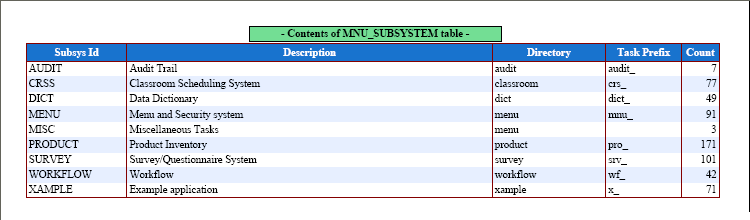
This is produced with the following code in the report structure file:
// identify column names and associated labels
$structure['body']['fields'][] = array('subsys_id' => 'Subsys Id');
$structure['body']['fields'][] = array('subsys_desc' => 'Description');
$structure['body']['fields'][] = array('subsys_dir' => 'Directory');
$structure['body']['fields'][] = array('task_prefix' => 'Task Prefix');
$structure['body']['fields'][] = array('count' => 'Count');
These labels can be amended with code such as the following:
function _cm_pre_output ($string)
// perform any processing required before the output operation
{
    if ($GLOBALS['mode'] == 'pdf-list') {
        // replace report headings
        $replace['subsys_id']   = 'NEW subsys_id';
        $replace['subsys_desc'] = 'NEW subsys_desc';
        $replace['subsys_dir']  = 'NEW subsys_dir';
        $result = replaceReportHeadings ($replace);
    } // if

    return $string;

} // _cm_pre_output
You may also use the following code as an alternative:
function _cm_pre_output ($string)
// perform any processing required before the output operation
{
    if ($GLOBALS['mode'] == 'pdf-list') {
        // replace report headings
        $this->dynamic_column_headings['label_1'] = 'NEW label_1';
        $this->dynamic_column_headings['label_2'] = 'NEW label_2';
    } // if

    return $string;

} // _cm_pre_output
This options requires that the strings in the report structure file which are to be replaced are identified with the prefix '%%' as in the following example:
$structure['body']['fields'][] = array('subsys_id' => '%%label_1');
$structure['body']['fields'][] = array('subsys_desc' => '%%label_2');
Although any database table may contain a column which is a date or date+time, sometimes there may be a need for some additional processing. The purpose of this section is to describe how the RADICORE framework can assist in this processing.
The first point is to identify how date and datetime values are stored in the database. Some people like to store them as integers (such as UNIX timestamps) which represent the number of days/seconds since the start of an arbitrary epoch, but there is nothing wrong with the data type which is provided by the underlying RDBMS:
The format in which dates can be displayed to or input by the user are described in FAQ113
Here are some of the other date facilities which are provided in the RADICORE framework:
These settings will ensure that the field cannot be set or modified by the user, but will be set to the equivalent of NOW() when the record is inserted or updated. This feature is commonly used for the columns called CREATED_DATE and REVISED_DATE.
SELECT ... FROM ... WHERE end_date <= '$today' OR end_date IS NULLIt is safer to always store a proper value in the END_DATE field, which is why the Data Dictionary has the INFINITY_IS_NULL setting. This will allow an unknown date in the future (infinity) to be shown as blank to the user but stored as '9999-12-31' in the database. This will allow the SQL SELECT statement to be simplified to:
SELECT ... FROM ... WHERE end_date <= '$today'
Any of these conditions can be incorporated into the SQL SELECT statement by adding one of the following to the $this->sql_search string:
curr_or_hist='C' for records with current dates.curr_or_hist='H' for records with historic datescurr_or_hist='F' for records with future dates.curr_or_hist which will enable the user to quickly select a date range. All the developer has to do is include that field name in the screen structure file.curr_or_hist='C' into the Selection (temporary) field using the Update Task screen.date(current) will set curr_or_hist='C' date(historic) will set curr_or_hist='H'date(future) will set curr_or_hist='F'The way that the Data Dictionary within RADICORE works is as follows:
So why is step #2 performed manually? Why can't the dictionary identify the relationships from the database schema?
The simple answer is that relationships are not defined in the database, not even foreign keys, only foreign key constraints, and they are not the same thing. Foreign key constraints are defined in the database and checked automatically during any INSERT, UPDATE and DELETE queries. Foreign keys, as used in SELECT queries, are not defined in the database and used automatically, instead they have to be manually defined in any JOIN clauses.
The differences between the database approach and the RADICORE approach are shown in the following grid:
| database constraint | Radicore | |
|---|---|---|
| 1 | Currently in the MySQL database foreign key constraints can only be used if both the parent and child tables use the INNODB engine. | There are no restrictions. |
| 2 | Once defined in the database schema the constraints cannot be turned off or altered within individual transactions. | Relationship details exist in the table structure file in the form of the $parent_relations array and the $child_relations array, so it is possible for the contents of these arrays to be temporarily altered within any transaction. |
| 3 | Foreign keys are not used to help in the construction of sql SELECT statements. | When the framework constructs an sql SELECT statement during the execution of the getData() method on a table object, it will automatically include JOINS to any parent tables as documented in Using Parent Relations to construct sql JOINs. |
| 4 | Foreign key constraints can only be defined between two tables when both of them exist within the same database schema. | RADICORE will allow the parent and child tables in a relationship to exist within different databases. The only restriction is that they must both be available in the same server connection at runtime. |
The RADICORE approach may involve the execution of code within the application layer rather than the database layer, but it offers more flexibility. Besides, all the necessary code is built into the framework so does not require any additional effort from any application builders.
The RADICORE framework was designed specifically to aid in the development of back office web applications, not front end web sites. If you do not understand the differences between the two then please read Web Site vs Web Application as well as Why is RADICORE no good for building web sites?
The User Interface (UI) of a RADICORE application is constructed using a standard library of page controllers and XSL stylesheets, which is usually too inflexible for a front-end web site which is supposed to be sexy and slick and full of gizmos and fancy widgets. A web site which is open to casual visitors also does not need a Role Based Access Control system which forces users to pass through a login screen.
This does not mean that none of the RADICORE components can be used in a front-end web site. If you are familiar with the design of the RADICORE infrastructure you should notice that it is based on the 3 Tier Architecture which has separate components for the Presentation, Business and Data Access layers. It is therefore possible to build the software for a front-end web site which has its own set of components in the presentation layer, but which uses the RADICORE components for the business and data access layers. This is documented further in Using RADICORE components in a front-end web site.
It is possible for clients to exist in a different time zone than the server on which the RADICORE application is being hosted, and this could mean that when times are displayed they are not in the client's time zone, and this could be confusing.
This problem can now be fixed using the new DateTimeZone class, but only if your PHP version is 5.2 or above
In order for this new feature to work it is first necessary to identify the time zone for the server. This is done by calling the date_default_timezone_get() function. You can override this setting by inserting the following line into your CONFIG.INC file:
$GLOBALS['server_timezone'] = 'America/New_York';
You can use any one of the List of Supported Time Zones.
The second step is to identify the user's time zone. It is not possible to determine this using information in the HTTP headers as nothing suitable is available, so the only workable alternative is to define this as an extra field on the MNU_USER table. It is an optional field, populated using the values obtained from the DateTimeZone::listIdentifiers() function, and should only be specified when the user's time zone is different from that of the server. This information will also be written out to a cookie called timezone_client for use whenever a user visits the LOGON page during a period when the system is shut down.
Having identified the different time zones, what is needed next is a function to convert the datetime value from one time zone to the other. This is achieved with the following:
    function convertTZ ($datetime, $tz_in, $tz_out)
    // convert datetime from one time zone to another
    {
        if (empty($datetime) OR empty($tz_in) OR empty($tz_out)) {
            return $datetime;  // no conversion possible
        } // if
        if ($tz_in == $tz_out) {
            return $datetime;  // no conversion necessary
        } // if

        if (version_compare(phpversion(), '5.2.0', '>=')) {
            // define datetime in input time zone
            $timezone1 = new DateTimeZone($tz_in);
            $dateobj = new DateTime($datetime, $timezone1);
            // switch to output time zone
            $timezone2 = new DateTimeZone($tz_out);
            $dateobj->setTimezone($timezone2);
            $result = date_format($dateobj, "Y-m-d H:i:s");
            return $result;
        } else {
            return $datetime;
        } // if

        return $datetime;

    } // convertTZ
When will this function be called? There are two places:
This also affects any messages which are displayed by the shutdown function.
In the PDF List View the way that each row is printed can be customised by changing the settings for the body style in the PDF style file as follows:
Figure 35 - List View with fillcolour = array(224,235,255)
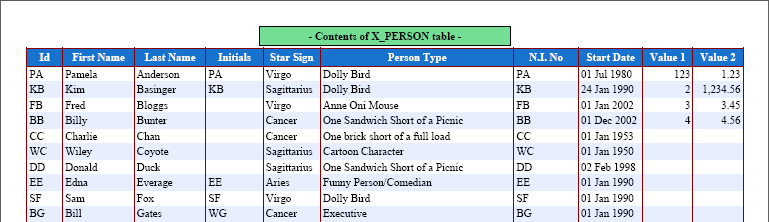
Figure 36 - List View with border => 'LRTB'
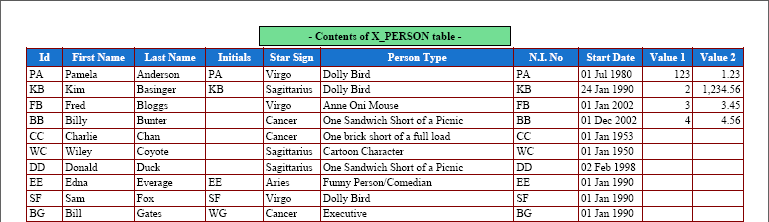
Figure 37 - List View with border => 'P'
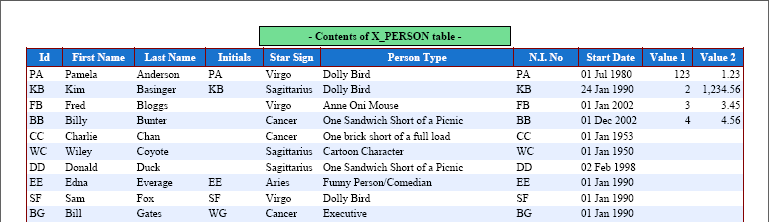
You can mix 'fillcolour' and 'border' settings to create whatever effect you desire.
FAQ109 shows how a screen label can be replaced at runtime, but there may be circumstances in which it would be desirable to replace the column name as well as its label so that a different piece of data can be displayed.
Figure 38 shows a screen based on the Multi 4 pattern where the outer entity is used to pass selection criteria to the inner entity. When the "Group by Country" field is set to 'N' it shows a line for each individual sales order with its id.
Figure 38 - original 'id' column
When the "Group by Country" field is set to 'Y' the id field is irrelevant, so it could be replaced by the count of orders for that country, as shown in Figure 39:
Figure 39 - 'id' replaced with 'count' column
This is achieved by calling the replaceScreenColumns() function in the _cm_pre_getData() method, as shown in the following example:
    if (is_True($group_by_country)) {
        $this->sql_select .= ', COUNT(h.order_id) AS order_count';
        $this->sql_groupby = 'country_id WITH ROLLUP';
        $replace_array['order_id'] = array('order_count' => 'Count', 'nosort' => 'y');
        $result = replaceScreenColumns($replace_array);
    } else {
        $this->sql_groupby = 'h.order_id WITH ROLLUP';
    } // if
The workflow system is a self-contained system which has its own database and its own processing engine. It has no knowledge of any application, or any application data, and works independently of any application, but may be plugged into an application at any time. This separation of responsibilities results in the following:
No application task is aware that is part of a workflow, and none of the code within an application task has to be amended in order for it to be included in a workflow case.
The only link between the workflow system and an application is when a workflow transition is linked to an application transaction (task). The workflow system does not know what this transaction does or which parts of the application database it reads and updates.
When an application task which is part of a workflow is completed (fired) then the workflow engine will consume one token from each of the transition's input places and create a new token on each of the transition's output places. If one of these places is the input place for another transition then this other transition will be enabled (waiting to be fired). If one of these places is the end place then the workflow case is closed.
The state of any workflow case is limited to the location of any tokens which are waiting to be consumed. These tokens identify which transitions are waiting to be fired, and each transition identifies an application transaction. When a transition is fired the context value provides the identity (primary key) of the application object which needs to be processed by that application transaction.
It is the application transaction which performs whatever processing is required by the application and updates any values in the application database, therefore the state of the application is the responsibility of the application.
NOTE: As of Radicore version 1.93.0 this answer is superseded by the use of new function getForeignKeyValues() which is described in Using Parent Relations to construct WHERE strings.
In a one-to-many relationship between two tables it is possible for different column names to be used between the primary key of the parent (one) table and the foreign key of the child (many) table. The mapping of column names is defined when the relationship details are entered into the Data Dictionary. This information is then included in the table structure file so that it is available to the application.
When the primary key is extracted from one database table object and passed to another object in the $where string it is often assumed that the framework can automatically convert the column names to the foreign key of the receiving table object, but it does not. Why is this?
The answer is that the contents of the $parent_relations array is only used to include JOIN clauses when a table object is constructing an sql SELECT statement. This involves processing every entry in the $parent_relations array. It is not possible to use this information to alter the contents of the $where string as the framework does not know which entry is the right one. Even if it knew the name of parent table this would still not be sufficient as there may be more than one relationship with that table, so it would not know which one to use.
Here is an example which deals with the relationship between the mnu_task and mnu_nav_button tables in the MENU database. The primary key of mnu_task is task_id, but mnu_nav_button has two foreign keys, task_id_snr and task_id_jnr, which both link back to mnu_task. This information appears in mnu_nav_button.dict.inc as follows:
    $this->parent_relations[]   = array('parent' => 'mnu_task',
                                        'alias' => 'mnu_task_snr',
                                        'parent_field' => 'task_desc AS task_desc_snr',
                                        'fields' => array('task_id_snr' => 'task_id'));

    $this->parent_relations[]   = array('parent' => 'mnu_task',
                                        'alias' => 'mnu_task_jnr',
                                        'parent_field' => 'task_desc AS task_desc_jnr',
                                        'fields' => array('task_id_jnr' => 'task_id'));
When the sql SELECT statement is constructed inside the mnu_nav_button object the result will look something like the following:
SELECT mnu_nav_button.*,
       mnu_task_snr.task_desc AS task_desc_snr,
       mnu_task_jnr.task_desc AS task_desc_jnr
FROM mnu_nav_button
LEFT JOIN mnu_task AS mnu_task_snr
       ON (mnu_task_snr.task_id=mnu_nav_button.task_id_snr)
LEFT JOIN mnu_task AS mnu_task_jnr
       ON (mnu_task_jnr.task_id=mnu_nav_button.task_id_jnr)
WHERE mnu_nav_button.task_id_snr='mnu_dialog_type(list)'
ORDER BY mnu_nav_button.sort_seq asc
When the WHERE string was passed into this object it contained task_id='...', but how was it translated into task_id_snr='...'? The answer is that it was converted by custom code in the _cm_pre_getData() method using code similar to the following:
$where = str_replace('task_id=', 'task_id_snr=', $where);
As there are two possible alternatives to this field name, task_id_snr and task_id_jnr, I created a separate subclass to deal with each one. Each of these subclasses is then used in a different task as follows:
If there are any pending workflow items they will appear as hyperlinks on the menu/home page with the text constructed in the format '<task_desk> where <context>'. Using the procedure outlined below it is now possible to customise this text so that it can be more 'user friendly'.
In the 'radicore/workflow/classes/custom-processing' directory there is a file called 'example.zip' which contains some customisable classes. If you wish to customise the hyperlink text then unzip these files and modify them as appropriate in order to create a column called link_text in each workitem record after it has been retrieved from the database. If the link_text column exists when the menu/home page is constructed then its contents will be used instead of the default text.
Below is an example of the custom code:
function _cm_post_getData ($rows, &$where)
// perform custom processing after database record(s) are retrieved.
{
    // insert custom text into LINK_TEXT
    foreach ($rows as $rownum => $rowdata) {
        switch ($rowdata['task_id']) {
        case 'x_person_addr(add)':
            $dbobject = RDCsingleton::getInstance('xample/x_person');
            $data = $dbobject->getData($rowdata['context']);
            if (!empty($data)) {
                $data = $data[0];
                $link_text = $rowdata['task_desc'] .' for ' .$data['first_name'] .' ' .$data['last_name'];
                $rowdata['link_text'] = $link_text;
            } // if
        default:
            break;
        } // switch
        $rows[$rownum] = $rowdata;
    } // foreach

    return $rows;

} // _cm_post_getData
Please note the following:
x_person class resides has not been included in the include_path directive you can include the subsystem name (in this case it is xample) in the argument. See FAQ163 for details.In the Workflow system there can be several arcs coming out of a transition in an Explicit OR Split, and the choice of which arc is used as the path down which the token will progress is governed by the pre-conditions or guards. Each pre-condition will be examined in sequence, and the first one which evaluates to TRUE will be chosen. If none evaluates to TRUE then the default path will be taken. But what is this sequence, and what identifies the default path?
Each outward arc goes from a transition to a place, and the sequence in which these arcs will be evaluated is governed by the place name. These are purely descriptive and have no meaning to the workflow engine, so can contain any value of your choosing. It would therefore be a good idea to prefix each place name with an explicit sequence identifier such as number or a letter, as in '1-' or 'A-'. In this way the sequence would be entirely under your control and not randomly picked at runtime.
The default path is the one which does not have a pre-condition. This means that in a sequence of Explicit OR Splits every path must have a pre-condition except the last one. When stepping through the sequence of outward arcs the workflow engine will go down the first path which has a pre-condition which evaluates to TRUE, or the path with an empty pre-condition (whichever comes first). It is therefore vitally important that the place name of the default path contains a value which ensures that it comes at the end of the sorted sequence. Depending on what you use as your prefix it could be something like '99-' or 'Z-'.
If it is ever necessary to execute a task after the LOGON screen has been processed but before the first menu (Home Page) is displayed, it can be specified in the Initial Passthru field of the menu/home page task on the MNU_TASK table. This task will only be executed once, when the Home Page is first displayed, during which there will be no menu buttons so the only options will be either the SUBMIT or the CANCEL buttons in the Action Bar.
There are several options for displaying either images or hyperlinks, or a hyperlink with an image, and these are described in the following paragraphs.
This uses the filepicker control. An example is available in the 'Person' screens of the 'Example' subsystem, which is included in the Radicore download. Using the Data Dictionary the details for the field can be specified as follows:
$fieldspec['picture']           = array('type' => 'string',
                                        'size' => 40,
                                        'subtype' => 'image',
                                        'imagewidth' => 75,
                                        'imageheight' => 95,
                                        'control' => 'filepicker',
                                        'task_id' => 'x_person(filepicker)');
This will produce the following in the HTML output:
The field's value is the path to the image file, which in this example is relative to the current working directory. This value can be changed either directly, or by pressing the button which activates the specified filepicker task.
If you do not wish the user to change the value directly you can remove the text field from the HTML output by adding the notext attribute to the field's specifications using code similar to the following in the _cm_changeConfig() method:
$this->fieldspec['picture']['notext'] = 'y';
The image control is similar to the filepicker, but without the ability for the user to select which image to use. This is for those circumstances where the identity of the image is chosen programmatically, such as to indicate a record's status. Using the Data Dictionary the details for the field can be specified as follows:
$fieldspec['status_icon']       = array('type' => 'string',
                                        'imagewidth' => 16,
                                        'imageheight' => 16,
                                        'control' => 'image');
If the field containing the image does not actually exist in the database then its details will have to be specified manually in the _cm_changeConfig() method.
By default an image's 'alt' text, which is displayed when the mouse is hovered over the image, is exactly the same as the path to the file which contains the image. It is possible to specify a customised string for this 'alt' text by appending [alt=...] to the path name, as shown in the following example:
function _cm_formatData ($fieldarray, &$css_array)
// perform custom formatting before values are shown to the user.
{
    if (!empty($fieldarray['foobar'])) {
        $fieldarray['foobar'] .= '[alt=put your custom text here]';
    } // if

    return $fieldarray;

} // _cm_formatData
When the data is transferred to the XML document prior to the XSL transformation the [alt=...] string will be stripped from the field's value and inserted as an attribute. The remainder will be used as the path to the image file.
The hyperlink control is used when a field contains a URL in the format http://whatever... and when displayed it will be an actual hyperlink which the user can click on to jump to that URL. Using the Data Dictionary the details for the field can be specified as follows:
$fieldspec['article_url']       = array('type' => 'string',
                                        'size' => 255,
                                        'control' => 'hyperlink');
In some circumstances it may be desirable to display a shortened label to the user instead of the entire URL. This can be achieved programmatically by changing the field's value to specify the label and url as separate components, as shown in the following example:
function _cm_formatData ($fieldarray, &$css_array)
// perform custom formatting before values are shown to the user.
{
    if (!empty($fieldarray['filename'])) {
        $fieldarray['filename'] .= '[url=put the url here]';
    } // if

    return $fieldarray;

} // _cm_formatData
When the data is transferred to the XML document prior to the XSL transformation the [url=...] string will be stripped from the field's value and inserted as an attribute. The remainder will be used as the label.
The image-hyperlink control can be used in order to display a small version of an image (often known as a thumbnail) which is a hyperlink to the full-sized image. Using the Data Dictionary the details for the field can be specified as follows:
$fieldspec['image_path']        = array('type' => 'string',
                                        'size' => 40,
                                        'subtype' => 'image',
                                        'imagewidth' => 75,
                                        'imageheight' => 95,
                                        'control' => 'imagehyper');
When this image is displayed in the form it will use the dimensions specified in imagewidth and imageheight. By clicking anywhere in the image this will activate the hyperlink and display the full size image.
Sometimes it may be necessary to display a list of hyperlinks instead of a single hyperlink, such as when an email contains several attachments. This is as simple as changing the string field into an array, as shown in the following:
function _cm_formatData ($fieldarray, &$css_array)
// perform custom formatting before values are shown to the user.
{
    if (!empty($fieldarray['attachments'])) {
        // multiple attachments are separated by ';'
        $array = explode(';', $fieldarray['attachments']);
        if (count($array) > 1) {
            // more than 1 entry, so set field to an array
            $fieldarray['attachments'] = $array;
        } // if
    } // if

    return $fieldarray;

} // _cm_formatData
An array of hyperlinks will appear in the XML file similar to the following:
<attachments noedit="y" control="hyperlink">
    <array url="email_attachment.php?id=154003&seq=1">att001.html</array>
    <array url="email_attachment.php?id=154003&seq=2">foobar.pdf</array>
    <array url="email_attachment.php?id=154003&seq=3">snafu.pdf</array>
</attachments>
Each entry may also contain the optional [url=...] as described in point 5 above.
Here is an example showing how the original string field may be constructed:
function _cm_pre_getData ($where, $where_array, $fieldarray=null)
// perform custom processing before database record(s) are retrieved.
{
    if (empty($this->sql_from)) {
        // construct default SELECT and FROM clauses using parent relations
        $this->sql_from    = null;
        $this->sql_groupby = null;
        $this->sql_having  = null;
        $this->sql_from    = $this->_sqlForeignJoin($this->sql_select,
                                                    $this->sql_from,
                                                    $this->parent_relations);

        if ($GLOBALS['mode'] == 'read') {
            // obtain a list of all attachments in format 'filename[url=...]; filename[url=...]; ...'
            $this->sql_select .= ",\n (SELECT GROUP_CONCAT(CONCAT(filename,'[url=...]')
                                       ORDER BY seq_no SEPARATOR ';')
                                       FROM email_attachment
                                       WHERE email_attachment.email_id=email.email_id
                                      ) AS attachments";
        } // if
    } // if

    return $where;

} // _cm_pre_getData
The [url=...] portion may point directly to the file on disk, or it may point to a PHP script which extracts the file's contents from a BLOB field in the database.
Each PDF report has its own Report Structure File which defines the specific requirements for that report, such as what goes where, and which style to use for which element. All these styles must have been defined in the PDF Style File which exists in the main subsystem directory. This allows different subsystems to have their own set of PDF styles.
Sometimes it may be useful to change the style of a field at runtime, such as changing the colour of a negative value to be red, for example. This can be achieved by placing the relevant code in the _cm_formatData() method, as shown in the following:
function _cm_formatData ($fieldarray, &$css_array)
  // perform custom formatting before values are shown to the user.
  // Note: $css_array is passed BY REFERENCE as it may be modified.
  {
      if ($fieldarray['value'] < 0) {
          $css_array['value'] = 'textcolour_red';
          // OR
          $css_array['value'] = array('style' => 'whatever');
      } // if

      return $fieldarray;

  } // _cm_formatData
In this example 'textcolour_red' is the name of a style in the PDF Style File which will change a single attribute, as shown below:
$style['textcolour_red']   = array(255,0,0);
$style['textcolour_green'] = array(0,255,0);
$style['textcolour_blue']  = array(0,0,255);
Alternatively you may specify a style that contains a complete set of attributes such as font, fillcolour, textcolour and drawcolour.
Under normal circumstances any navigation buttons which have been defined for a task will be displayed when that task is being executed, except those for which access by the current user has not been granted. However, there may be circumstances when a navigation button becomes inappropriate due to data values which can only be determined at runtime. While it is not possible to add a new button, it is possible to nominate a button for removal by adding the task's identity to the $GLOBALS['nav_buttons_omit'] array variable.
The action buttons for each dialog type are hard-coded within each of the controller scripts. It is possible to remove any of these buttons at runtime by removing the relevant entry from the $GLOBALS['act_buttons'] variable using the unset() function..
By default the only buttons allowed in the data area of a form are for fields which use the filepicker or popup controls as these help the user to choose values for those fields. Other buttons exist in the navigation bar and the action bar, but these perform actions which are not limited to a single field.
If you wish to have a button in the data area this can be done by amending the $fieldspec array using code similar to the following:
function _cm_changeConfig ($where, $fieldarray)
// Change the table configuration for the duration of this instance.
{
    if ($GLOBALS['mode'] == 'insert') {
        $this->fieldspec['add_attachment'] = array('type' => 'string',
                                                   'control' => 'input',
                                                   'subtype' => 'button',       <-- optional -->
                                                   'class' => '...',            <-- optional -->
                                                   'id' => '...'),              <-- optional -->
                                                   'task_id' => 'whatever');    <-- optional -->
    } // if

    ... or alternatively ...

    $this->fieldspec['some_button'] = array('type' => 'string',
                                            'control' => 'button',
                                            'subtype' => 'button',       <-- optional -->
                                            'class' => '...',            <-- optional -->
                                            'id' => '...'),              <-- optional -->
                                            'value' => '...'),           <-- optional -->
                                            'task_id' => 'whatever');    <-- optional -->

    return $fieldarray;

} // _cm_changeConfig
The output from the first option will look like the following:
<input name="..." class="..." id="..." value="..." type="[submit] or [button]" />
The output from the second option will look like the following:
<button name="..." class="..." id="..." value="..." type="[submit] or [button] or [reset]" >value</button>
The purpose of this control is to put a button in the data area. This can be used for one of the following reasons:
'task_id' attribute. This task will be activated without the need for any code in the _cm_customButton() method. If the nominated task is a POPUP, FILEPICKER or FILEUPLOAD then the popupReturn() method will be automatically activated when that task is completed.If no value for the subtype attribute is supplied the HTML type attribute will default to submit.
If no value for the class attribute is supplied it will default to button.
The name attribute will be set to one of the following:
task_id has been supplied it will be set to "task#<task_id>""button#<fieldname>"Note that the input/button control cannot be set for any field via the data dictionary as that only deals with data fields which exist in the database, while custom buttons are non-database fields which represent actions and not data.
In order to have this button displayed in the HTML document you will need to add the relevant entry to the screen structure file, similar to the following:
$structure['main']['fields'][] = array('add_attachment' => '');
Unless you are in an ADD transaction you will also need to ensure that this non-database field appears in the data array otherwise it will not appear in the screen. You will need code similar to the following:
$this->fieldarray['add_attachment'] = '<button text>';
Here is an example showing how to display several buttons on the same line:
$structure['main']['fields'][11][] = array('label' => '');
$structure['main']['fields'][11][] = array('field' => 'add_attachment');
$structure['main']['fields'][11][] = array('field' => 'list_attachments', 'colspan' => 7);
Note here that the separate screen label is not used as the button will contain its own descriptive text, as shown in Figure 40:
Figure 40 - Example of Button controls

When the button is displayed in the HTML document the text displayed inside the button will be the field's value.
If the button's subtype is SUBMIT then when it is pressed it will call the current script using the POST method. If an optional 'task_id' has been specified then the nominated task will automatically be activated, otherwise the _cm_customButton() method on the object in which the button was defined will be activated instead. In order for the _cm_customButton() method to be called in other objects you will need to set $this->allow_buttons_all_zones=TRUE; in all those other objects. You will need to insert code into the _cm_customButton() method in all relevant objects to perform whatever actions are required otherwise nothing will happen at all.
If you have several custom buttons in the same row on a screen then by default each button will be treated as a separate field and will require its own table cell. This can sometimes prove to be inconvenient, which is why I have enabled the option to put several buttons into a single table cell. The steps are as follows:
if (!array_key_exists('button_group', $this->fieldspec)) {
    $this->fieldspec['button_group']            = array('type' => 'string',
                                                        'control' => 'button',
                                                        'subtype' => 'button');  <-- optional -->
} // if
The value for subtype will be inherited by all the buttons in the group. If nothing is specified it will default to 'submit'.
$fieldarray['button_group']['button_1'] = 'button_1_label';
$fieldarray['button_group']['button_2'] = 'button_2_label';
$fieldarray['button_group']['button_3'] = 'button_3_label';
If you wish to add a class to a button you must set the button's value to an array instead of a string:
$fieldarray['button_group']['button_1'] = array('name' => 'button_1_label', 'class' => 'whatever');
$fieldarray['button_group']['button_2'] = array('name' => 'button_2_label', 'class' => 'whatever');
$fieldarray['button_group']['button_3'] = array('name' => 'button_3_label', 'class' => 'whatever');
<button_group control="button">
  <array name="button#outer#button_1" class="whatever">button_1_label</array>
  <array name="button#outer#button_2">button_2_label</array>
  <array name="button#outer#button_3">button_3_label</array>
</button_group>
FAQ09 gives an example of how to create the option list for a dropdown or radio group from a database table with a single-column key, but if the table in question has a compound key then a slightly different approach will be necessary. The option list which is used to populate the contents of a dropdown or radio group is a simple associative array, so it cannot handle compound keys without some assistance.
Here is an example which shows how to build the option list using a simple key:
    // get data from the database
    $this->sql_select      = 'id, name';
    $this->sql_orderby     = 'name';
    $this->sql_orderby_seq = 'asc';
    $data = $this->getData($where);

    // convert each row into 'id=name' in the output array
    foreach ($data as $row => $rowdata) {
        $array[$rowdata['id']] = $rowdata['name'];
    } // foreach

    return $array;
Here is an example which shows how to build the option list using a compound key:
    // get data from the database
    $this->sql_select      = 'idA, idB, idC, name';
    $this->sql_orderby     = 'name';
    $this->sql_orderby_seq = 'asc';
    $data = $this->getData($where);

    // convert each row into 'idA/ibB/idC=name' in the output array
    foreach ($data as $row => $rowdata) {
        $key = $rowdata['idA'].'/'.$rowdata['idB'].'/'.$rowdata['idC'];
        $array[$key] = $rowdata['name'];
    } // foreach

    return $array;
Here you see we have constructed the array key as 'idA/idB/idC', where '/' is the delimiter which separates the different values. You can use whatever delimiter you like, just ensure that it never appears in any of the values.
When the user selects one of these options it will be returned as a single string, but it will have to be split into its component parts before they can be used as individual values. This will require some additional code, in either the _cm_pre_insertRecord() or _cm_pre_updateRecord() methods, which is similar to the following:
    list($idA, $idB, $idC) = explode('/', $rowdata['compound_key']);
    $rowdata['idA'] = $idA;
    $rowdata['idB'] = $idB;
    $rowdata['idC'] = $idC;
By default all checkboxes are displayed using the same CSS style, but sometimes it may be useful if individual entries could be displayed using a different style. This can now be achieved by adding the required CSS class name to the $fieldspec array, as shown in the following example:
shutdown_saturday has the following entry in $this->fieldspec:
    $fieldspec['shutdown_saturday']     = array('type' => 'boolean',
                                                'true' => 'Y',
                                                'false' => 'N',
                                                'control' => 'checkbox',
                                                'label' => $day_names['sat'],
                                                'align_lr' => 'left');
<td>
  <span class="checkbox">
    <input type="hidden" name="shutdown_saturday" value="0" />
    <label>
      Sat<input type="checkbox" name="shutdown_saturday" />
    </label>
  </span>
</td>
Figure 41 - standard checkbox display

$this->fieldspec['shutdown_saturday']['class'] = 'weekend';
This will result in the following HTML output:
    <label class="weekend">
      Sat<input type="checkbox" name="shutdown_saturday" />
    </label>
.weekend {
  background-color: green;
  color: white;
  font-weight: bold;
}
this will result in the display shown in Figure 42:
Figure 42 - customised checkbox display

By default all entries in a dropdown list are displayed using the same CSS style, but sometimes it may be useful if individual entries could be displayed using a different style. This can now be achieved by adding the required CSS class name to the $this->lookup_css array, as shown in the following example:
uom_id has the following entry in $this->fieldspec:
    $fieldspec['uom_id'] = array('type' => 'string',
                                 'size' => 16,
                                 'uppercase' => 'y',
                                 'control' => 'dropdown',
                                 'optionlist' => 'uom_id');
The optionlist entry tells the framework to load its contents from the array in $this->lookup_data['uom_id'].
    if (!array_key_exists('uom_id', $this->lookup_data)) {
        $dbobject = RDCsingleton::getInstance('unit_of_measure');
        $array = $dbobject->getValRep('uom_id');
        $this->lookup_data['uom_id'] = $array;
    } // if
<td>
  <select class="dropdown" name="uom_id">
    <option value="" id="" selected="selected">(undefined)</option>
    <option value="0" id="0">== AREA ==</option>
    <option value="SQ_CM" id="SQ_CM">Square Centimeter</option>
    <option value="SQ_FOOT" id="SQ_FOOT">Square Foot</option>
    <option value="SQ_INCH" id="SQ_INCH">Square Inch</option>
    <option value="SQ_M" id="SQ_M">Square Meter</option>
    <option value="SQ_YARD" id="SQ_YARD">Square Yard</option>
    <option value="1" id="1">== CURRENCY ==</option>
    <option value="AUD" id="AUD">Australian Dollars</option>
    .....
  </select>
</td>
Figure 43 - standard radio group display
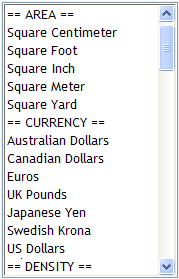
    foreach ($array as $key => $value) {
        if (substr($value, 0, 3) == '== ') {
            $this->lookup_css['uom_id'][$key] = 'heading';
        } // if
    } // foreach
This will result in the following HTML output:
      <option value="0" id="0" class="heading">== AREA ==</option>
      .....
      <option value="1" id="1" class="heading">== CURRENCY ==</option>
      .....
select.dropdown option.heading {
  background: #dddddd;
}
this will result in the display shown in Figure 44:
Figure 44 - customised dropdown display
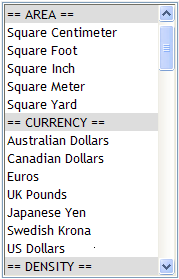
A hidden field is one that use the 'hidden' control to make itself invisible to the user, but will still be sent to the client when a SUBMIT button is pressed. It will produce HTML output similar to the following:
<td><input type="hidden" name="display_currency" value="GBP" /></td>
To add such a field to any HTML form you must perform the following:
$fieldarray.$fieldspec array, such as:
    $this->fieldspec['display_currency'] = array('type' => 'string',
                                                 'control' => 'hidden');
If you ever want the field to be both 'hidden' and 'visible' at the same time (ie: can be seen by the user but not changed, yet still sent to the client when a SUBMIT button is pressed) just add the 'visible' attribute as follows:
    $this->fieldspec['display_currency'] = array('type' => 'string',
                                                 'control' => 'hidden',
                                                 'visible' => 'y');
This will produce HTML output similar to the following:
<td><input type="hidden" name="display_currency" value="GBP" />GBP</td>
In the Workflow system if a transition has a single input place then that place cannot hold more than one token as each time one lands on it the related transition is fired automatically and the token is instantly consumed. In this situation it is therefore impossible for a place to hold more than one token. If, however, a transition has multiple input places then it is possible for one of those places to hold more than one token at a time, as explained in the following example:
The remaining token on 'P1' just sits there, waiting for a token to be placed on 'P2' so that its transition can be fired and it can be consumed. If the workflow is completed before the token is consumed then it is never consumed as the workflow is no longer active.
This error is generated when creating the XML document prior to its transformation into HTML. It signifies that the element (field) name contains invalid characters. According to the XML specification an element name must conform to the following:
Among the excluded characters are '(' and ')', so the most common cause of this error is where a SELECT statement contains an aggregate without an alias name:
COUNT(...) |
This produces the name COUNT(...) which is invalid. |
COUNT(...) AS count |
This produces the name count which is valid. |
Whenever you wish to modify a SELECT statement for a particular task the first step should *ALWAYS* be to try it out in your database client. In this way you will verify that the statement is syntactically correct and actually produces the results that you want. Then, and only then, should you modify your code to use this modified statement.
As an example I shall use the 'List Role' task in the MENU subsystem. In its original version the generated SQL was very simple:
SELECT mnu_role.role_id, start_task_id, global_access, role_desc
FROM mnu_role
ORDER BY mnu_role.role_id asc
This was produced by modifying the mnu_role(list1).php script to contain the following:
$sql_select = 'mnu_role.role_id, start_task_id, global_access, role_desc';
$sql_from   = '';
$sql_where  = '';
$sql_groupby = '';
When I wanted to include the count of users within each role I needed to generate the following statement:
SELECT mnu_role.role_id, start_task_id, global_access, role_desc, count(user_id) as count
FROM mnu_role
LEFT JOIN mnu_user ON (mnu_user.role_id=mnu_role.role_id)
GROUP BY mnu_role.role_id
ORDER BY mnu_role.role_id asc
Note that this requires a GROUP BY clause.
This was produced by modifying the mnu_role(list1).php script to contain the following:
$sql_select = 'mnu_role.role_id, start_task_id, global_access, role_desc, count(user_id) as count';
$sql_from   = 'mnu_role LEFT JOIN mnu_user ON (mnu_user.role_id=mnu_role.role_id) ';
$sql_where  = '';
$sql_groupby = 'mnu_role.role_id';
An alternative statement, which does not require a GROUP BY clause, would be as follows:
SELECT mnu_role.role_id, start_task_id, global_access, role_desc
      ,(SELECT count(user_id) FROM mnu_user WHERE mnu_user.role_id=mnu_role.role_id) as count
FROM mnu_role
ORDER BY mnu_role.role_id asc
The QuickSearch Bar is a faster alternative to the use of a separate SEARCH screen. It is currently only supported in tasks of the LIST and POPUP patterns. It is not available by default, but can be enabled using one of the following methods:
    function _cm_getExtraData ($where, $fieldarray)
    {
        $pattern_id = getPatternId();

        if (preg_match('/^(list1|popup1)$/i', $pattern_id)
        OR (preg_match('/^(list2|popup2)$/i', $pattern_id) AND $this->zone == 'inner')) {
            if (!array_key_exists('quicksearch_field', $this->lookup_data)) {
                // set list of field names for QuickSearch option
                $array = array('database_id' => 'Database Id',
                               'database_desc' => 'Database Desc',
                               'subsys_id' => 'Subsys Id');
                $this->lookup_data['quicksearch_field'] = $array;
                $this->xsl_params['quicksearch_default'] = 'database_id';  // optional
            } // if
        } // if

        return $fieldarray;

    } // _cm_getExtraData
The quicksearch_default option will cause the named field to be pre-selected in the dropdown, otherwise it will be empty.
Note that option #1 will still keep working for a task until option #2 is implemented. After this point the code for option #1 can be deleted as it will be redundant.
One of the ways in which a screen can be customised is to alter the way in which a single field, or a whole column of fields, is displayed. This can be achieved by modifying the screen structure file to include one or more additional attributes, such as:
In list screens with a horizontal display these attributes can be applied to every field in a column using code similar to the following:
<?php
$structure['xsl_file'] = 'std.list1.xsl';

$structure['tables']['main'] = 'person';

$structure['main']['columns'][] = array('width' => 5);
$structure['main']['columns'][] = array('width' => 70);
$structure['main']['columns'][] = array('width' => 100);
$structure['main']['columns'][] = array('width' => 100);
$structure['main']['columns'][] = array('width' => 100, 'align' => 'center', 'nosort' => 'y');
$structure['main']['columns'][] = array('width' => '*', 'align' => 'right');

$structure['main']['fields'][] = array('selectbox' => 'Select');
$structure['main']['fields'][] = array('person_id' => 'ID');
$structure['main']['fields'][] = array('first_name' => 'First Name');
$structure['main']['fields'][] = array('last_name' => 'Last Name');
$structure['main']['fields'][] = array('star_sign' => 'Star Sign');
$structure['main']['fields'][] = array('pers_type_desc' => 'Person Type');
?>
In detail screens with a vertical display these attributes can be applied to individual fields using code similar to the following:
$structure['main']['fields'][1] = array('person_id' => 'ID',
                                        'colspan' => 5);

$structure['main']['fields'][2][] = array('label' => 'First Name');
$structure['main']['fields'][2][] = array('field' => 'first_name',
                                          'size' => 15);
$structure['main']['fields'][2][] = array('label' => 'Last Name');
$structure['main']['fields'][2][] = array('field' => 'last_name',
                                          'size' => 15);
$structure['main']['fields'][2][] = array('label' => 'Initials');
$structure['main']['fields'][2][] = array('field' => 'initials');

$structure['main']['fields'][4] = array('picture' => 'Picture',
                                        'colspan' => 5,
                                        'imagewidth' => 32,
                                        'imageheight' => 32);
....
$structure['main']['fields'][11] = array('value2' => 'Value 2',
                                         'colspan' => 5);

$structure['main']['fields'][12][] = array('label' => 'Start Date');
$structure['main']['fields'][12][] = array('field' => 'start_date');
$structure['main']['fields'][12][] = array('label' => 'End Date');
$structure['main']['fields'][12][] = array('field' => 'end_date',
                                           'colspan' => 3);
It is also possible to change the way a field is displayed at runtime, as described in FAQ73.
By default an insert, update or delete operation will only affect a single database table, the one which is accessed by the table class on which the operation is requested. However, it is possible to extend this default behaviour to include other tables by inserting the relevant custom code into any of the _cm_post_insertRecord(), _cm_post_updateRecord() and _cm_post_deleteRecord() methods. Here is an example:
function _cm_post_insertRecord ($rowdata)
// perform custom processing after database record has been inserted.
{
    $dbobject1 = RDCsingleton::getInstance('table_1');
    $new = $dbobject1->insertRecord($rowdata);
    if ($dbobject1->errors) {
        $this->errors[$dbobject1->getClassName()] = $dbobject1->errors;
        return $rowdata;
    } // if

    $dbobject2 = RDCsingleton::getInstance('table_2');
    $data['field_1']    = $rowdata['field_1'];
    $data['field_2']    = $rowdata['field_2'];
    $data = $dbobject2->updateRecord($data);
    if ($dbobject2->errors) {
        $this->errors[$dbobject2->getClassName()] = $dbobject2->errors;
        return $rowdata;
    } // if

    return $rowdata;

} // _cm_post_insertRecord
Note the following:
table_1 is the complete contents of the $rowdata argument. It does not matter that it may contain fields which do not belong in that table as these will be automatically filtered out before it gets processed by the Data Access Object.table_2 is filtered manually so that only certain fields are updated. Note that the update method requires that the data array contains either the primary key or a candidate key as a bare minimum, otherwise it won't know which record to update.$errors property as an array of 'fieldname = error_message' pairs.The simplest answer is because PDO was "too little, too late":
The limitation with PDO is that, although it can connect to a variety of different DBMS engines, it is only capable of issuing the same SQL query to each of those engines - it is not capable of modifying the query to deal with any peculiarities of a particular DBMS. This limitation is far too restrictive for me, so although I wrote my original Data Access Object (DAO) to deal with MySQL using the mysql_* extension, I later added a separate class for the mysqli_* extension. I used the same technique to create additional classes for the PostgreSQL, Oracle and SQL Server engines, and this enabled me to easily include the ability to deal with all the differences I found. The major ones are:
select * from ( select a.*, rownum as rnum from (
    ... normal query goes here ...
) a where rownum <= $max_rows ) where rnum >= $min_rows
select * from (
SELECT $select_str, ROW_NUMBER() OVER ($sort_str) AS rownum
FROM $from_str $where_str $group_str $having_str
) AS x WHERE rownum BETWEEN $min_rows and $max_rows
So you can see that switching to the PDO extension in the RADICORE framework would be a backward step, so it is one that I am not going to take.
To keep the structure of the software objects synchronised with the structure of the database, thus avoiding the need for any sort of Object Relational Mapper. My approach is to design the database first, then construct my classes, one per table, from the database structure. This is done by importing the database structure into the data dictionary, then exporting from the dictionary to the application. If any database table is subsequently altered it is a simple process to re-import and then re-export. This will not touch the existing class file but will replace the structure file.
Please refer to A Data Dictionary for PHP Applications and Menu and Security System User Guide - Appendix N for more details.
By default the four databases used by Radicore - AUDIT, DICT, MENU and WORKFLOW - have their own database names in the server instance. However, there are some Radicore users whose ISPs do not allow them to create or access more than one MySQL database, so it would be convenient if these four databases could be maintained under a single database name. This is now possible using the switch_dbnames option which is described in FAQ92. In the following sample from the CONFIG.INC file all the databases will be redirected at runtime from the names contained in the various class files to the consolidated name 'single':
    global $servers;
    // server 0
    $servers[0]['dbhost']     = 'localhost';
    $servers[0]['dbengine']   = 'mysql';
    $servers[0]['dbusername'] = '??';
    $servers[0]['dbuserpass'] = '??';
    $servers[0]['dbprefix']   = '';
    $servers[0]['dbport']     = '';
    $servers[0]['dbsocket']   = '';
    // these are the database names used in the Data Dictionary
    $servers[0]['dbnames']    = 'audit, dict, menu, workflow';
    // these are the database names used on the server
    $servers[0]['switch_dbnames'] = array('audit' => 'single',
					  'dict' => 'single',
					  'menu' => 'single',
					  'workflow' => 'single');
Instead of 'single' you may use any database name that you like.
There may be some cases where you wish to update a table column by using the result of a database function instead of supplying a literal value, so can this be done with Radicore? Imagine the following SQL statement which you wish to execute:
UPDATE ... SET field1=REPLACE(field1, '_','-') WHERE ...
During the normal process of converting the body of the statement from a string to array the following will be produced:
field1 = REPLACE(field1, '_','-')
By default when this array is converted back into a string it will result in the following:
UPDATE ... SET field1='REPLACE(field1, \'_\',\'-\')' WHERE ...
In order to prevent the function call to be treated as a string literal you must add an entry to the $this->allow_db_function array immediately before the update command as in the following:
$this->allow_db_function[] = 'field2';
This enables you to use this ability on any number of columns in a single SQL statement. Note also that the contents of this array will be cleared after it has been used.
Please note that this feature should not be used with any unique keys (primary or candidate) as the framework will test for uniqueness before the SQL query is executed, but the results of the function are not known until afterwards.
If you think that the world revolves around a front-end website then you must be working with small websites which are so simple that they do not need a back-end administrative application. When writing business applications, such as e-commerce, there should be a separate back-end application which can be used by members of staff. The front-end website contains only a subset of the functionality and is only accessed by visitors and potential customers. This arrangement is shown in Figure 47:
Figure 47 - Front End web site, Back End administrative application
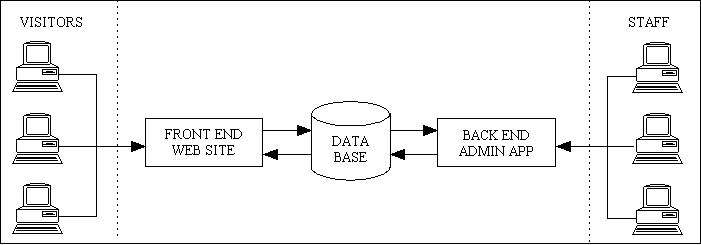
The front-end website is nothing more than a gaudy order entry system while the back-end is responsible for everything involved with order fulfilment - pick lists, inventory, invoicing, shipments, purchase orders, suppliers, et cetera. The back-end application can sometimes be as much as 100 times bigger than the front-end.
RADICORE is built around the 3 Tier Architecture which provides separate components for the Presentation, Business and Data Access layers. While RADICORE's Presentation layer is built specifically for the needs of the back-end administrative application, the Business and Data Access layers can be shared by your front-end website (or even multiple front-end websites) with little effort. This arrangement is shown in Figure 48:
Figure 48 - A small Front End sharing the components in a larger Back End application
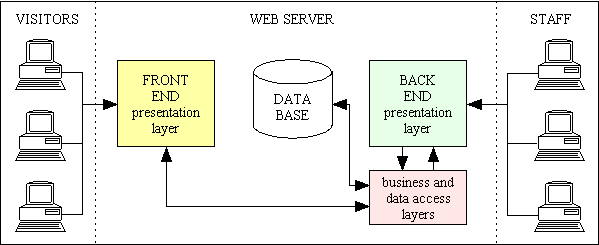
This means that the bulk of the processing has already been provided by the back-end components, so all that is necessary to build a front-end website is a new light-weight Presentation layer. You can have as many different Presentation layers as you like, but they all share the same Business and Data Access layers. Because the Presentation layer is light-weight it can easily be re-styled or rebuilt without any effect on the other layers.
See also How can I use RADICORE components in my front-end web site?
By asking such a question you are exposing your own lack of experience. There is no such thing as a one-size-fits-all wheel just as there is no such thing as a one-size-fits-all framework. A wheel for a shopping trolley is unsuitable for a racing car just as a wheel for a tractor is unsuitable for a child's pram. Similarly a framework for building content management systems is unsuitable for building customer relationship management systems just as a framework for building blogging applications is unsuitable for building e-commerce applications. A framework for building front-end websites is also unsuitable for building back-end enterprise applications.
My background is in building database applications for the desktop such as order entry, order processing, warehousing and inventory, shipments, invoicing and accounting. This type of application is also known as Order Fulfilment, Order Processing, Supply Chain Management or Enterprise Resource Planning. In today's world of e-commerce a front-end website is used as a glamorous order entry mechanism, but that still leaves everything else to be handled by the back-end administrative application. Note here that the front-end is open to all visitors while the back-end is restricted to members of staff. Other requirements of back-end administrative applications include:
Another big failing with all these other frameworks is that they do not provide support for Rapid Application Development (RAD). The RADICORE framework implements the Model-View-Controller design pattern in the following ways:
It also contains an implementation of the 3-Tier Architecture, which is not the same thing, by taking all database access out of the Model and placing it in a separate Data Access Object (DAO).
All the frameworks I have seen have been concerned with the development of front-end websites and not back-end administrative applications (See FAQ152 for an explanation of the difference) and therefore don't offer the functionality that I expect, so they are all unsuitable. As I have already built back-end frameworks in two of my previous languages it was a simple exercise to build another in PHP rather than waste my time with someone else's pile of rubbish unsuitable offering. If you want to make a silk purse you don't start with a sow's ear.
If you think that Object Oriented Programming (OOP) requires that absolutely everything be done using objects then you are sadly mistaken. It is a simple fact that there must be some procedural code somewhere, even if all it does is instantiate the first object. In this article you will see this simple definition of OOP:
Object Oriented Programming is programming which is oriented around objects, thus taking advantage of Encapsulation, Polymorphism, and Inheritance to increase code reuse and decrease code maintenance.
PHP is a great language because, just like C++, it supports both the procedural and OO approaches, so it is up to the individual developer to decide which approach works best depending on the circumstances. I will continue to use procedural functions unless there is a compelling reason, or a distinct advantage, in switching to objects. I'm afraid that "because that's how it is done" is not a compelling reason.
In my framework you will see that that the following components have been implemented as classes which can be turned into objects:
All my page controllers are still procedural for the simple reason that there is no opportunity for either inheritance or polymorphism, so there would be no advantage in converting them into classes and objects. If there is no benefit in making a change, then how can you justify the effort in making that change?
Some programmers like to use static methods instead of procedural functions, but this is not Object Oriented as the classes are never instantiated into objects. Where is the inheritance? Where is the polymorphism?
Putting unrelated functions into the same class would be wrong as it would violate the principle of encapsulation. Putting each function in its own class, then following the convention of putting each class in its own file, would require an increase in the number of include statements which would be a logistical nightmare as well as increasing the processing overhead.
As far as I can see the only valid reason to take a group of procedural functions and place them in the same class is when those functions share common state.
In his article Why C++ is not just an Object Oriented Programming Language (PDF) the author Bjarne Stroustrup has this to say regarding language features:
Even when all the features required to support object oriented programming are available, you don't need to use them all the time. Some classes just don't belong in a hierarchy and some functions don't belong to any particular object.
You may also want to read the following article:
When there is a fatal error, such as when an SQL query fails, the standard error handler is invoked using the trigger_error() function in order to write the details of the error to a log file on disk as well as sending them via email to the system administrator. The address or file path which is used can be specified using the following constants in the CONFIG.INC file:
ERROR_LOG_MAILTO - a string containing one or more email addresses, comma separated.$_SERVER['SERVER_ADMIN'] will be used instead.ERROR_LOG - the full path name of the file, including the file name.ERROR_LOG_DIR - the directory in which the file errorlog.html will be written.$_SERVER['DOCUMENT_ROOT'].'/error_logs/errorlog.html' will be used instead.The standard method of allowing the user to add new rows of data to the database is via an ADD1 or ADD2 screen which will process one row at a time. However, in the ADD5 screen the user is presented with a fixed number of blank rows which can be filled is as needed and added to the database with a single press of the SUBMIT button. For example, I have used this pattern in a timesheet entry screen as there are always seven days in a week, so the getInitialDataMultiple() method will always create seven new database rows for the designated week. But what if you have circumstances where the number of rows is not not fixed and you need to adjust them at runtime? There is no functionality within the standard ADD5 pattern to do this, but this functionality can be added by using custom buttons in the following manner:
function _cm_changeConfig ($where, $fieldarray)
// Change the table configuration for the duration of this instance.
{
    if (!array_key_exists('add_row_button', $this->fieldspec)) {
        $this->fieldspec['add_row_button']          = array('type' => 'string',
                                                            'control' => 'button');
    } // if
    if (!array_key_exists('delete_row_button', $this->fieldspec)) {
        $this->fieldspec['delete_row_button']       = array('type' => 'string',
                                                            'control' => 'button');
    } // if

} // _cm_changeConfig
function _cm_getExtraData ($where, $fieldarray)
{
    $fieldarray['add_row_button']    = 'ADD PACKAGE';
    $fieldarray['delete_row_button'] = 'DELETE PACKAGE';

} // _cm_getExtraData
This is necessary as these two fields do not have any values which can be retrieved from the database, therefore by default would not be added to the XML output which is used to build the HTML form, which in turn means that they would not be displayed.
function _cm_customButton ($fieldarray, $button)
// user pressed a custom button.
{
    $childOBJ = $this->getChildObject();
    if (!is_object($childOBJ)) return $fieldarray;  // no child, so exit now
    $child_data = $this->getChildData();

    switch ($button) {
        case 'add_row_button':
            $child_data = $childOBJ->_add_package($child_data, $fieldarray);
            break;
        case 'delete_row_button':
            $child_data = $childOBJ->_delete_package($child_data, $_POST['select']);
            break;
        default:
            // do nothing
    } // switch

    return $fieldarray;

} // _cm_customButton
Note that in this example the actual processing for each button is contained in separate methods within the child object. It is also possible to modify the contents of $child_data within the parent object after which it must execute the following line in order to update the contents of the child object:
$this->setChildData($child_data);
This will add an empty row to the current screen after populating hidden fields with data from the parent.
function _add_package ($fieldarray, $parent_data)
// add a blank row for another package
{
    if (!is_long(key($fieldarray))) {
        $fieldarray = array($fieldarray);  // convert from associative to indexed
    } // if

    $package['invoice_id'] = $parent_data['invoiceno'];
    $package['order_id']   = $parent_data['headerid'];
    $this->last_seq_no++;
    $package['seq_no']     = $this->last_seq_no;
    $package['box_id']     = null;
    $package['pkg_height'] = null;
    $package['pkg_width']  = null;
    $package['pkg_depth']  = null;
    $package['pkg_weight'] = null;

    $fieldarray[] = $package;

    return $fieldarray;

} // _add_package
Note here that I am using variable
$this->last_seq_no to keep track of values for the seq_no column which is part of the primary key. The starting value for this variable can be obtained by putting code in the _cm_initialise() method similar to the following:
$this->last_seq_no = $this->getCount("SELECT max(seq_no) FROM ... WHERE ...");
Existing rows are selected by using the checkbox in the 'Select' column before pressing the button. This will allow any number of rows to be selected for deletion.
function _delete_package ($fieldarray, $select_array)
// delete selected package(s)
{
    if (empty($select_array)) {
        $this->errors[] = "No package has been selected - cannot delete";
        return $fieldarray;
    } // if

    foreach ($select_array as $ix => $selected) {
        // selections start from 1, but indexes start from zero
        $rownum = $ix-1;
        unset($fieldarray[$rownum]);
    } // foreach

    // resequence so that index numbers start at zero
    $fieldarray = array_merge($fieldarray);

    foreach ($fieldarray as $ix => &$rowdata) {
        $rowdata['seq_no'] = $ix+1;  // re-index all package numbers
    } // foreach

    return $fieldarray;

} // _delete_package
The above procedure can be used in an ADD5 screen which does nothing but add new rows to the database. However, with a small modification it can also be used in a MULTI2, MULTI3, MULTI4, MULTI5 or MULTI6 screen which reads existing rows from the database and allows them to be updated using the updateMultiple() method. In order for this method to perform inserts and deletions as well as updates you must include the following in your custom code:
$fieldarray['rdc_to_be_inserted'] = true;
$fieldarray['rdc_to_be_updated'] = true;
$fieldarray['rdc_to_be_ignored'] = true;
$rownum = $ix-1;
if (array_key_exists('rdc_to_be_inserted', $fieldarray[$rownum])) {
    if ($fieldarray[$rownum]['seq_no'] == $this->last_seq_no) {
        $this->last_seq_no--;     // this was the highest, so decrement it
    } // if
    unset($fieldarray[$rownum]);  // not in the database yet, so remove it
} else {
    $fieldarray[$rownum]['rdc_to_be_deleted'] = TRUE;
} // if
Note that a row containing rdc_to_be_deleted will still appear in the HTML output, but all the fields will be non-editable and the select checkbox at the start of the row will be missing. The row will also be displayed using the CSS class rdc_to_be_deleted which by default will show the row with text in yellow with line-through against a brown background, as shown in Figure 49 below:
Figure 49 - Result of using rdc_to_be_deleted
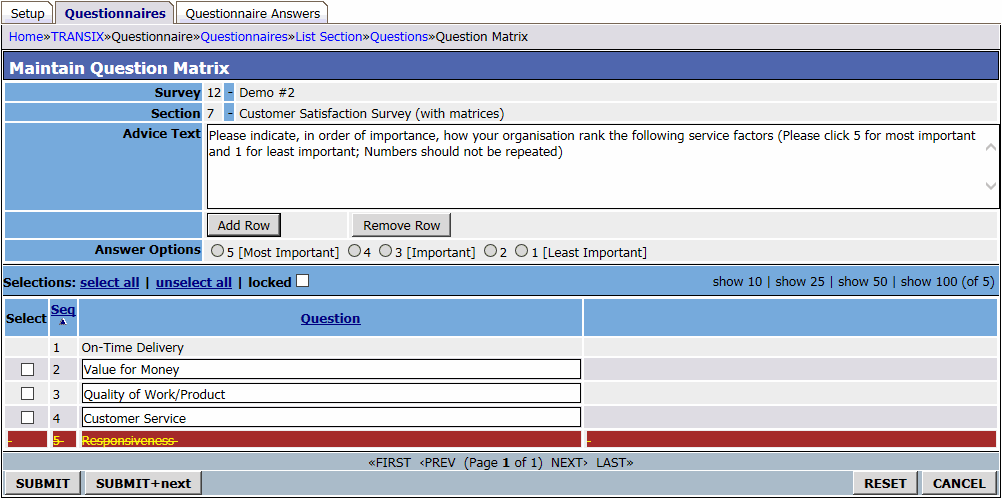
By default in order to perform a database query you call one of the standard methods such as getData(), insertRecord(), updateRecord() or deleteRecord() which includes a large processing overhead due to the multiple steps which are taken. In some cases it would be useful to construct and execute a query without this additional overhead, and this can now be done using the executeQuery() method. Note that this method can be used to execute either a single query or a number of queries.
It is possible to execute a series of pre-defined queries in a single operation by calling the executeQuery() method.
While the fonts defined in the pdf.styles.inc file will be satisfactory for most users, there may be circumstances when a different font is required to deal with unicode characters such as those found in languages such as Chinese, Japanese and Korean. This situation can now be dealt with by adding the $font_replacement array to the pdf.styles.inc such as in the following example:
// fonts will be replaced if the language changes
$font_replacement['ja']    = 'kozgopromedium';
$font_replacement['ko']    = 'hysmyeongjostdmedium';
$font_replacement['th']    = 'freeserif';
$font_replacement['zh-cn'] = 'stsongstdlight';
$font_replacement['zh-hk'] = 'msungstdlight';
$font_replacement['zh-mo'] = 'msungstdlight';
$font_replacement['zh-sg'] = 'msungstdlight';
Note that the format is $font_replacement['<language>'] = '<font>';
The font replacement will be triggered automatically by setting $GLOBALS['party_language'] to the desired language code. This value is initially set to the current user's language, but may be changed to the language of the party who will be receiving the PDF document. Only those styles in the pdf.styles.inc file which have the following attribute added to the style definition will be affected:
$style['hdg']['font'] = array('family' => 'Times',
                              'style' => 'B',
                              'size' => 12,
                              'height' => 7,
                              'draw' => .4,
                              'font_replacement' => 'y',
                              'halign' => 'center');
This will enable you to produce output such as the following:
FAQ106 shows how it is possible to make a single row in a multi-row area non-editable, but in some circumstances it may be a requirement for individual columns in individual rows to be made non-editable. For example, in Figure 50 the entry labelled 'Sick Leave' is valid only on Wednesday 27th and the entry labelled 'Vacation Leave' is valid only on the 28th and 29th.
Figure 50 - individual columns made non-editable
This can be achieved with code in the _cm_post_getData method similar to the following which uses the rdc_fieldspec pseudo-column:
function _cm_post_getData ($rows, &$where)
{
    foreach ($rows AS $rownum => $rowdata) {
        if (condition) {
            $rowdata['rdc_fieldspec']['field_name'] = array('noedit'] => 'y');
        } // if
        $rows[$rownum] = $rowdata;
    } // foreach

    return $rows;

} // _cm_post_getData
You may also use the name rdc_fieldspecs as an alias, and you may also put the code in the _cm_formatData method.
Note that pseudo-columns rdc_fieldspec and rdc_fieldspecs are reserved words.
Note also that you cannot unset a value that already exists in the $fieldspec array. You can only add new values or replace existing ones. Some features are enabled by having a 'keyword' = 'y' entry in the array, but it is the presence of the keyword which enables the feature, not the value 'y'. This means that if the feature is already enabled you cannot disable it by changing the value to 'n'.
By default when a new workflow case is created it will be assigned to a ROLE_ID so that it will appear in the Menu/Home page of all users within that role, and the first user to click on that workitem will have the entire case allocated to them. However, there may be circumstances where instead of assigning a new workitem to a role you wish to assign it immediately to a particular user. This can now be achieved using the following steps:
$this->wf_user_id variable. Note that no other code is necessary in any of the other methods as the task's database record does not have to change.Whenever a new case is created from this workflow the first transition will be fired automatically, but it will do nothing but insert the value of $this->wf_user_id into the user_id field of the wf_workitem record. This will close that workitem record and then activate the next one which, provided that it's trigger is set to "manual", will then appear on the Menu/Home page for the designated user and no-one else.
By default a filepicker task will only show those files which exist in a single directory which is named in $this->picker_subdir. However, it is now possible to change the name of this directory dynamically by adding two new tasks to the navigation bar of the filepicker:
The Choose Directory task is similar to a standard filepicker but with the following differences:
    $this->picker_subdir  = 'default_directory';

    if (!empty($where)) {
        $where_array = where2array($where);
        if (!empty($where_array['picker_subdir'])) {
            $this->picker_subdir  = $where_array['picker_subdir'];
        } // if
    } // if
This will set the current directory to that which is currently being used in the parent task.
    $this->picker_filetypes = 'directory';  // no files, just directories

    // clicking on a name will return it, not open it in the browser
    unset($this->xsl_params['hyperlink_direct']);
This tells the current task to list the subdirectories within the current directory.
The Up Directory task is a standard task in the "Miscellaneous" subsystem which executes script menu/directory_up.php, so all you need do is add this existing task to your filepicker's navigation buttons. This task contains code similar to the following:
<?php
require_once 'include.general.inc';

initSession();      // initialise session

if (!empty($where)) {
    $where_array = where2array($where);
    if (!empty($where_array['picker_subdir'])) {
        // strip last part of this path name
        $return_string = dirname($where_array['picker_subdir']);
    } // if
} // if

// send updated value back to the previous script
$prev_script = getPreviousScript();
$prev_task   = getPreviousTask($prev_script);
$_SESSION['pages'][$prev_script][$prev_task]['return_string'] = $where;
scriptPrevious(null, null, 'choose');
?>
You will also need to make the following changes to your filepicker task:
    $this->picker_subdir  = 'default_directory';

    $this->picker_basedir = $this->picker_subdir;
This identifies the starting directory for this task.
    // change '\' into '/' as '\' will be treated as an escape character
    $this->picker_subdir = str_replace('\\', '/', $this->picker_subdir);

    // return name of current directory
    $where = "picker_subdir = '{$this->picker_subdir}'";

    return $where;
This will supply the child form with the name of the current directory.
    if ($return_action == 'choose') {
        if ($return_from == 'con_content(filepicker)dir'
         OR $return_from == 'directory(up)') {
            // change current directory
            $this->picker_subdir = $return_string;
        } // if
    } // if

    if (strlen($this->picker_subdir) < strlen($this->picker_basedir)) {
        $this->picker_subdir = $this->picker_basedir;
        // "Cannot go up higher than base directory"
        $this->errors[] = getLanguageText('sys0245', $this->picker_basedir);
    } // if

    return;
This will change the value for the current directory to that returned by the child task. Note that it cannot go above the base directory.
When writing code there may be places where you wish to access another object, but if you have already loaded and instantiated that object you want to reuse that instance instead of creating another one. This is exactly the situation for which the Singleton design pattern was created. Unlike most implementations which require each class to have its own getInstance() method, the RADICORE framework has all the relevant code within a separate singleton class. The disadvantage of the first method is that you must load the class before you can access its getInstance() method. My approach has the ability to locate and load the class automatically.
Before you can use this class it must first be loaded, but that is taken care of within the statement require_once 'include.general.inc'; which is at the start of each page controller.
In order to obtain an instance of a class within your code this is all you need:
$object = RDCsingleton::getInstance('<classname>');
The reason that the class name is RDCsingleton and not just plain singleton is quite frustrating. In 2010 I was asked to provide some back-end functionality to a front-end website which was being developed by a separate design agency. I developed all the components using the RADICORE framework, but some of them had to be accessed from their code which was built using a totally different framework. This framework was not written according to accepted conventions, so they had an object interface called singleton which did not have the 'i' prefix which would have made it iSingleton. Due to a bug in PHP it was not possible to have both an interface and a class with the same name, so one of these two names had to change. Even though their use of the 'singleton' name was only referenced once in their entire application whereas my code contained multiple references, they insisted that their code was too precious to change, so muggins here had to bite the bullet and change the entire RADICORE framework.
The value passed as <classname> will be used to load the associated file containing the class definition as well as to instantiate the class with that name. It does this using code similar to the following:
static function &getInstance ($class, $arg1=null, $initialise=true)
// $class = name of class to be instantiated.
// $arg1 = an optional argument to pass to the class constructor (may be a string/array/whatever).
// $initialise = if set to FALSE an existing instance will not have its initialise() method called.
{
    static $instances = array();  // array of instance names

    if (substr_count($class, '/') == 1) {
        // use leading directory name as the subsystem name
        $subsystem = basename(dirname($class));     // only one directory allowed
        $classname = basename($class);              // strip leading directories
        $filename  = "../$subsystem/classes/$classname.class.inc";

    } elseif (substr_count($class, '/') > 1) {
        // use path name 'as-is'
        $classname = basename($class);              // strip leading directories
        $filename  = "$class.class.inc";

    } else {
        $classname = $class;
        $filename  = "classes/$classname.class.inc";
    } // if

    if (!empty($instances[$classname])) {
        // instance exists in array, so use it
        $instance =& $instances[$classname];
    } else {
        require_once $filename;
        $instances[$classname] = new $classname($arg1);
        $instance =& $instances[$classname];
    } // if

    if ($initialise === true) {
        if (method_exists($instance, 'initialise')) {
            // object has an 'initialise' method, so call it
            $null = $instance->initialise($arg1);
        } // if
    } // if

    return $instance;
}
The class file is loaded using the require_once command which searches through the directories specified in the include_path configuration directive. This should contain a list of all the relevant subsystem directories as it will automatically look for class files in the classes subdirectory. Note that both the name of the class, the class file and associated directories SHOULD be in lowercase. I do not like case sensitive software, so the simplest way to avoid mistakes is to define everything in lower case with underscore separators (known as snake case) - none of this camelCase crap for me.
Once a class has been loaded and instantiated it will be stored in the $instances array so that subsequent requests for the same class will be taken from this array.
Note that with the exception of my DML classes I do not use any arguments on the class constructor. For other classes I may use an argument on the separate initialise() method, and this argument may be a string or an array. This allows me to call the initialise() method as many times as I like, whereas the class constructor can only ever be called once.
By default the initialise() method will be called each time an instance is requested even if that instance was obtained from the $instances array. This is because it is my practice, within any object in the business layer, to extract the results of a method call and merge it with the current object's data. This means that if I reference the same object later on I can ignore its current state as it will always start afresh. This behaviour can be overridden by setting the $initialise argument to FALSE.
The argument which is passed to the RDCsingleton::getInstance() method can be in one of the following forms:
'foo' |
Will look for a file named 'classes/foo.class.inc' where the 'classes' directory will be a subdirectory in one of the entries on the include_path list. This is the default behaviour. |
'foo/bar' |
Here the argument contains a single '/' character. The code will look for a file named 'foo/classes/bar.class.inc' and will cause the directory 'foo' to be added to the include_path list if it is not already there. This option was added in version 1.90.0 |
'foo/bar/snafu' |
Here the argument contains more than one '/' character. The code will look for a file named 'foo/bar/snafu.class.inc' without inserting a 'classes' directory. This option was added in version 2.04.2 |
Every DBMS has a mechanism for providing a technical or surrogate key from an automatic sequence, such as the AUTO_INCREMENT attribute in MySQL. Other databases, such as PostgreSQL, Oracle and SQL Server, have different mechanisms. With the exception of MySQL when using either the MyISAM or BDB storage engines, it is not possible to use an automatic sequence within a compound key. For example, in an order processing system I might have three types of order - Sales, Purchase and Transfer - and each order type requires its own sequence. The table schema looks something like the following:
CREATE TABLE `order_header` (
  `order_type` CHAR(1) NOT NULL,
  `order_id` INT(11) UNSIGNED NOT NULL,
  .....
  PRIMARY KEY (`order_type`, `order_id`)
)
If I set the order_id column to be AUTO_INCREMENT then each order_type would share the same sequence. The only solution to this is to assign the sequence numbers manually using code similar to the following:
function _cm_getInitialData ($fieldarray)
// Perform custom processing prior to insertRecord().
// $fieldarray contains data from the initial $where clause.
{
    // set order_id to next available number
    if (!empty($fieldarray['order_type'])) {
        $where = "order_type='{$fieldarray['order_type']}'";
        $query = "SELECT MAX(order_id) FROM $this->tablename WHERE $where";
        $count = $this->getCount($query);
        $fieldarray['order_id'] = $count + 1;
        $this->retry_on_duplicate_key = 'order_id';
    } // if

    return $fieldarray;

} // _cm_getInitialData
The line $this->retry_on_duplicate_key = 'order_id'; tells the DML object that if the current value should produce a duplicate key error then it should increment the specified column's value and try the INSERT again. This should get around the issue when the code above is executed at the same time by different processes, thus providing several processes with the same number. The INSERT statement will succeed for the first process, but will fail for the others.
This requires two simple steps:
$style['rule']['font'] = array('family' => 'Times',     // Courier, Helvetica, Times
                               'style' => '',           // blank=Regular, B=Bold, I=Italic, U=Underline
                               'size' => 1.75,          // size in points
                               'height' => 0.75,        // line height in units
                               'draw' => 0);            // width of drawn lines

$style['rule']['fillcolour'] = array(113,113,113);   // colour for background
$style['rule']['textcolour'] = array(0,0,0);         // colour for foreground
$style['rule']['drawcolour'] = array(0,0,0);         // colour for line drawing
Note here that the font is actually irrelevant. The important factors are 'height' and 'fillcolour'.
$structure['title'][] = array('text' => '',
                              'style' => 'rule',
                              'width' => '100%',
                              'y_relative' => 2.5,
                              'newline' => 'y');
This will output a blank line (no text) across the full width of the page using 'fillcolour' as the background colour and with a height of 'height'.
When a workflow case is created the workitem(s) which come out of the START place are initially assigned to a ROLE, not a particular USER. This role can be specified on the transition record, but if blank will default to the primary role of the user who started the case. These workitem(s) will then appear as hyperlinks on the Home Page for all users who share that role. The first user to click on one of these hyperlinks will then have that workitem assigned to himself/herself, and by default all remaining workitems in that case will be assigned to that user.
However, during the execution of a transition/workitem it is possible to assign the subsequent workitems to a different user by loading the relevant user's Id into $this->wf_user_id.
This is possible as of version 2.01.0 with the file includes/custom_javascript.class.inc. This class contains the following methods:
This will allow you to specify javascript for each form. The $formid argument will allow you to restrict this to specific forms.
This will allow you to specify javascript for each field in the current form. The $fieldname, $fieldvalue and $spec arguments will allow you to restrict this to specific fields.
For more details please refer to Radicore for PHP - Inserting optional JavaScript.
By far the easiest way to filter records when reading from the database is to construct an appropriate WHERE clause for use in an SQL "select" query. This will provide the following information which will be used in the Navigation Bar and the Pagination Area:
However, in some circumstances it may be necessary to filter records AFTER they have been read from the database, possibly because the filtering criteria are too complex to put into the SQL query. This post-query filtering can now be achieved by using code similar to the following in the _cm_post_getData() method:
function _cm_post_getData ($rows, &$where)
{
    foreach ($rows as $rownum => $rowdata) {
    if ( ..condition..) {
       unset($rows[$rownum]);
    } // foreach

    return $rows;

} // _cm_post_getData
The framework will detect when rows have been removed by noticing that the row count coming out of that method is less that the row count going in, and will take the following steps:
This means that where the SQL query returns 100 rows at 10 rows per page, but 5 of the rows are removed from each page, the row count in the Navigation Bar will still show 100 (not 50), the Pagination Area will still show 10 pages, but some page numbers will be skipped. In this example the first page will be #2, and all odd numbers will be skipped.
Responsive Web Design (RWD) is an approach to web design aimed at allowing desktop web pages to be viewed in response to the size of the screen or web browser with which it is being viewed. This enables the same website to be viewed on a desktop, tablet or smartphone without the page being shrunk to such a point that it is unreadable.
The RADICORE framework does not support this concept 'out of the box' for the simple reason that it was designed to aid the building of business-facing administrative web applications and not public-facing web sites. This means that it designed to be used by an organisation's members of staff who work in their offices, or perhaps from home, using full sized screens. The idea of performing administrative tasks on a mobile device with a miniature screen does not appear to be a practical proposition as too many of the screens contain vast amounts of data which would be awkward to view on anything other than a full sized screen.
Should a different user interface be required then the fact that the framework is built using the 3-Tier Architecture should indicate that a new Presentation layer could be built to your own specifications which could reuse the existing Business and Data Access layers.
UPDATE: The ability to change each classic web page into a responsive web page is now available in the commercial version which uses a set of drop-in files which use the BOOTSTRAP library. This enables a responsive GUI to be turned on or off for individual pages as well as individual users.
Simple. Foreign keys and foreign key constraints are different animals.
| Foreign Keys | These are used in SELECT queries where you use a JOIN to link one table with another. The columns that are used in the JOIN must be identified explicitly as they are never taken from any foreign key constraint which is defined within the database schema. |
| Foreign Key Constraints | These are used in INSERT, UPDATE or DELETE queries and will either allow or disallow the operation, or propagate it through all related records on the child/many table. A constraint is never used in a SELECT query. |
Please also refer to:
Yes you can, by using the label-only option described in the Screen Structure file. An example of how this looks is shown as the orphan label in Figure 51:
Figure 51 - example of an orphan label

You may have more than one of these labels on a single line, and you may align each label differently.
While other users of the RADICORE framework may only develop their applications for a single DBMS system which will never change during the lifetime of that application, the RADICORE framework has to provide support for several popular database engines and generate valid queries regardless of which DBMS is actually being used. Although in theory each DBMS follows the same SQL standard, in practice they all contain their own unique deviations from the standard, which means that an SQL query which works on one DBMS may fail on another. By default all the queries which are generated by the framework use MySQL syntax, and where there are differences in another DBMS the syntax conversion is handled by specific code within the relevant dml.???.class.inc file where '???' is the mnemonic for that DBMS. MySQL is the preferred syntax simply because all my original development was done on a MySQL database, and I only offered support for other database engines when their vendors provided free community editions for the Windows operating system.
Unlike most other developers who work on an application which is used only by a single customer, I have developed an ERP package which can be used by any number of customers, and each customer is able to deploy this package on a DBMS of their choice. While the queries for the standard CRUD operations can be handled silently by the framework, there may be occasions where some specialist queries are required in order to deal with non-standard circumstances, such as the one provided as an example in this->executeQuery(). Where the queries need to work on more than one DBMS, and the syntax is different for each DBMS, it will be necessary to identify the current DBMS and then use this to construct a valid query. This can be done by using the $dbengine variable which is provided by the findDBConfig() function, as shown in the following example:
    $date_from            = $where_array['date_from'];
    $date_to              = $where_array['date_to'];
    $sold_not_sold        = $where_array['sold_not_sold'];

    list($dbname, $dbprefix, $dbengine) = findDBConfig($this->dbname);

    $productDB = findDBName('product');

    $product_id_size = $this->fieldspec['product_id']['size'];

    // step 1: create a copy of the PRODUCT table
    $query[] = "DROP TEMPORARY TABLE IF EXISTS temp_product;";
    if ($dbengine == 'sqlsrv') {
        $query[] = "CREATE TEMPORARY TABLE IF NOT EXISTS temp_product (product_id NVARCHAR($product_id_size) PRIMARY KEY,
                                                                       product_name NVARCHAR(80) );";
    } else {
        $query[] = "CREATE TEMPORARY TABLE IF NOT EXISTS temp_product (product_id VARCHAR($product_id_size),
                                                                       product_name VARCHAR(80),
                                                                       PRIMARY KEY (product_id) );";
    } // if
    $query[] = "INSERT INTO temp_product (product_id, product_name)"
                                ." SELECT product_id, product_name"
                                ." FROM {$productDB}product"
                                ." WHERE date_intro <= '{$date_to} 23:59:59' AND end_date_sales >= '{$date_from} 00:00:00'"
                                  ." AND NOT EXISTS(SELECT 1 FROM {$productDB}prod_cat_class
                                                    WHERE product_id=product.product_id
                                                      AND prod_cat_id LIKE 'NOTFORSALE%'
                                                      AND start_date<='{$date_to} 23:59:59' AND end_date>='{$date_to} 00:00:00');";

    // step 2: create a second table containing items which have been ordered during this period
    $query[] = "DROP TEMPORARY TABLE IF EXISTS temp_ordered;";
    if ($dbengine == 'sqlsrv') {
        $query[] = "CREATE TEMPORARY TABLE temp_ordered (product_id NVARCHAR($product_id_size) PRIMARY KEY );";
    } else {
        $query[] = "CREATE TEMPORARY TABLE IF NOT EXISTS temp_ordered (product_id VARCHAR($product_id_size),
                                                                       PRIMARY KEY (product_id) );";
    } // if
    $query[] = "INSERT INTO temp_ordered (product_id)"
                   ." SELECT product_id FROM order_item"
                   ." WHERE order_item.order_type='S'"
                     ." AND order_item.created_date>='{$date_from}' AND order_item.created_date<='{$date_to}'"
                     ." AND order_item.order_item_status_type_id NOT IN ('PEND','CNCL','CNRG','HOLD','SAM1','SAM2','SAM3','SAM4')"
                     ." GROUP BY product_id;";

    // step 3: remove from TEMP_PRODUCT anything which exists in TEMP_ORDERED
    $query[] = "DELETE FROM temp_product WHERE product_id IN (SELECT product_id FROM temp_ordered);";

    $result = $this->executeQuery($query);

    return $result;
Just add the path to the CSS file to the $this->css_files array in the current object.
This is useful when you want to make use of a feature which only became available in a later release of the DBMS, such as Common Table Expressions which did not exist in MySQL until version 8. The code to obtain the necessary values is as follows:
$db_version = $this->findDBVersion();
This method is described in findDBVersion.
See FAQ180 if you want a non-recursive query with multiple expressions.
When traversing a hierarchy of records such as for a TREE 1 or TREE 2 pattern the most efficient method is to use a Common Table Expression (CTE) which can retrieve the entire hierarchy in a single query. However, CTEs were not available in MySQL until version 8 which was released in May 2018, so for earlier versions I had to perform the extract using a separate query for each level in the hierarchy. For small hierarchies this is manageable, but for very large hierarchies it is not. As of version 2.10.0 of the RADICORE framework I have included code which allows the use of CTEs in all the database drivers - MySQL, Postgresql, Oracle and SQL Server - and have provided a working example in the XAMPLE subsystem. Select the 'Tree Type' menu option, select a type, then press the 'Tree Structure' navigation button. The code itself can be found in script xample/classes/x_tree_node_jnr.class.inc.
The CTE requires a special query structure which is as follows:
WITH <cte_name> (<cte_select>)
-- end of CTE declaration --
AS (
   <cte_anchor>
   -- end of CTE anchor --
   UNION ALL
   <cte_recursive>
   -- end of CTE recursion --
)
-- end of CTE --
<outer_query>
The following properties have been added to the abstract table class:
$this->sql_CTE_name - a string which identifies the single CTE name$this->sql_CTE_select - an optional string which identifies the column names used in the query$this->sql_CTE_anchor - the first part of the query (run only once)$this->sql_CTE_recursive - the recursive part of the query (run multiple times)Note that the contents of $this->sql_CTE_select can be appended to $this->sql_CTE_name in which case the enclosing parentheses must be defined.
The <outer_query> does not require a new property as it makes use of the existing properties.
The script xample/classes/x_tree_node_jnr.class.inc provides code (shown below) which shows how the CTE can be constructed for each of the supported DBMS engines. Note that there are small variations in the CTE syntax for each DBMS. So much for following a single SQL standard!
Here is the PHP code:
$this->sql_CTE_name   = 'RECURSIVE cte';
$this->sql_CTE_select = 'node_depth, node_id, node_desc, node_id_snr, sort_seq';

$this->sql_CTE_anchor = "SELECT 1 AS node_depth, x_tree_node.node_id, x_tree_node.node_desc, x_tree_node.node_id_snr
, CAST(LPAD(ROW_NUMBER() OVER (ORDER BY x_tree_node.node_id_snr ASC), 4, '0') AS CHAR(4000)) AS sort_seq
FROM x_tree_node
LEFT JOIN x_tree_level ON (x_tree_level.tree_type_id=x_tree_node.tree_type_id AND x_tree_level.tree_level_id=x_tree_node.tree_level_id)
WHERE {$where}";

$expanded_list = "'0'";  // do not expand any nodes
if (is_array($expanded) AND !empty($expanded)) {
    $container_list = array_keys($expanded);
    $expanded_list = "'".implode("','", $container_list) ."'";  // expand this node
} elseif ($expanded == 'ALL') {
    $expanded_list = null;  // expand all nodes
} // if
$collapsed_list = '';
if (is_array($collapsed) AND !empty($collapsed)) {
    $container_list = array_keys($collapsed);
    $collapsed_list = "'".implode("','", $container_list) ."'";  // collapse this node
} // if

$this->sql_CTE_recursive = "SELECT node_depth+1, x_tree_node.node_id, x_tree_node.node_desc, x_tree_node.node_id_snr
, CONCAT(cte.sort_seq, '/',  LPAD(x_tree_node.node_id, 4, '0')) AS sort_seq
FROM x_tree_node
INNER JOIN cte ON (x_tree_node.node_id_snr = cte.node_id)";

$recursive_where_array = array();
if (!empty($expanded_list)) {
    $recursive_where_array[] = "x_tree_node.node_id_snr IN ($expanded_list)";
} // if
if (!empty($collapsed_list)) {
    $recursive_where_array[] = "x_tree_node.node_id_snr NOT IN ($collapsed_list)";
} // if
if (!empty($recursive_where_array)) {
    $recursive_where = array2where($recursive_where_array);
    $this->sql_CTE_recursive .= "\nWHERE $recursive_where";
} // if

$count_expression = "SELECT count(node_id) FROM x_tree_node AS child WHERE child.node_id_snr=cte.node_id";

$this->sql_select = "cte.*"
                   ."\n, ($count_expression) AS child_count";

if (!empty($expanded_list) OR !empty($collapsed_list)) {
    // some nodes are expanded while others are not
    $condition = '';
    if (!empty($collapsed_list)) {
        $condition .= "WHEN cte.node_id IN ($collapsed_list) THEN 'N' ";
    } // if
    if (!empty($expanded_list)) {
        $condition .= "WHEN cte.node_id IN ($expanded_list) THEN 'Y' ";
    } else {
        $condition .= "WHEN ($count_expression) > 0 THEN 'Y'";
    } // if
    $this->sql_select .= "\n, CASE $condition ELSE 'N' END AS expanded";
} else {
    // every node with children is automatically expanded
    $this->sql_select .= "\n, CASE WHEN ($count_expression) > 0 THEN 'Y' ELSE 'N' END AS expanded";
} // if

$this->sql_from    = "cte";
$this->sql_orderby = 'sort_seq';
$this->sql_groupby = '';
$this->sql_having  = '';

$this->CTE_in_use = true;  // see fetchRowChild() for details

$this = null;

return $where;
Note that this code does not automatically expand every node in the tree. It starts by displaying only the node(s) at level #1. If a node has children a  button will be displayed which, when pressed, will display the children of that node. The button will then change to
  which will hide the children of that node.
Here is the SQL query which that code generates:
WITH RECURSIVE cte (node_depth, node_id, node_desc, node_id_snr, sort_seq) AS ( SELECT 1 AS node_depth, x_tree_node.node_id, x_tree_node.node_desc, x_tree_node.node_id_snr , CAST(LPAD(ROW_NUMBER() OVER (ORDER BY x_tree_node.node_id_snr ASC), 4, '0') AS CHAR(4000)) AS sort_seq FROM x_tree_node LEFT JOIN x_tree_level ON (x_tree_level.tree_type_id=x_tree_node.tree_type_id AND x_tree_level.tree_level_id=x_tree_node.tree_level_id) WHERE x_tree_node.tree_type_id= 'ORG' AND tree_level_seq= '1' AND x_tree_node.node_id_snr IS NULL UNION ALL SELECT node_depth+1, x_tree_node.node_id, x_tree_node.node_desc, x_tree_node.node_id_snr , CONCAT(cte.sort_seq, '/', LPAD(x_tree_node.node_id, 4, '0')) AS sort_seq FROM x_tree_node INNER JOIN cte ON (x_tree_node.node_id_snr = cte.node_id) ) SELECT cte.* , (SELECT count(node_id) FROM x_tree_node AS child WHERE child.node_id_snr=cte.node_id) AS child_count , CASE WHEN (SELECT count(node_id) FROM x_tree_node AS child WHERE child.node_id_snr=cte.node_id) > 0 THEN 'Y' ELSE 'N' END AS expanded FROM cte ORDER BY sort_seq asc
By default when a popup button is pressed in a screen it is used to identify the primary key of a single row in a foreign/parent table which can then be used as a foreign key in the current row of the child table. It is simply not possible for a foreign key to link to multiple rows in the parent table. However, in the ADD 3 pattern it is possible to select multiple rows in the popup form as this task does not have a visible screen. It can therefore add multiple rows to the database, one for each entry selected in the popup, before returning control to the previous screen, which is usually a MULTI 2 pattern.
In an ADD 7 task which allows multiple child rows, and each row contains a popup button, instead of adding new rows one at a time in order to use the popup button on each row it would be faster to call the popup task from a single row, make multiple selections, then have each of those selections appear in their own rows which are automatically added to the screen. This is now possible by using the $rows_to_be_appended variable. This is always empty by default, but can be populated in the _cm_popupReturn() method using code similar to the following:
if ($return_from == 'whatever') { if (is_long(key($select_array))) { // multiple rows selected, so start at current row then add more as necessary foreach ($select_array as $rownum => $rowdata) { if ($rownum == 0) { $fieldarray['field1'] = $rowdata['field1']; $fieldarray['field2'] = $rowdata['field2']; } else { $append = $fieldarray; $append['field1'] = $rowdata['field1']; $append['field2'] = $rowdata['field2']; $append = $this->getForeignData($append); $this->rows_to_be_appended[] = $append; } // if } // foreach $select_array = null; } // if } // if
If $select_array were to contain just a single selection then it would be an associative array, and that selection would be added to $fieldarray which represents the current row in the screen. If multiple selections are made then $select_array would be an indexed array containing a series of associative arrays indexed by row number. The first selection is added to the current row while additional selections are added to $this->to_be_appended which will be processed by the framework code later. This processing will include calling $this->getExtraData() on each new row.
In some cases a PDF List View may have a large number of short columns where the length of the column labels is wider than the column values. In such cases it may be better to display the labels vertically instead of horizontally. This can be achieved in one of two ways, or a combination of both:
Note that this method will not actually rotate the label text through 90 degrees so that you have to tilt your head to read them. The characters will be displayed one under the other instead of one next to the other, so instead of
label
you will see
l
a
b
e
l.
This question is similar to Is it really possible to separate business logic from data access logic? which means that the answer is also similar. Every database application contains a mixture of presentation logic, business logic and data access logic which, while they could be combined into a single monolithic component, would be more difficult to read and maintain. A better solution would be to have a separate component which deals with only one of those areas of logic, which is precisely the purpose of the 3-Tier Architecture which has separate components for each area of logic as follows:
You should note that I have merged the 3-Tier Architecture with the Model-View-Controller (MVC) design pattern by splitting the Presentation Layer into two smaller components, a Controller and a View. This also means that I have taken all database access out of the Model and placed it into a separate Data Access Object. This means that each Model (business layer) component contains nothing but business rules and the way that the data is presented to the user is handled in a totally separate View object. The only data which comes out of a Model is raw application data in the form of a PHP array which is then given to a View object to transform it into the desired type of output, which is usually HTML, but could be CSV or PDF. There is absolutely no code, such as an echo or print statement, in any Model which writes to the output stream.
Note that I do not have a separate version of the View object for each table in the database as I have been able to create a single View object for each of the HTML, CSV and PDF formats which can handle any data from any database table. In the case of HTML output I have a single component which takes the array of raw data out of the Model, inserts it into to an XML document, then performs a transformation using a set of reusable XSL stylesheets. My reasons for using XML and XSL to generate all HTML output is explained in Why don't you use another templating system instead of XSL?
SQL (Structured Query Language) is a powerful language for manipulating data inside a relational database. While INSERTS, UPDATES and DELETES are quite straightforward in that they mainly operate on one table at a time, SELECT queries, on the other hand, can retrieve and combine data from multiple tables into a single result set. As well as retrieving values which exist in table columns they can perform functions such as CONCAT() which will combine several strings into a single column or aggregate functions such as AVG(), COUNT(), MIN(), MAX() and SUM() which will accumulate a single result by accumulating values from multiple rows.
As well as simple queries you can have queries within queries, which are known as subqueries. As well as retrieving columns from a physical table it is also possible to retrieve columns from a derived table. These will be described below. Another form of complicated query is the Common Table Expression which is described separately.
The following examples use tables in the MENU database.
Example 1: a simple query.
SELECT subsys_id, subsys_name, subsys_dir, task_prefix FROM mnu_subsystem
Example 2: a simple query with an aggregate.
SELECT mnu_subsystem.subsys_id, subsys_name, subsys_dir, task_prefix , count(task_id) AS task_count FROM mnu_subsystem LEFT JOIN mnu_task ON (mnu_task.subsys_id=mnu_subsystem.subsys_id) GROUP BY task_id HAVING task_count > 50 WHERE ... ORDER BY task_count, subsys_id
The primary key subsys_id of table mnu_subsystem is also a foreign key on table mnu_task, and this query will include the count of associated rows in the mnu_task table which is identified in a JOIN. Note that I have to qualify the column name subsys_id in the SELECT string otherwise I would get an error telling me that "Column xxx in field list is ambiguous" as that column exists in both tables in that query.
The GROUP BY string will return a separate row for each different task_id. Without it the result would contain only a single row with a total count for all entries on the mnu_task table instead of a different count for each task_id. Note that MySQL will allow you to specify only a single column from those which are identified in the SELECT list whereas other databases have failed to implement the SQL 1999 standard and still operate in ONLY FULL GROUP BY mode.
The WHERE clause is entirely optional, but note that you wish to refer to an aggregated column you must put it in the HAVING clause instead of the WHERE clause. If you forget to do this the framework will do it for you. If it detects a column name in the WHERE clause which is the alias for an expression in the SELECT list it will automatically move that column reference from the WHERE clause to the HAVING clause. This is because the WHERE clause restricts the result set before returning rows and HAVING restricts the result set after bringing all the rows. You cannot restrict the selection on an aggregated value until after the rows which need to be aggregated have been selected. Note that MySQL will allow you to reference the aggregated column by its alias name task_count while other databases will insist that you repeat the aggregate expression.
The ORDER BY clause can reference any column whether it be an aggregate or not. Note that MySQL will allow you to reference the aggregated column by its alias name task_count while other databases will insist that you repeat the aggregate expression.
Example 3: moving the aggregate to a subquery.
SELECT subsys_id, subsys_name, subsys_dir, task_prefix , (SELECT count(task_id) FROM mnu_task WHERE mnu_task.subsys_id=mnu_subsystem.subsys_id) AS task_count FROM mnu_subsystem -- LEFT JOIN mnu_task ON (mnu_task.subsys_id=mnu_subsystem.subsys_id) -- GROUP BY task_id HAVING task_count > 50 WHERE ... ORDER BY task_count, subsys_id
This example contains two queries, an outer query and an inner (nested) subquery. In this example it is known as a correlated or synchronised subquery as it contains a reference to a table contained in the outer query. Note the differences with Example 2:
The rules for HAVING and ORDER BY are the same as in Example 2.
Example 4: using a derived table.
SELECT xyz.* FROM ( SELECT subsys_id, subsys_name, subsys_dir, task_prefix , (SELECT count(task_id) FROM mnu_task WHERE mnu_task.subsys_id=mnu_subsystem.subsys_id) AS task_count FROM mnu_subsystem ) AS xyz WHERE task_count > 50 ORDER BY task_count, subsys_id
A derived table is an expression that generates a table within the scope of a query FROM clause. This comes in handy when the use of column aliases is not possible because another clause is processed by the SQL translator before the alias name is known. Please note the following:
In order to make it easy to use derived tables some extra variables have been added to the framework as follows:
$this->sql_derived_table; // the alias name for the expression $this->sql_derived_select; // the SELECT list for the expression $this->sql_derived_from; // the FROM clause for the expression
Here is the code from mnu_subsystem.class.inc which uses these variables:
if (preg_match('/^(LIST1)$/i', $pattern_id)) { $this->sql_derived_table = 'xyz'; $tablename =& $this->sql_derived_table; $this->sql_select = "$tablename.*"; $this->sql_having = null; $this->sql_groupby = null; // construct nested subquery for a derived table $this->sql_derived_select = 'subsys_id, subsys_name, subsys_dir, task_prefix'; $this->sql_derived_select .= "\n, (SELECT count(task_id) FROM mnu_task WHERE mnu_task.subsys_id=mnu_subsystem.subsys_id) AS task_count"; $this->sql_derived_from = $this->tablename; $this->sql_from = $tablename; $this->sql_from = $this->_sqlForeignJoin($this->sql_select, $this->sql_from, $this->parent_relations); } // if
Here is another example of a more complicated query with a derived table:
SELECT xyz.*, mnu_user.user_name, mnu_user.user_password, mnu_user.rdcaccount_id, mnu_user.pswd_change_datetime, mnu_user.pswd_count
, mnu_user.force_pswd_chg, mnu_user.in_use, mnu_user.is_disabled, mnu_user.logon_datetime, mnu_user.language_id
, mnu_user.start_date, mnu_user.end_date, mnu_user.ip_address, mnu_user.email_addr, mnu_user.external_id
, mnu_user.is_external_auth_off, mnu_user.party_id, mnu_user.user_timezone, mnu_user.allow_responsive_gui
, mnu_user.created_date, mnu_user.created_user, mnu_user.revised_date, mnu_user.revised_user, mnu_account.account_name
FROM (
SELECT user_id
, (SELECT GROUP_CONCAT(role_name ORDER BY sort_seq ASC, mnu_user_role.role_id ASC SEPARATOR ', ')
FROM mnu_user_role
LEFT JOIN mnu_role ON (mnu_role.role_id=mnu_user_role.role_id)
WHERE user_id=mnu_user.user_id
AND start_date<='2021-05-25 23:59:59'
AND end_date>='2021-05-25 00:00:00'
) AS role_list
, (SELECT role_name
FROM mnu_user_role
LEFT JOIN mnu_role ON (mnu_role.role_id=mnu_user_role.role_id)
WHERE user_id=mnu_user.user_id
AND sort_seq=(SELECT MIN(sort_seq)
FROM mnu_user_role
WHERE user_id=mnu_user.user_id
AND start_date<='2021-05-25 23:59:59'
AND end_date>='2021-05-25 00:00:00'
)
) AS primary_role
FROM mnu_user
) AS xyz
LEFT JOIN mnu_user ON (mnu_user.user_id=xyz.user_id)
LEFT JOIN mnu_account ON (mnu_account.rdcaccount_id=mnu_user.rdcaccount_id)
ORDER BY user_id asc
This was produced using the following code in mnu_user.class.inc:
if (empty($this->sql_from)) { $this->sql_derived_table = 'xyz'; $tablename =& $this->sql_derived_table; $this->sql_select = "$tablename.*, mnu_user.*"; $this->sql_select .= ', mnu_account.account_name'; $this->drop_from_sql_select[] = 'mnu_user.user_id'; // this is contained in the inner query $this->sql_having = null; $this->sql_groupby = null; // construct nested subquery for a derived table $this->sql_derived_select = 'user_id'; $this->sql_derived_select .= "\n, (SELECT GROUP_CONCAT(role_name ORDER BY sort_seq ASC, mnu_user_role.role_id ASC SEPARATOR ', ') FROM mnu_user_role LEFT JOIN mnu_role ON (mnu_role.role_id=mnu_user_role.role_id) WHERE user_id=mnu_user.user_id AND start_date<='$today 23:59:59' AND end_date>='$today 00:00:00' ) AS role_list"; $this->sql_derived_select .= "\n, (SELECT role_name FROM mnu_user_role LEFT JOIN mnu_role ON (mnu_role.role_id=mnu_user_role.role_id) WHERE user_id=mnu_user.user_id AND sort_seq=(SELECT MIN(sort_seq) FROM mnu_user_role WHERE user_id=mnu_user.user_id AND start_date<='$today 23:59:59' AND end_date>='$today 00:00:00' ) ) AS primary_role"; $this->sql_derived_from = $this->tablename; $this->sql_from = $tablename; $this->sql_from .= "\nLEFT JOIN mnu_user ON (mnu_user.user_id=$tablename.user_id)"; $this->sql_from = $this->_sqlForeignJoin($this->sql_select, $this->sql_from, $this->parent_relations); } // if
Here the derived table xyz will return three columns called user_id, role_list and primary_role. The outer query will return every column from table xyz plus every column from table mnu_user. As this would automatically include a duplicate of user_id I put an entry into the $this->drop_from_sql_select array to exclude it when the string menu_user.* is expanded into a full list of columns.
Unlike the example shown in FAQ175 which uses a recursive query to traverse a hierarchy this version can use multiple CTEs where the results of one CTE can be carried forward into another CTE.
WITH <cte_name[0]> -- end of CTE declaration -- AS ( <cte_anchor[0]> -- end of CTE anchor -- ), <cte_name[1]> AS ( <cte_anchor[1]> -- end of CTE anchor -- ), <cte_name[2]> AS ( <cte_anchor[2]> -- end of CTE anchor -- ..... -- end of CTE anchor -- ) -- end of CTE -- <outer_query>
The following properties have been added to the abstract table class:
$this->sql_CTE_name - an array of CTE names with an optional list of column names$this->sql_CTE_select - an optional string which will be appended to the first CTE name$this->sql_CTE_anchor - an array of queries for each CTE name$this->sql_CTE_recursive - will be ignoredNote here that both $this->sql_CTE_name and $this->sql_CTE_anchor are arrays, not strings, in order to allow multiple sets of CTE names and their associated queries.
Please refer to Can I change the style of individual entries in a dropdown?
It is sometimes necessary to change the behaviour of certain parts of the framework in order to deal with particular circumstances. Initially I achieved this by setting a class variable, such as $this->skip_validation, but this has the disadvantage of requiring to be reset after it has been processed otherwise it remains in operation during the lifetime of that object. This is no good when I am processing several rows in a single operation and I want the default behaviour to be changed for specific rows only.
Instead of having a separate class variable for each column of data, which would limit me to only a single row within each object, I chose to use the $fieldarray variable which can hold the data for any number of rows. This may be an indexed array of one or more rows where the index number is the row number, and each row is an associative array of fieldname=fieldvalue pairs. The data for any row may contain fieldnames which do not actually exist as columns in that table, but this will not cause an error because when building the SQL queries for INSERT or UPDATE operations only those valid columns, which exist in the $fieldspec array, will be included in the query - everything else will be filtered out. This means that you can add an entry <control_flag>=TRUE to any row in $fieldarray and it will operate on that row only.
In order to alter the processing of a READ operation, such as getData or getData_raw, where $fieldarray has not yet been populated with data, you can insert the control flag into the $where string.
These control flags are listed in What reserved words exist within the RADICORE framework? with the prefix "rdc".