This is an update to an earlier article called Generating dynamic web pages using XSL and XML.
Some people complain than XML and XSL are too verbose, that it takes too may keystrokes to achieve the simplest of things. To me this is irrelevant - it is much more important that software be readable and understandable to other humans than be quick to type. I would rather take a minute to type something that can be understood in a second than take a second to type something that takes a minute to understand.
Another way to overcome the verbosity of any language, not just XSL, is not to find yourself writing the same code over and over again. Instead you should find a way to put that code into a reusable library so that when you want to run that code you call a library routine instead of writing the same piece of code all over again in long hand. XSL has the ability to create reusable routines in the form of XSL templates which can be called from any number of different places. There is also the ability to maintain this template code in a single location and to make the contents of the files in this location available in any XSL stylesheet by means of the <xsl:include> statement. Having identified that XSL contains the tools to build and execute reusable code the only remaining difficulty is to decide what code can be put into a reusable template. The purpose of this article is to explain the steps that I have taken which make my library of XSL stylesheets and templates much more reusable than most.
When constructing an XSL stylesheet it is usual to start with minimum reusability and to work up in stages to maximum reusability, such as in the following:
  <tr>
    <td class="label">User Name</td>
    <td>
      <input type="text" name="user_name" size="//person/user_name/@size">
        <xsl:attribute name="value">
          <xsl:value-of select="//person/user_name"/>
        </xsl:attribute>
      </input>
    </td>
  </tr>
Notice here that the field's size is taken from the
size attribute in the XML file as shown below:
<?xml version="1.0" encoding="UTF-8"?>
<root>
  <person>
    <user_id size="8" pkey="y">PA</user_id>
    <user_name size="40" required="y">Fred Bloggs</user_name>
    <user_type size="4" required="y" control="dropdown" optionlist="user_type">A1</user_type>
    .....
  </person>
  <person>
</root>
These means that such attributes do not need to be hard-coded in the XSL stylesheet. It is good practice to have data passed in as XML elements, but to have meta-data (which is "data about data") passed in as XML attributes. An element can have only one value but any number of attributes.
  <tr>
    <td class="label">User Name</td>
    <td>
      <xsl:call-template name="textbox">
        <xsl:with-param name="field" select="//person/user_name"/>
      </xsl:call-template>
    </td>
  </tr>
  <tr>
    <td class="label">User Name</td>
    <td>
      <xsl:call-template name="datafield">
        <xsl:with-param name="field" select="//person/user_name"/>
      </xsl:call-template>
    </td>
  </tr>
This "datafield" template will examine the
control attribute and then call the relevant sub-template for that HTML control, as in:
<xsl:template name="datafield">
  <xsl:param name="field"/>

    <xsl:choose>

      <xsl:when test="$field/@control='dropdown'">
        <xsl:call-template name="dropdown">
          <xsl:with-param name="field" select="$field"/>
        </xsl:call-template>
      </xsl:when>

      <xsl:when test="$field/@control='radiogroup'">
        <xsl:call-template name="radiogroup">
          <xsl:with-param name="field" select="$field"/>
        </xsl:call-template>
      </xsl:when>

      <xsl:otherwise> <!-- this is the default control type -->
        <xsl:call-template name="textbox">
          <xsl:with-param name="field" select="$field"/>
        </xsl:call-template>
      </xsl:otherwise>

    </xsl:choose>

</xsl:template>
  <structure>
    <main id="person">
      <row>
        <cell label="Id"/>
        <cell field="user_id"/>
      </row>
      <row>
        <cell label="Name"/>
        <cell field="user_name"/>
      </row>
  </structure>
The main element is an internal stylesheet (zone) name while the id attribute identifies the database table name within the XML file. All subordinate row and cell elements belong to this table. The following XSL statement will extract all the cell elements which have a label attribute:
<xsl:for-each select="//structure/main/row/cell[@label]">
If a stylesheet contains more than one zone then the zone name can be passed in as a parameter and processed with the following statement:
<xsl:for-each select="//structure/*[name()=$zone]/row/cell[@label]">
Similarly all the field names and their corresponding values can be extracted with the following statements:
  <xsl:for-each select="//structure/*[name()=$zone]/row/cell[@field]">

    <xsl:variable name="fieldname"  select="@field" />
    <xsl:variable name="fieldvalue" select="//*[name()=$table]/*[name()=$fieldname]"/>

  </xsl:for-each>
I reached as far as step (3) in 2003 as documented in Generating dynamic web pages using XSL and XML. Since that time I have been able to implement step (4) which means that instead of having a customised XSL stylesheet for each "detail" screen I can now use a generic XSL stylesheet instead. This means that the time I need to spend in building individual screens is far less than it used to be, and this boost in productivity produces significant savings which I can pass on to my customers.
You may think that it is impossible to build an entire application from 1 or 2 XSL stylesheets, and you would be right. The same stylesheet can only be used in transactions which have the same structure, and my long experience has allowed me to identify just a dozen or so structures that can be used in an application of over 500 components. I have organised these different screen structures into what I call transaction patterns which are a combination of structure and behaviour. Each individual transaction is an implementation of a particular pattern (structure and behaviour) with content (application data). It is possible for the same structure to be combined with different behaviours to form different patterns. This can be demonstrated with the INSERT, UPDATE, DELETE, ENQUIRE and SEARCH forms which all share the same DETAIL stylesheet.
My entire development framework is based around the Model-View-Controller design pattern which blends in very easily with my transaction patterns with their mixture of Structure-Behaviour-Content, as indicated in the following:
Each controller communicates with one or more models in order to generate a response to a request, then the data is extracted from each model and written to an XML document by the view. The contents of a screen structure file are then appended to the XML document before the XSL transformation process which creates the HTML output.
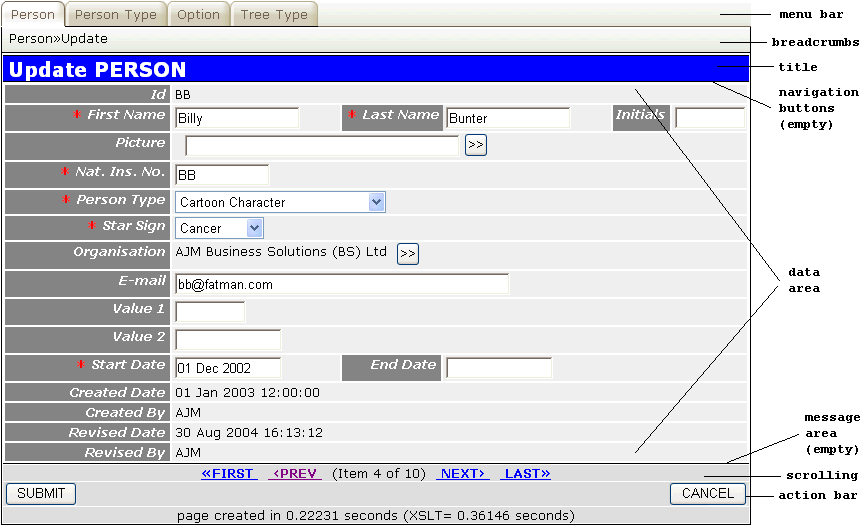
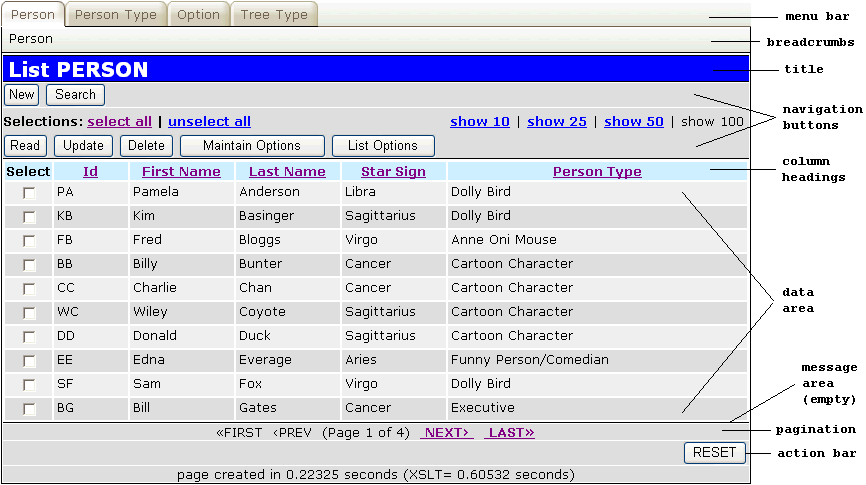
The following screen shots show sample screens with the different areas (zones) which are built into each pattern. Each of these zones is constructed from a central library of common XSL templates which means that it is a simple process to construct a new XSL stylesheet to deal with a different screen structure.
This layout can be used for any number of database tables - all that changes is the title, the column headings and the data area. The contents of the pagination area, menu, navigation and action bars are supplied in the XML file, therefore common templates can be used in the XSL file without any modification.
This layout can be used for any number of database tables - all that changes is the title and the data area. The contents of the scrolling area, menu, navigation and action bars are supplied in the XML file, therefore common templates can be used in the XSL file without any modification.
Within these two different layouts there are common zones - the menu bar, breadcrumb area, title, navigation bar, message area and action bar - which can be dealt with by common templates and thus do not require separate copies of the same code.
Please note that these XML documents are constructed automatically by the framework and do not require any intervention from the developer.
The following is a sample of an XML file which was used to create a list screen as shown in figure 1.
<?xml version="1.0" encoding="UTF-8"?>
<root>
  <person>
    <person_id size="8" pkey="y">PA</person_id>
    <pers_type_id size="6"
                  control="dropdown"
                  optionlist="pers_type_id">DOLLY</pers_type_id>
    <first_name size="20">Pamela</first_name>
    <last_name size="30">Anderson</last_name>
    <initials size="6">PA</initials>
    <star_sign control="dropdown"
               optionlist="star_sign">Virgo</star_sign>
    <selected noedit="y">1</selected>
  </person>
  <person>
    <person_id size="8" pkey="y">KB</person_id>
    ......
  </person>
  <person>
    <person_id size="8" pkey="y">FB</person_id>
    ......
  </person>
  <person>
    <person_id size="8" pkey="y">BB</person_id>
    ......
  </person>
  <person>
    <person_id size="8" pkey="y">CC</person_id>
    ......
  </person>
  <person>
    <person_id size="8" pkey="y">WC</person_id>
    ......
  </person>
  <person>
    <person_id size="8" pkey="y">DD</person_id>
    ......
  </person>
  <person>
    <person_id size="8" pkey="y">EE</person_id>
    ......
  </person>
  <person>
    <person_id size="8" pkey="y">SF</person_id>
    ......
  </person>
  <person>
    <person_id size="8" pkey="y">BG</person_id>
    ......
  </person>
  <lookup>
    <star_sign>
      <option id="ARI">Aries</option>
      ......
      <option id="VIR">Virgo</option>
    </star_sign>
    <pers_type_id>
      <option id="ACTOR">Actor/Artiste</option>
      ......
      <option id="QP">Of Questionable Parentage>/option>
    </pers_type_id>
  </lookup>
  <cssfiles>
    <filename>HTTP://localhost/radicore/style_default.css</filename>
    <filename>HTTP://localhost/radicore/xample/style_custom.css</filename>
  </cssfiles>
  <actbar>
    <button id="reset">RESET</button>
  </actbar>
  <navbar>
    <button id="task#person_add.php"
            context_preselect="N">New</button>
    <button id="task#person_upd.php"
            context_preselect="Y">Update</button>
    <button id="task#person_enq.php"
            context_preselect="Y">Read</button>
    <button id="task#person_del.php"
            context_preselect="Y">Delete</button>
    <button id="task#person_search.php"
            context_preselect="N">Search</button>
    <button id="task#pers_opt_xref_link(a).php"
            context_preselect="Y">Maintain Options</button>
    <button id="task#pers_opt_xref_list(a).php"
            context_preselect="Y">List Options</button>
  </navbar>
  <menubar>
    <button id="person_list.php" active="y">Person</button>
    <button id="pers_type_list.php">Person Type</button>
    <stack id="/sample/person_list.php" active="y">Person</stack>
  </menubar>
  <pagination>
    <page id="main" numrows="32" curpage="1" lastpage="4"/>
  </pagination>
  <structure>
    <main id="person">
      <columns>
        <column width="5"/>
        <column width="70"/>
        <column width="100"/>
        <column width="100"/>
        <column width="100"/>
        <column width="*"/>
      </columns>
      <row>
        <cell label="Select"/>
        <cell field="selectbox"/>
      </row>
      <row>
        <cell label="Id"/>
        <cell field="person_id"/>
      </row>
      <row>
        <cell label="First Name"/>
        <cell field="first_name"/>
      </row>
      <row>
        <cell label="Last Name"/>
        <cell field="last_name"/>
      </row>
      <row>
        <cell label="Star Sign"/>
        <cell field="star_sign"/>
      </row>
      <row>
        <cell label="Person Type"/>
        <cell field="pers_type_desc"/>
      </row>
    </main>
  </structure>
  <params>
    <script>HTTP://localhost/sample/person_list.php</script>
    <session_name>sample</session_name>
    <http_host>HTTP://localhost</http_host>
    <doc_root>HTTP://localhost/sample</doc_root>
    <title>List PERSON</title>
    <language>en</language>
    <text>
      <page>Page</page>
      <item>Item</item>
      <of>of</of>
      <first>FIRST</first>
      <last>LAST</last>
      <prev>PREV</prev>
      <next>NEXT</next>
      <show>show</show>
      <select-all>select all</select-all>
      <unselect-all>unselect all</unselect-all>
      <help>help</help>
      <page-created>page created in</page-created>
      <seconds>seconds</seconds>
    </text>
    <mode>read</mode>
    <taskid>person_list.php</taskid>
    <help_root>HTTP://localhost/sample</help_root>
    <script_time>0.22325</script_time>
  </params>
</root>
The following is a sample of an XML file which was used to create a detail screen as shown in figure 2.
<?xml version="1.0" encoding="UTF-8"?>
<root>
  <person>
    <person_id size="8" pkey="y">BB</person_id>
    <pers_type_id size="6"
                  control="dropdown"
                  optionlist="pers_type_id">DOLLY</pers_type_id>
    <node_id size="5"
             control="popup"
             foreign_field="node_desc"
             task_id="task#tree_structure_popup.php">53</node_id>
    <nat_ins_no size="10">BB</nat_ins_no>
    <first_name size="20">Billy</first_name>
    <last_name size="30">Bunter</last_name>
    <initials size="6">bb</initials>
    <star_sign size="3"
               control="dropdown"
               optionlist="star_sign">CAN</star_sign>
    <email_addr size="50">bb@fatman.com</email_addr>
    <value1 size="6"></value1>
    <value2 size="12"></value1>
    <start_date size="12">01 Dec 2002</start_date>
    <end_date size="12"></end_date>
    <picture size="40"
             control="filepicker"
             task_id="task#filepicker.php"
             image="y" imagewidth="75" imageheight="95"></picture>
    <created_date size="21" noedit="y">01 Jan 2003 12:00:00</created_date>
    <created_user size="16" noedit="y">AJM</created_user>
    <revised_date size="21" noedit="y">30 Aug 2004 16:13:12</revised_date>
    <revised_user size="16" noedit="y">AJM</revised_user>
    <pers_type_desc noedit="y">Cartoon Character</pers_type_desc>
    <node_desc noedit="y">AJM Business Solutions (BS) Ltd</node_desc>
  </person>
  <lookup>
    <star_sign>
      <option id=""> </option>
      <option id="ARI">Aries</option>
      ......
      <option id="VIR">Virgo</option>
    </star_sign>
    <pers_type_id>
      <option id=""> </option>
      <option id="ACTOR">Actor/Artiste</option>
      ......
      <option id="QP">Of Questionable Parentage>/option>
    </pers_type_id>
  </lookup>
  <cssfiles>
    <filename>HTTP://localhost/radicore/style_default.css</filename>
    <filename>HTTP://localhost/radicore/xample/style_custom.css</filename>
  </cssfiles>
  <actbar>
    <button id="submit">SUBMIT</button>
    <button id="finish">CANCEL</button>
  </actbar>
  <menubar>
    <button id="person_list.php" active="y">Person</button>
    <button id="pers_type_list.php">Person Type</button>
    <button id="option_list.php">Option</button>
    <button id="tree_type_list.php">Tree Type</button>
    <stack id="/sample/person_list.php" active="y">Person</stack>
    <stack id="/sample/person_upd.php">Update</stack>
  </menubar>
  <navbar/>
  <scrolling>
    <scroll id="person" curitem="1" lastitem="10"/>
  </scrolling>
  <message/>
  <structure>
    <main id="person">
      <columns>
        <column width="185"/>
        <column width="180"/>
        <column width="115"/>
        <column width="180"/>
        <column width="45"/>
        <column width="45"/>
      </columns>
      <row>
        <cell label="Id"/>
        <cell field="person_id" colspan="5"/>
      </row>
      <row>
        <cell label="First Name"/>
        <cell field="first_name" size="15"/>
        <cell label="Last Name"/>
        <cell field="last_name" size="15"/>
        <cell label="Initials"/>
        <cell field="initials"/>
      </row>
      <row>
        <cell label="Picture"/>
        <cell field="picture" colspan="5"/>
      </row>
      <row>
        <cell label="Nat. Ins. No."/>
        <cell field="nat_ins_no" colspan="5"/>
      </row>
      <row>
        <cell label="Person Type"/>
        <cell field="pers_type_id" colspan="5"/>
      </row>
      <row>
        <cell label="Star Sign"/>
        <cell field="star_sign" colspan="5"/>
      </row>
      <row>
        <cell label="Organisation"/>
        <cell field="node_id" colspan="5"/>
      </row>
      <row>
        <cell label="E-mail"/>
        <cell field="email_addr" colspan="5"/>
      </row>
      <row>
        <cell label="Value 1"/>
        <cell field="value1" colspan="5"/>
      </row>
      <row>
        <cell label="Value 2"/>
        <cell field="value2" colspan="5"/>
      </row>
      <row>
        <cell label="Start Date"/>
        <cell field="start_date"/>
        <cell label="End Date"/>
        <cell field="end_date" colspan="3"/>
      </row>
      <row>
        <cell label="Created Date"/>
        <cell field="created_date" colspan="5"/>
      </row>
      <row>
        <cell label="Created By"/>
        <cell field="created_user" colspan="5"/>
      </row>
      <row>
        <cell label="Revised Date"/>
        <cell field="revised_date" colspan="5"/>
      </row>
      <row>
        <cell label="Revised By"/>
        <cell field="revised_user" colspan="5"/>
      </row>
    </main>
  </structure>
  <params>
    <script>HTTP://localhost/sample/person_upd.php</script>
    <session_name>sample</session_name>
    <http_host>HTTP://localhost</http_host>
    <doc_root>HTTP://localhost/sample</doc_root>
    <title>Update PERSON</title>
    <language>en</language>
    <text>
      <page>Page</page>
      <item>Item</item>
      <of>of</of>
      <first>FIRST</first>
      <last>LAST</last>
      <prev>PREV</prev>
      <next>NEXT</next>
      <show>show</show>
      <select-all>select all</select-all>
      <unselect-all>unselect all</unselect-all>
      <help>help</help>
      <page-created>page created in</page-created>
      <seconds>seconds</seconds>
    </text>
    <mode>update</mode>
    <taskid>person_upd.php</taskid>
    <help_root>HTTP://localhost/sample</help_root>
    <script_time>0.22231</script_time>
  </params>
</root>
The XML document can be broken down into the following constituent parts:
<?xml version="1.0" encoding="UTF-8"?>
<root>
......
</root>
The first line contains the XML declaration and the encoding. The second and last lines identify the root node within the document. Every XML document must contain a root node to encompass all the other nodes. In this example the name of the root node is "root" (how original!), but it could be anything.
Here is some data from a database table:
  <person>
    <person_id size="8" pkey="y">PA</person_id>
    .....
    <end_date size="12"></end_date>
  </person>
  <person>
    .....
    <person_addr>
      .....
    </person_addr>
  </person>
Everything between <person>...</person> belongs to the same occurrence (row) from the "person" table. Each element in between belongs to a different field (column) of that table. Note that an element can contain a value and any number of attributes each of which can have its own value. For example, the "person_id" element contains the value "PA" but also attributes for "size" and "pkey".
It is possible for an XML file to contain multiple occurrences, either from the same table or even from different tables. To indicate a relationship between two tables it is also possible for the occurrences of a child table to be held within the related occurrence of the parent table.
The next section identifies the options for dropdown lists or radio groups. These are all contained within the node called "lookup".
  <lookup>
    <star_sign>
      <option id=""> </option>
      <option id="ARI">Aries</option>
      ......
      <option id="VIR">Virgo</option>
    </star_sign>
    <pers_type_id>
      <option id=""> </option>
      <option id="ACTOR">Actor/Artiste</option>
      ......
      <option id="QP">Of Questionable Parentage>/option>
    </pers_type_id>
  </lookup>
Here there are lists for two fields, "star_sign" and "pers_type_id". Each fields has a number of options which are broken down into ID (supplied as an attribute) and VALUE.
The next section contains other miscellaneous sets of data:
  <cssfiles>
    <filename>HTTP://localhost/radicore/style_default.css</filename>
    <filename>HTTP://localhost/radicore/xample/style_custom.css</filename>
  </cssfiles>
  <actbar>
    <button id="copy">Copy</button>
    ......
  </actbar>
  <menubar>
    <button id="person_list.php" active="y">Person</button>
    <button id="pers_type_list.php">Person Type</button>
    <stack id="/sample/person_list.php" active="y">Person</stack>
    <stack id="/sample/person_upd.php">Update</stack>
  </menubar>
  <navbar>
    <button id="task#person_add.php" context_preselect="N">New</button>
    <button id="task#person_upd.php" context_preselect="Y">Update</button>
  </navbar>
  <pagination>
    <page id="main" numrows="32" curpage="1" lastpage="4"/>
  </pagination>
  <scrolling>
   <scroll id="person" curitem="1" lastitem="10"/>
  </scrolling>
  <message/>
The next section tells the XSL stylesheet which data belongs in which zone, which fields are to be displayed, and in what order.
  <structure>
    <main id="person"> <!-- zone id = 'main', but associated table name = 'person'-->
      <columns>
        <column width="185"/>
        ......
      </columns>
      <row>
        <cell label="Id"/>
        <cell field="person_id" colspan="5"/>
      </row>
      <row>
        <cell label="First Name"/>
        <cell field="first_name" size="15"/>
        <cell label="Last Name"/>
        <cell field="last_name" size="15"/>
        <cell label="Initials"/>
        <cell field="initials"/>
      </row>
      ......
    </main>
  </structure>
Here there is a single zone called "main" which will be populated using entries from the "person" table. This contains a group of column specifications which is then followed by specifications for each HTML table row and cell which is to appear in that zone. Note that each cell may contain either a field label (which is supplied as a literal string) or the name of the field in the XML document which will supply the value.
It is possible for an XSL stylesheet to contain multiple data zones, so each zone will have its own specifications in the XML document.
For LIST screens (with a horizontal layout) all "label" entries will appear as a single line of column headings at the top of the display while the "field" entries will be grouped into a single data line, one line for each database occurrence.
For DETAIL screens (with a vertical layout) each row will be an actual HTML table row, with the "label" entry on the left and the contents of the "field" entry on the right. Note that it is also possible to have more than one label/field combination appearing in the same row. The "colspan" attribute will allow an entry to span multiple columns, and the "rowspan" attribute will allow an entry to span multiple rows.
The optional "size" attribute is used to reduce the size of the field to something which is smaller than its actual size in the database.
The last area holds values that were originally passed in as parameters during the XSL transformation process which was performed on the server. These were later switched to being ordinary entries with the XML document so that they could be made available for client-side transformations.
  <params>
    <script>HTTP://localhost/sample/person_list.php</script>
    ......
    <language>en</language>
    <text>
      <page>Page</page>
      ......
      <seconds>seconds</seconds>
    </text>
  </params>
These entries are arranged in two levels:
<params> node: this contains general values which may be used in various places during the transformation process.<params><text> node: this contains pieces of text which will appear in various places in the output document. These values used to be hard-coded within the XSL stylesheet, but they are now supplied from within the XML document as they need to be in different languages.The following is a sample of an XSL file used to create a list screen as shown in figure 1.
XSL file 1 - std.list1.xsl
<?xml version='1.0'?>
<xsl:stylesheet version="1.0"
                xmlns:xsl="http://www.w3.org/1999/XSL/Transform"
                xmlns="http://www.w3.org/1999/xhtml">

<xsl:output method="xml"
            indent="yes"
            omit-xml-declaration="yes"
            doctype-public = "-//W3C//DTD XHTML 1.0 Strict//EN"
            doctype-system = "http://www.w3.org/TR/xhtml1/DTD/xhtml1-strict.dtd"
/>

<!-- include common templates -->
<xsl:include href="std.buttons.xsl"/>
<xsl:include href="std.column_hdg.xsl"/>
<xsl:include href="std.data_field.xsl"/>
<xsl:include href="std.head.xsl"/>
<xsl:include href="std.pagination.xsl"/>

<!-- get the name of the MAIN table -->
<xsl:variable name="main" select="//structure/main/@id"/>
<xsl:variable name="numrows" select="//pagination/page[@id='main']/@numrows"/>

<xsl:template match="/"> <!-- standard match to include all child elements -->

  <html xml:lang="{/root/params/language}" lang="{/root/params/language}">
    <xsl:call-template name="head" />
  <body>

  <form method="post" action="{$script}">

    <div class="universe">

      <!-- create help button -->
      <xsl:call-template name="help" />

      <!-- create menu buttons -->
      <xsl:call-template name="menubar" />

      <div class="body">

        <h1><xsl:value-of select="$title"/></h1>

        <!-- create navigation buttons -->
        <xsl:call-template name="navbar">
          <xsl:with-param name="noshow"   select="//params/noshow"/>
          <xsl:with-param name="noselect" select="//params/noselect"/>
        </xsl:call-template>

        <div class="main">

          <!-- this is the actual data -->
          <table>

            <!-- set up column widths -->
            <xsl:call-template name="column_group">
              <xsl:with-param name="table" select="'main'"/>
            </xsl:call-template>

            <thead>
              <!-- set up column headings -->
              <xsl:call-template name="column_headings">
                <xsl:with-param name="table" select="'main'"/>
              </xsl:call-template>
            </thead>

            <tbody>
              <!-- process each non-empty row in the MAIN table of the XML file -->
              <xsl:for-each select="//*[name()=$main][count(*)>0]">

                <!-- display all the fields in the current row -->
                <xsl:call-template name="display_horizontal">
                  <xsl:with-param name="zone" select="'main'"/>
                </xsl:call-template>

              </xsl:for-each>
            </tbody>

          </table>

        </div>

        <!-- look for optional messages -->
        <xsl:call-template name="message"/>

        <!-- insert the page navigation links -->
        <xsl:call-template name="pagination">
          <xsl:with-param name="object" select="'main'"/>
        </xsl:call-template>

        <!-- create standard action buttons -->
        <xsl:call-template name="actbar"/>

      </div>

    </div>

  </form>
  </body>
  </html>

</xsl:template>

</xsl:stylesheet>
The following is a sample of an XSL file used to create a detail screen as shown in figure 2.
XSL file 2 - std.detail1.xsl
<?xml version='1.0'?>
<xsl:stylesheet version="1.0"
                xmlns:xsl="http://www.w3.org/1999/XSL/Transform"
                xmlns="http://www.w3.org/1999/xhtml">

<xsl:output method="xml"
            indent="yes"
            omit-xml-declaration="yes"
            doctype-public = "-//W3C//DTD XHTML 1.0 Strict//EN"
            doctype-system = "http://www.w3.org/TR/xhtml1/DTD/xhtml1-strict.dtd"
/>

<!-- include common templates -->
<xsl:include href="std.buttons.xsl"/>
<xsl:include href="std.column_hdg.xsl"/>
<xsl:include href="std.data_field.xsl"/>
<xsl:include href="std.head.xsl"/>
<xsl:include href="std.pagination.xsl"/>

<!-- get the name of the MAIN table -->
<xsl:variable name="main" select="//structure/main/@id"/>
<xsl:variable name="numrows">1</xsl:variable>

<xsl:template match="/">

  <html xml:lang="{/root/params/language}" lang="{/root/params/language}">
    <xsl:call-template name="head" />
  <body>

  <form method="post" action="{$script}">

    <div class="universe">

      <!-- create help button -->
      <xsl:call-template name="help" />

      <!-- create menu buttons -->
      <xsl:call-template name="menubar" />

      <div class="body">

        <h1><xsl:value-of select="$title"/></h1>

        <!-- create navigation buttons -->
        <xsl:call-template name="navbar_detail" />

        <div class="main">
          <!-- table contains a row for each database field -->
          <table>

            <!-- process the first row in the MAIN table of the XML file -->
            <xsl:for-each select="//*[name()=$main][1]">

              <!-- display all the fields in the current row -->
              <xsl:call-template name="display_vertical">
                <xsl:with-param name="zone" select="'main'"/>
              </xsl:call-template>

            </xsl:for-each>

          </table>
        </div>

        <!-- look for optional messages -->
        <xsl:call-template name="message"/>

        <!-- insert the scrolling links for MAIN table -->
        <xsl:call-template name="scrolling" >
          <xsl:with-param name="object" select="$main"/>
        </xsl:call-template>

        <!-- create standard action buttons -->
        <xsl:call-template name="actbar"/>

      </div>

    </div>

  </form>
  </body>
  </html>

</xsl:template>

</xsl:stylesheet>
The XSL stylesheet can be broken down into the following constituent parts:
<?xml version='1.0'?>
<xsl:stylesheet ......>

<xsl:output ....../>

......

</xsl:stylesheet>
The first line contains the XML declaration. The second line and last lines identify the contents as an XSL stylesheet. The <xsl:output> line specifies the output format required by the transformation process.
The next set of lines perform various functions before the main template is executed.
<!-- include common templates -->
<xsl:include href="......"/>

<!-- get the name of the MAIN table -->
<xsl:variable name="main" select="//structure/main/@id"/>
<xsl:variable name="numrows" select="//pagination/page[@id='main']/@numrows"/>
The <xsl:include> statements make the contents of those files available to the transformation process. Each of these files may contain any number of XSL templates.
The <xsl:variable> statements extract values from the current XML file.
$main will contain the value of the id attribute from the main element which is a child of the structure element. So <structure><main id="person"> will provide the value person.$numrows will contain the value of the numrows attribute from the page element with the id attribute of 'main' which is a child of the pagination element. So <pagination><page id="main" numrows="32"> will provide the value 32.The remainder of the code performs the actual transformation.
<xsl:template match="/">

  <html>
  <body>

  <form method="post" action="{$script}">

  ......

  </form>
  </body>
  </html>

</xsl:template>
Note here that every XSL transformation requires a template which matches "/" - this path expression includes everything which is subordinate to the root node of the XML document. The lines within this template are then scanned and processed sequentially. Anything beginning with <xsl: is treated as an XSL instruction. Everything else, such as ordinary HTML tags, is output as is.
Individual parts of the XML document are then processed using different named XSL templates, as shown in the following section.
All programming languages allow common code to be defined once in a subroutine which can then be referenced from multiple places instead of having to be duplicated in each of those places. In XSL these "subroutines" are called "templates". They can either be hard-coded into individual stylesheets or held in central files which can be incorporated into any number of stylesheets by means of the <xsl:include> statement.
A template can be called using code similar to the following if no parameters are required:
<xsl:call-template name="head"/>
If parameter values are to be passed they must be specified by name, as in the following example:
<xsl:call-template name="display_vertical">
  <xsl:with-param name="zone" select="'main'"/>
</xsl:call-template>
Each template definition must specify any parameter it needs by name, as in the following example:
<xsl:template name="display_vertical">
  <xsl:param name="zone"/>
  <xsl:param name="noedit"/>

  ......

</xsl:template>
Note that the order in which the parameters are specified is irrelevant as they are all matched by name. If any parameter is not supplied it is treated as having a null value.
In the sample XSL stylesheets for LIST and DETAIL screens there are references to numerous templates which provide the following functionality:
| Name | Description |
|---|---|
| actbar | This is responsible for creating the action bar in the HTML document. |
| column_group | This is responsible for creating the <colgroup> element of the HTML document for that data zone. |
| column_headings | This is responsible for creating the column headings in the HTML document. |
| display_horizontal | This is responsible for outputting the data for multiple database occurrences, one line per occurrence, in a horizontal arrangement. |
| display_vertical | This is responsible for outputting the data for a single database occurrence in a vertical arrangement. |
| head | This is responsible for creating the <head> element of the HTML document. It contains the form title and links to CSS files. |
| help | This is responsible for creating the top row of the menu bar in the HTML document. |
| menubar | This is responsible for creating the bottom two rows of the menu bar in the HTML document. |
| message | This is responsible for creating the message area in the HTML document. |
| navbar | This is responsible for creating the navigation bar in the HTML document. |
| pagination | This is responsible for creating the pagination area in the HTML document. |
| scrolling | This is responsible for creating the scrolling area(s) in the HTML document. |
The following global variables are constructed for use within any template:
<xsl:variable name="client-side"   select="/root/params/client-side"/>
<xsl:variable name="doc_root"      select="/root/params/doc_root"/>
<xsl:variable name="help_root"     select="/root/params/help_root"/>
<xsl:variable name="mode"          select="/root/params/mode"/>
<xsl:variable name="orderby"       select="/root/params/orderby"/>
<xsl:variable name="order"         select="/root/params/order"/>
<xsl:variable name="print-preview" select="/root/params/print-preview"/>
<xsl:variable name="script"        select="/root/params/script"/>
<xsl:variable name="script_time"   select="/root/params/script_time"/>
<xsl:variable name="title"         select="/root/params/title"/>
<xsl:variable name="select_one"    select="/root/params/select_one"/>
<xsl:variable name="session_name"  select="/root/params/session_name"/>
<xsl:variable name="session"       select="concat('session_name=',$session_name)" />
<xsl:variable name="taskid"        select="/root/params/taskid"/>

<!-- extract pieces of text in the user's language -->
<xsl:variable name="show"          select="/root/params/text/show"/>
<xsl:variable name="select-all"    select="/root/params/text/select-all"/>
<xsl:variable name="unselect-all"  select="/root/params/text/unselect-all"/>
<xsl:variable name="page-created"  select="/root/params/text/page-created"/>
<xsl:variable name="seconds"       select="/root/params/text/seconds"/>
<xsl:variable name="page"          select="/root/params/text/page"/>
<xsl:variable name="item"          select="/root/params/text/item"/>
<xsl:variable name="of"            select="/root/params/text/of"/>
<xsl:variable name="first"         select="/root/params/text/first"/>
<xsl:variable name="last"          select="/root/params/text/last"/>
<xsl:variable name="prev"          select="/root/params/text/prev"/>
<xsl:variable name="next"          select="/root/params/text/next"/>
This is responsible for creating the action bar in the HTML document.
<xsl:template name="actbar"> (1)

  <xsl:if test="not($print-preview)"> (2)

    <div class="actionbar">

      <div class="left">
        <xsl:text> </xsl:text>  <!-- insert a space to prevent an empty element -->
        <xsl:for-each select="//actbar/button[starts-with(@id,'submit')
                              or @id='choose']"> (3)
          <!-- create a button on the left for each element within actionbar -->
          <input class="submit" type="submit" name="{@id}" value="{node()}" /> (4)
          <xsl:text> </xsl:text>
        </xsl:for-each>
      </div>

      <div class="right">
        <xsl:text> </xsl:text>  <!-- insert a space to prevent an empty element -->
        <xsl:for-each select="//actbar/button[not(starts-with(@id,'submit'))
                              and not(@id='choose')]"> (5)
          <!-- create a button on the right for each element within actionbar -->
          <input class="submit" type="submit" name="{@id}" value="{node()}" /> (4)
          <xsl:text> </xsl:text>
        </xsl:for-each>
      </div>

    </div>

  </xsl:if>

</xsl:template>
Here is the description of the numbered items:
print-preview mode.id attribute is within a range of values. These buttons will appear on the left.ID attribute as the internal identifier and the node's value as the button text.id attribute is not within a range of values. These buttons will appear on the right.This is responsible for creating the <colgroup> element of the HTML document for that data zone.
<xsl:template name="column_group"> (1)
  <xsl:param name="zone"/> <!-- zone name (eg: main, inner, outer) -->
  <xsl:param name="count"/> <!-- column count -->

  <colgroup>

    <xsl:for-each select="//structure/*[name()=$zone]/columns/column"> (2)
      <col>
        <xsl:if test="@width"> (3)
          <xsl:attribute name="width" ><xsl:value-of select="@width" /></xsl:attribute>
        </xsl:if>
        <xsl:if test="@class"> (4)
          <xsl:attribute name="class" ><xsl:value-of select="@class" /></xsl:attribute>
        </xsl:if>
      </col>
    </xsl:for-each>

    <xsl:if test="$count > 1"> (5)
      <!-- repeat until $count is reduced to 1 -->
      <xsl:call-template name="column_group">
        <xsl:with-param name="zone" select="$zone"/>
        <xsl:with-param name="count" select="$count -1"/>
      </xsl:call-template>
    </xsl:if>

  </colgroup>

</xsl:template>
Here is the description of the numbered items:
structure/zone/columns/column node where the zone name is the same as the $zone input parameter.width attribute to the <col> tag, if one has been specified.class attribute to the <col> tag, if one has been specified.$count has been reduced to less than 1.This is responsible for creating the column headings in the HTML document.
<xsl:template name="column_headings">
  <xsl:param name="zone"/> <!-- zone name (eg: main, inner, outer) -->
  <xsl:param name="count"/> <!-- column count -->

  <tr> <!-- these are all within a single row -->
    <xsl:call-template name="column_heading">
      <xsl:with-param name="zone" select="$zone"/>
      <xsl:with-param name="count" select="$count"/>
    </xsl:call-template>
  </tr>

</xsl:template>
This calls the column_heading template inside a <tr> (table row) tag.
<xsl:template name="column_heading">
  <xsl:param name="zone"/> <!-- zone name (eg: main, inner, outer) -->
  <xsl:param name="count"/> <!-- column count -->

  <xsl:for-each select="//structure/*[name()=$zone]/row/cell[@label]"> (1)
    <th>
      <xsl:if test="string-length(@label)"> (2)

        <xsl:call-template name="column_hdg"> (3)
          <!-- get fieldname from the FIELD attribute of the following sibling -->
          <xsl:with-param name="fieldname"
                        select="string(following-sibling::*[@field]/@field)" />
          <xsl:with-param name="label" select="@label"/>
          <xsl:with-param name="nosort" select="@nosort"/>
        </xsl:call-template>

      </xsl:if>
    </th>
  </xsl:for-each>

  <xsl:if test="$count > 1"> (4)
    <!-- repeat until $count is reduced to 1 -->
    <xsl:call-template name="column_heading">
      <xsl:with-param name="zone" select="$zone"/>
      <xsl:with-param name="count" select="$count -1"/>
    </xsl:call-template>
  </xsl:if>

</xsl:template>
Here is the description of the numbered items:
structure/zone/row/cell node which has a label attribute and where the zone name is the same as the $zone input parameter. Each entry is put inside a <th> (table header) tag.field attribute in the following sibling node and pass it to the column_hdg template.$count has been reduced to 1.<xsl:template name="column_hdg"> <xsl:param name="fieldname"/> <xsl:param name="label"/> <xsl:param name="nosort"/> <xsl:param name="count"/> <xsl:choose> <xsl:when test="$fieldname='selectbox'"> (1) <!-- text only, no hyperlink --> <xsl:value-of select="$label"/> </xsl:when> <xsl:when test="$numrows > 0 and not($nosort)"> (2) <!-- $numrows is one of the XSL parameters --> <!-- note that if 'nosort' is set there are no hyperlinks for sorting --> <!-- create hyperlink to sort on this field --> <a href="{$script}?{$session}&orderby={$fieldname}"> (3) <!-- this is the visible text for the hyperlink --> <xsl:value-of select="$label"/> </a> <!-- if sorted by this field insert ascending or descending image --> <xsl:if test="$orderby=$fieldname"> (4) <img src="images/order_{$order}.gif" height="16" width="16" alt="order_{$order}.gif" /> </xsl:if> </xsl:when> <xsl:otherwise> <!-- no sorting allowed, so don't bother with the hyperlink --> <xsl:value-of select="$label"/> (5) </xsl:otherwise> </xsl:choose> </xsl:template>
Here is the description of the numbered items:
$nosort parameter has not been set.&orderby=<fieldname> appended to the URL. This tells the server-side script to sort on this column name.$orderby parameter indicates that the data has been sorted on his column then item (4) will insert an image to indicate either "ascending" or "descending".$count has been reduced to 1.This template is used to create the HTML control for each field. The type of control to be used is passed as an attribute in the XML file, and this value is then used to activate the relevant sub-template. This allows the HTML control type to be decided at runtime instead of being hard-coded within the component stylesheet. Any other values required by individual templates for their control types must be supplied as additional attributes within the XML file.
This template can be called from either the display_horizontal or display_vertical templates.
<xsl:template name="datafield">
  <xsl:param name="item"/>       <!-- the item value -->
  <xsl:param name="itemname"/>   <!-- the item name -->
  <xsl:param name="multiple"/>   <!-- set this for more than one occurrence -->
  <xsl:param name="path"/>       <!-- the entity name -->
  <xsl:param name="position"/>   <!-- the row number -->
  <xsl:param name="noedit"/>     <!-- no edit, display only -->
  <xsl:param name="str-size"/>   <!-- size value from the screen structure file -->

  <xsl:choose>

    <xsl:when test="$itemname='selectbox'"> (1)
      <!-- insert a checkbox to make selections -->
      <xsl:call-template name="selectbox">
        <xsl:with-param name="path" select="$path"/>
        <xsl:with-param name="position" select="$position"/>
      </xsl:call-template>
    </xsl:when>

    <xsl:otherwise>

      <!-- do nothing unless the item is present -->
      <xsl:if test="$item"> (2)

        <xsl:choose>

          <xsl:when test="$item/@nodisplay"> (3)
            <!-- 'nodisplay' attribute set, so display nothing -->
            <xsl:text> </xsl:text>
          </xsl:when>

          <xsl:when test="$item/@control='checkbox'"> (4)
            <xsl:choose>
              <xsl:when test="$mode='search'">
                <!-- make this a radio group to give 3 options - ON,OFF,UNDEFINED -->
                <xsl:call-template name="radiogroup">
                  <xsl:with-param name="item" select="$item"/>
                  <xsl:with-param name="multiple" select="$multiple"/>
                  <xsl:with-param name="noedit" select="$noedit"/>
                  <xsl:with-param name="position" select="$position"/>
                </xsl:call-template>
              </xsl:when>
              <xsl:otherwise>
                <xsl:call-template name="checkbox">
                  <xsl:with-param name="item" select="$item"/>
                  <xsl:with-param name="multiple" select="$multiple"/>
                  <xsl:with-param name="noedit" select="$noedit"/>
                  <xsl:with-param name="position" select="$position"/>
                </xsl:call-template>
              </xsl:otherwise>
            </xsl:choose>
          </xsl:when>

          <xsl:when test="$item/@control='dropdown'"> (4)
            <xsl:call-template name="dropdown">
              <xsl:with-param name="item" select="$item"/>
              <xsl:with-param name="multiple" select="$multiple"/>
              <xsl:with-param name="noedit" select="$noedit"/>
              <xsl:with-param name="position" select="$position"/>
            </xsl:call-template>
          </xsl:when>

          <xsl:when test="$item/@control='filepicker'"> (4)
            <xsl:call-template name="filepicker">
              <xsl:with-param name="item" select="$item"/>
              <xsl:with-param name="multiple" select="$multiple"/>
              <xsl:with-param name="noedit" select="$noedit"/>
            </xsl:call-template>
          </xsl:when>

          <xsl:when test="$item/@control='multiline'"> (4)
            <xsl:call-template name="multiline">
              <xsl:with-param name="item" select="$item"/>
              <xsl:with-param name="multiple" select="$multiple"/>
              <xsl:with-param name="noedit" select="$noedit"/>
            </xsl:call-template>
          </xsl:when>

          <xsl:when test="$item/@control='popup'"> (4)
            <xsl:call-template name="popup">
              <xsl:with-param name="item" select="$item"/>
              <xsl:with-param name="multiple" select="$multiple"/>
              <xsl:with-param name="noedit" select="$noedit"/>
              <xsl:with-param name="path" select="$path"/>
              <xsl:with-param name="position" select="$position"/>
            </xsl:call-template>
          </xsl:when>

          <xsl:when test="$item/@control='radiogroup'"> (4)
            <xsl:call-template name="radiogroup">
              <xsl:with-param name="item" select="$item"/>
              <xsl:with-param name="multiple" select="$multiple"/>
              <xsl:with-param name="noedit" select="$noedit"/>
              <xsl:with-param name="position" select="$position"/>
            </xsl:call-template>
          </xsl:when>

          <xsl:when test="$item/@control='hyperlink'"> (4)
            <xsl:choose>
              <xsl:when test="$mode='insert' or $mode='update' or $mode='search'">
                <!-- change this into a modifiable text field -->
                <xsl:call-template name="textfield">
                  <xsl:with-param name="item" select="$item"/>
                  <xsl:with-param name="multiple" select="$multiple"/>
                  <xsl:with-param name="noedit" select="$noedit"/>
                  <xsl:with-param name="position" select="$position"/>
                  <xsl:with-param name="str-size" select="$str-size"/>
                </xsl:call-template>
              </xsl:when>
              <xsl:otherwise>
                <!-- display this as a hyperlink -->
                <xsl:call-template name="hyperlink">
                  <xsl:with-param name="item" select="$item"/>
                </xsl:call-template>
              </xsl:otherwise>
            </xsl:choose>
          </xsl:when>

          <xsl:otherwise> <!-- this is the default control type -->
            <xsl:call-template name="textfield"> (5)
              <xsl:with-param name="item" select="$item"/>
              <xsl:with-param name="multiple" select="$multiple"/>
              <xsl:with-param name="noedit" select="$noedit"/>
              <xsl:with-param name="position" select="$position"/>
              <xsl:with-param name="str-size" select="$str-size"/>
            </xsl:call-template>
          </xsl:otherwise>

        </xsl:choose>

      </xsl:if>

    </xsl:otherwise>

  </xsl:choose>

  <!-- check if field has error attribute set -->
  <xsl:if test="$item/@error"> (6)
    <br/><span class="error"><xsl:value-of select="$item/@error"/></span>
  </xsl:if>

</xsl:template>
Here is the description of the numbered items:
nodisplay attribute is set, in which case nothing is output.control attribute.error attribute has been set.This is responsible for outputting the data for multiple database occurrences, one line per occurrence, in a horizontal arrangement, as can be found on LIST screens.
<xsl:template name="display_horizontal">
  <xsl:param name="zone"/>      <!-- could be 'main', 'inner', 'outer', etc -->
  <xsl:param name="multiple"/>  <!-- set this for more than one occurrence -->

  <xsl:variable name="table" select="name()"/> (1)      <!-- current table name -->
  <xsl:variable name="position" select="position()"/>   <!-- current row within table -->

  <tr>
    <!-- set the row class to 'odd' or 'even' to determine the colour -->
    <xsl:attribute name="class"> (2)
      <xsl:choose>
        <xsl:when test="position()mod 2">odd</xsl:when>
        <xsl:otherwise>even</xsl:otherwise>
      </xsl:choose>
    </xsl:attribute>

    <!-- step through the fields defined in the STRUCTURE element -->
    <xsl:for-each select="//structure/*[name()=$zone]/row/cell[@field]"> (3)

      <!-- get fieldname from the FIELD attribute -->
      <xsl:variable name="fieldname" select="@field" /> (4)

      <!-- select the field (identified in STRUCTURE) from the current row
           of the specified table -->
      <xsl:variable name="field" (5)
                  select="//*[name()=$table][position()=$position]/*[name()=$fieldname]" />

      <td>
        <!-- process the named field from the current row -->
        <xsl:call-template name="datafield"> (6)
          <xsl:with-param name="item"     select="$field"/>
          <xsl:with-param name="itemname" select="$fieldname"/>
          <xsl:with-param name="path"     select="$table"/>
          <xsl:with-param name="position" select="$position"/>
          <xsl:with-param name="multiple" select="$multiple"/>
        </xsl:call-template>
      </td>

    </xsl:for-each>
  </tr>

</xsl:template>
Here is the description of the numbered items:
$table and row number into $position.class attribute to the current <tr> tag with a value of odd or even to allow alternate rows to be displayed in a different colour.structure/zone/row/cell node which has a label attribute and where the zone name is the same as the $zone input parameter.field attribute into $fieldname.This is responsible for outputting the data for a single database occurrence in a vertical arrangement, as can be found on DETAIL screens. Note that this allows a row to contain more than one field, and for a field to span more than one row.
<xsl:template name="display_vertical">
  <xsl:param name="zone"/>    <!-- could be 'main', 'inner', 'outer', etc -->
  <xsl:param name="noedit"/>  <!-- y = no edit, display only -->

  <xsl:variable name="table" select="name()"/> (1)      <!-- current table name -->
  <xsl:variable name="table_row" select="position()"/>  <!-- current row within table -->

  <!-- output column settings -->
  <xsl:call-template name="column_group"> (2)
    <xsl:with-param name="zone" select="$zone"/>
  </xsl:call-template>

  <!-- step through each row/item defined in the STRUCTURE element -->
  <xsl:for-each select="//structure/*[name()=$zone]/row"> (3)

    <xsl:variable name="struct_row" select="position()"/> <!-- current row within structure -->

    <!-- build a node-set of field names to be processed for this row -->
    <xsl:variable name="fieldnames" select="cell[@field]/@field"/> (4)

    <!-- build a node-set of field names which actually exist as data elements -->
    <xsl:variable name="fieldsfound" (5)
                select="//*[name()=$table][position()=$table_row]/*[name()=$fieldnames]"/>

    <!-- build a node-set of fields which have the NODISPLAY attribute set -->
    <xsl:variable name="nodisplay" select="$fieldsfound[@nodisplay]"/> (6)

    <!-- build a node-set of fields which have the DISPLAY-EMPTY attribute set -->
    <xsl:variable name="display-empty" select="cell[@display-empty]/@field"/> (7)

    <xsl:choose>
      <xsl:when test="count($fieldsfound) = count($nodisplay) and not($display-empty)"> (8)
        <!-- all the fields in this row have the NODISPLAY attribute set,
             so do not output anything -->
      </xsl:when>

      <xsl:otherwise>

        <xsl:call-template name="display_vertical_row"> (9)
          <xsl:with-param name="zone"       select="$zone"/>
          <xsl:with-param name="table"      select="$table"/>
          <xsl:with-param name="table_row"  select="$table_row"/>
          <xsl:with-param name="struct_row" select="$struct_row"/>
          <xsl:with-param name="noedit"     select="$noedit"/>
        </xsl:call-template>

      </xsl:otherwise>

    </xsl:choose>

  </xsl:for-each>

</xsl:template>
Here is the description of the numbered items:
$table and row number into $table_row.structure/zone/row node where the zone name is the same as the $zone input parameter.row in structure where the cell has a field attribute.$fieldsfound which have the nodisplay attribute set.$fieldsfound which have the display-empty attribute set.Sfieldsfound have the nodisplay attribute set, and no field has the display-empty attribute set, then item (8) will skip this entire row without outputting anything.<xsl:template name="display_vertical_row"> <xsl:param name="zone"/> <!-- could be 'main', 'inner', 'outer', etc --> <xsl:param name="table"/> <!-- name of data table --> <xsl:param name="table_row"/> <!-- position of this data element --> <xsl:param name="struct_row"/> <!-- position of this structure element --> <xsl:param name="noedit"/> <!-- y = no edit, display only --> <tr> <!-- step through the cells defined in the STRUCTURE element for the current ROW --> <xsl:for-each select="//structure/*[name()=$zone]/row[position()=$struct_row]/cell"> (1) <td> <xsl:if test="@colspan"> (2) <xsl:attribute name="colspan"><xsl:value-of select="@colspan" /></xsl:attribute> </xsl:if> <xsl:if test="@rowspan"> (3) <xsl:attribute name="rowspan"><xsl:value-of select="@rowspan" /></xsl:attribute> </xsl:if> <xsl:choose> <xsl:when test="@label"> (4) <!-- get fieldname from the FIELD attribute of the following sibling --> <xsl:variable name="fieldname" (5) select="string(following-sibling::*[@field]/@field)" /> <!-- obtain the value for this field from the current row of the specified table --> <xsl:variable name="fieldvalue" (6) select="//*[name()=$table][position()=$table_row]/*[name()=$fieldname]" /> <xsl:choose> <!-- do nothing unless the field is actually present in the XML file --> <!-- and it does not have the @nodisplay attribute set --> <xsl:when test="$fieldvalue and not($fieldvalue/@nodisplay)"> (7) <!-- set classname for this label cell --> <xsl:attribute name="class">label</xsl:attribute> (8) <xsl:choose> <!-- insert indicator if field is marked as 'required' --> <xsl:when test="$mode='insert' (9) and ($fieldvalue/@pkey or $fieldvalue/@required)"> <span class="required">* </span> </xsl:when> <xsl:when test="$mode='update' (9) and $fieldvalue/@required and not($fieldvalue/@pkey) and not($noedit)"> <span class="required">* </span> </xsl:when> </xsl:choose> <!-- output the value for the label --> <xsl:value-of select="@label"/> (10) </xsl:when> <xsl:otherwise> (11) <xsl:text> </xsl:text> <!-- insert non-breaking space --> </xsl:otherwise> </xsl:choose> </xsl:when> <xsl:otherwise> (12) <!-- get fieldname from the FIELD attribute --> <xsl:variable name="fieldname" select="@field" /> (13) <!-- obtain the value for this field from the current row of the specified table --> <xsl:variable name="fieldvalue" (14) select="//*[name()=$table][position()=$table_row]/*[name()=$fieldname]" /> <xsl:choose> <!-- do nothing unless the field is actually present in the XML file --> <!-- and it does not have the @nodisplay attribute set --> <xsl:when test="$fieldvalue and not($fieldvalue/@nodisplay)"> (15) <!-- process the named field from the current row --> <xsl:call-template name="datafield"> (16) <xsl:with-param name="item" select="$fieldvalue"/> <xsl:with-param name="itemname" select="$fieldname"/> <xsl:with-param name="path" select="$table"/> <xsl:with-param name="position" select="$table_row"/> <xsl:with-param name="noedit" select="$noedit"/> <xsl:with-param name="str-size" select="@size"/> </xsl:call-template> </xsl:when> <xsl:otherwise> (17) <xsl:text> </xsl:text> <!-- insert non-breaking space --> </xsl:otherwise> </xsl:choose> </xsl:otherwise> </xsl:choose> </td> </xsl:for-each> </tr> </xsl:template>
Here is the description of the numbered items:
cell nodes for the current row of the structure/zone/row elements.colspan attribute on the current <td> (table cell) tag if a colspan attribute has been defined on the current node in the XML document.rowspan attribute on the current <td> (table cell) tag if a rowspan attribute has been defined on the current node in the XML document.label attribute, and jumps to item (12) if it does not.field attribute of the following sibling and places it in $fieldname.$fieldname from the current row of the specified table in the data area of the XML document.$fieldname has any node data and does not have the nodisplay attribute set, and jumps to item (11) if the test returns FALSE.class="label" attribute to the current <td> (table cell) tag.<span class="required">* </span> if either of those two conditions is met.label attribute from the current node.field attribute from the current node and place it in $fieldname.$fieldname from the current row of the specified table in the data area of the XML document.$fieldname has any node data and does not have the nodisplay attribute set, and jumps to item (17) if the test returns FALSE.This is responsible for creating the <head> element of the HTML document. It contains the form title and links to CSS files.
<xsl:template name="head">

  <!-- output standard <HEAD> element into HTML document -->
  <head>
    <title><xsl:value-of select="$title"/></title> (1)

    <xsl:if test="/root/params/screen_refresh"> (2)
      <!-- cause the browser to refresh this screen every N seconds -->
      <meta http-equiv="refresh">
        <xsl:attribute name="content">
          <xsl:value-of select="/root/params/screen_refresh" />
          <xsl:text>;</xsl:text>
          <xsl:value-of select="$script"/>
        </xsl:attribute>
      </meta>
    </xsl:if>

    <xsl:for-each select="/root/cssfiles/filename"> (3)
        <link rel="stylesheet" type="text/css" href="{node()}" />
    </xsl:for-each>

  </head>

</xsl:template>
Here is the description of the numbered items:
$title into the document title./root/params/screen_refresh element has been defined in the XML document, and if it has will create a corresponding instruction in the HTML output./root/cssfiles/filename elements in the XML document and writes them out to the HTML document.This is responsible for creating the top row of the menu bar in the HTML document.
<xsl:template name="help">

  <div class="loggedinas"> (1)
    <xsl:if test="not($mode='logon') and not ($mode='recover')">
      <!-- do not include this in the logon screen -->
      <xsl:value-of select="/root/params/text/logged-in-as"/>
      <xsl:text> </xsl:text>
      <xsl:value-of select="/root/params/logged-in-as"/>
    </xsl:if>
  </div>

  <div class="help"> (2)
    <p>
      <xsl:if test="not($mode='logon') and not ($mode='recover')">
        <!-- create a logout link -->
        <a href="{$script}?action=logout&{$session}" >
          <xsl:value-of select="/root/params/text/logout"/>
        </a>
        <xsl:text> | </xsl:text>
        <!-- create a logout (all) link -->
        <a href="{$script}?action=logout_all&{$session}" >
          <xsl:value-of select="/root/params/text/logout-all"/>
        </a>
        <xsl:text> | </xsl:text>
        <!-- create a link to start a new session -->
        <!-- (this creates a new session name with a new session id) -->
        <a href="{$script}?action=newsession&{$session}" >
          <xsl:value-of select="/root/params/text/new-session"/>
        </a>
        <xsl:text> | </xsl:text>

        <xsl:choose>
          <xsl:when test="$print-preview"> (3)
            <!-- create a link to turn off print-preview mode -->
            <a href="{$script}?action=noprint&{$session}" >
              <xsl:value-of select="/root/params/text/noprint"/>
            </a>
          </xsl:when>
          <xsl:otherwise>
            <!-- create a link to redisplay the page in print mode -->
            <a href="{$script}?action=print&{$session}" >
              <xsl:value-of select="/root/params/text/print"/>
            </a>
          </xsl:otherwise>
        </xsl:choose>

        <xsl:text> | </xsl:text>
      </xsl:if>

      <xsl:if test="$mode='logon'"> (4)
          <!-- create a password recovery link -->
          <a href="{$doc_root}/menu/mnu_user_pswd.php?{$session}" >
            <xsl:value-of select="/root/params/text/recover-pswd"/>
          </a>
          <xsl:text> | </xsl:text>
      </xsl:if>

      <!-- create a HELP link --> (5)
      <a href="{$help_root}/help.php?taskid={$taskid}">
        <xsl:value-of select="/root/params/text/help"/>
      </a>
    </p>
  </div>

</xsl:template>
Here is the description of the numbered items:
Note that all text is obtained from /root/params/text/??? elements in the XML document as it may be displayed in different languages.
This is responsible for creating the bottom two rows of the menu bar in the HTML document.
<xsl:template name="menubar"> <xsl:if test="not($print-preview)"> (1) <div id="menubar"> <!-- produce a list of menu items, with the one which is active being highlighted --> <ul> <xsl:for-each select="//menubar/button"> (2) <li> <xsl:attribute name="class"> (3) <xsl:choose> <xsl:when test="@active">active</xsl:when> <xsl:otherwise>inactive</xsl:otherwise> </xsl:choose> </xsl:attribute> <!-- create a link for each element within menubar --> <a href="{$script}?selection={@id}&{$session}"> (4) <xsl:value-of select="node()"/> </a> </li> </xsl:for-each> </ul> </div> <div id="menustack-outer"> <div id="menustack"> <!-- this area is the same colour as the active item in the previous line --> <!-- it also contains entries for each page in the current hierarchy --> <!-- (aka 'breadcrumbs') --> <ul> <xsl:for-each select="//menubar/stack"> (5) <li> <xsl:choose> <xsl:when test="position()=last() or @active"> <!-- last/active entry is not a hyperlink, just plain text --> <xsl:value-of select="node()"/> (6) </xsl:when> <xsl:otherwise> <!-- insert hyperlink --> <a href="{$script}?selection={@id}&{$session}"> <xsl:value-of select="node()"/> (7) </a> </xsl:otherwise> </xsl:choose> <xsl:if test="not(position()=last())"> <!-- not last entry, so insert a '>>' separator before the next one --> <xsl:text>»</xsl:text> (8) </xsl:if> </li> </xsl:for-each> </ul> </div> </div> </xsl:if> </xsl:template>
Here is the description of the numbered items:
print-preview mode.menubar/button elements in the XML document.class"active" or class="inactive" to the current <li> (list item) tag depending on the existence of the active attribute on the current node.menubar/stack elements in the XML document.active attribute set or is the last entry.This is responsible for creating the message area in the HTML document.
<xsl:template name="message">

  <xsl:if test="//infomsg/*"> (1)
    <div class="infomsg">
      <xsl:for-each select="//infomsg/line">
        <p><xsl:value-of select="node()"/></p>
      </xsl:for-each>
    </div>
  </xsl:if>

  <xsl:if test="//errmsg/*"> (2)
    <div class="errmsg">
      <xsl:for-each select="//errmsg/line">
        <p><xsl:value-of select="node()"/></p>
      </xsl:for-each>
    </div>
  </xsl:if>

</xsl:template>
Here is the description of the numbered items:
infomsg elements and output each one that it finds.errmsg elements and output each one that it finds.The reason for using different classes of message is that they may need to be output with different style settings.
This is responsible for creating the navigation bar in the HTML document.
<xsl:template name="navbar"> <xsl:param name="noshow"/> <!-- if set do not include options to change page size --> <xsl:param name="noselect"/> <!-- if set do not include options to select/unselect all --> <div class="navbar"> <xsl:if test="//navbar/*[@context_preselect='N']"> (1) <!-- pick out the entries that do not require a selection to be made --> <p class="withoutselection"> <xsl:for-each select="//navbar/*[@context_preselect='N']"> <!-- create a button for each element within navbar --> <input class="submit" type="submit" name="{@id}" value="{node()}" /> <xsl:text> </xsl:text> </xsl:for-each> </p> </xsl:if> <xsl:if test="not($noshow)"> (2) <!-- these links will allow the user to change the number of rows in the page --> <p class="show" > <xsl:choose> <xsl:when test="$numrows > 10"> (3) <a href="{$script}?{$session}&pagesize=10"> <xsl:value-of select="$show"/> 10 </a> </xsl:when> <xsl:otherwise><xsl:value-of select="$show"/> 10</xsl:otherwise> </xsl:choose> <xsl:text> | </xsl:text> <xsl:choose> <xsl:when test="$numrows > 10"> (3) <a href="{$script}?{$session}&pagesize=25"> <xsl:value-of select="$show"/> 25 </a> </xsl:when> <xsl:otherwise><xsl:value-of select="$show"/> 25</xsl:otherwise> </xsl:choose> <xsl:text> | </xsl:text> <xsl:choose> <xsl:when test="$numrows > 25"> (3) <a href="{$script}?{$session}&pagesize=50"> <xsl:value-of select="$show"/> 50 </a> </xsl:when> <xsl:otherwise><xsl:value-of select="$show"/> 50</xsl:otherwise> </xsl:choose> <xsl:text> | </xsl:text> <xsl:choose> <xsl:when test="$numrows > 50"> (3) <a href="{$script}?{$session}&pagesize=100"> <xsl:value-of select="$show"/> 100 </a> </xsl:when> <xsl:otherwise><xsl:value-of select="$show"/> 100</xsl:otherwise> </xsl:choose> <!-- insert a non-breaking space --> <xsl:text> </xsl:text> </p> </xsl:if> <xsl:if test="not($noselect)"> (4) <xsl:choose> <xsl:when test="not($select_one)"> (5) <!-- only display if the $select_one parameter is not set --> <p class="selection"> <!-- these links will allow the user to toggle all select boxes either ON or OFF --> <!-- do this only if there is a field called 'selectbox' --> <xsl:if test="//row/cell[@field='selectbox']"> <xsl:text>Selections: </xsl:text> <a href="{$script}?{$session}&action=selectall"> <xsl:value-of select="$select-all"/> </a> <xsl:text> | </xsl:text> <a href="{$script}?{$session}&action=unselectall"> <xsl:value-of select="$unselect-all"/> </a> </xsl:if> <!-- insert a on-breaking space --> <xsl:text> </xsl:text> </p> </xsl:when> <xsl:otherwise> <xsl:if test="not($noshow)"> <!-- if 'show' paragraph has been created there --> <!-- must be an empty 'selection' paragraph --> <p class="selection"> </p> </xsl:if> </xsl:otherwise> </xsl:choose> </xsl:if> <xsl:if test="//navbar/*[@context_preselect='Y']"> (6) <!-- pick out the entries that require a selection --> <!-- to be made before the button is pressed --> <p class="withselection"> <xsl:for-each select="//navbar/*[@context_preselect='Y']"> <!-- create a button for each element within navbar --> <input class="submit" type="submit" name="{@id}" value="{node()}" /> <xsl:text> </xsl:text> </xsl:for-each> </p> </xsl:if> </div> </xsl:template>
Here is the description of the numbered items:
context_preselect attribute set to 'N'.noshow variable has not been defined.noselect variable has not been defined.select_one variable has not been defined.context_preselect attribute set to 'Y'.This is responsible for creating the pagination area in the HTML document.
<xsl:template name="pagination"> <xsl:param name="object" /> <div class="pagination"> <!-- look for the entry with the specified value in the id attribute --> <xsl:for-each select="//pagination/page[@id=$object]"> (1) <xsl:choose> <xsl:when test="@curpage <= 1"> (2) <!-- we are on page 1, so there is no navigation backwards --> <xsl:text>«</xsl:text><xsl:value-of select="$first"/> <xsl:text>  </xsl:text> <xsl:text>‹</xsl:text><xsl:value-of select="$prev"/> </xsl:when> <xsl:otherwise> (3) <!-- insert links for first/previous page --> <a href="{$script}?{$session}&pagination={$object}&page=1"> <b>«<xsl:value-of select="$first"/></b> </a> <xsl:text>  </xsl:text> <a href="{$script}?{$session}&pagination={$object}&page={@curpage -1}"> <b>‹<xsl:value-of select="$prev"/></b> </a> </xsl:otherwise> </xsl:choose> <!-- insert "(page x of y)" --> (4) <xsl:text>  (</xsl:text><xsl:value-of select="$page"/><xsl:text> </xsl:text> <xsl:value-of select="@curpage"/> <xsl:text> </xsl:text><xsl:value-of select="$of"/><xsl:text> </xsl:text> <xsl:value-of select="@lastpage"/> <xsl:text>)  </xsl:text> <xsl:choose> <xsl:when test="@curpage=@lastpage"> (5) <!-- we are on the last page, so there is no navigation forwards --> <xsl:value-of select="$next"/><xsl:text>›</xsl:text> <xsl:text>  </xsl:text> <xsl:value-of select="$last"/><xsl:text>»</xsl:text> </xsl:when> <xsl:otherwise> (6) <!-- insert links for last/next item --> <a href="{$script}?{$session}&pagination={$object}&page={@curpage +1}"> <b><xsl:value-of select="$next"/>›</b> </a> <xsl:text>  </xsl:text> <a href="{$script}?{$session}&pagination={$object}&page={@lastpage}"> <b><xsl:value-of select="$last"/>»</b> </a> </xsl:otherwise> </xsl:choose> </xsl:for-each> </div> </xsl:template>
Here is the description of the numbered items:
pagination/page node where the value of the id attribute is the same as the $object parameter.(Page X of Y).This is responsible for creating one or more scrolling area(s) in the HTML document.
<xsl:template name="scrolling"> <xsl:param name="object" /> <div class="scrolling"> <xsl:text> </xsl:text> <!-- insert a space to prevent an empty element --> <!-- look for the entry with the specified value in the id attribute --> <xsl:for-each select="//scrolling/scroll[@id=$object]"> (1) <!-- include only if there is more than 1 item --> <xsl:if test="@lastitem > 1"> (2) <xsl:choose> <xsl:when test="@curitem <= 1"> (13) <!-- we are on item 1, so there is no navigation backwards --> <xsl:text>«</xsl:text><xsl:value-of select="$first"/> <xsl:text>  </xsl:text> <xsl:text>‹</xsl:text><xsl:value-of select="$prev"/> </xsl:when> <xsl:otherwise> (4) <!-- insert links for first/previous item --> <a href="{$script}?{$session}&scrolling={$object}&item=1"> <b>«<xsl:value-of select="$first"/></b> </a> <xsl:text>  </xsl:text> <a href="{$script}?{$session}&scrolling={$object}&item={@curitem -1}"> <b>‹<xsl:value-of select="$prev"/></b> </a> </xsl:otherwise> </xsl:choose> <!-- insert "item x of y" --> (5) <xsl:text>  (</xsl:text><xsl:value-of select="$item"/><xsl:text> </xsl:text> <xsl:value-of select="@curitem"/> <xsl:text> </xsl:text><xsl:value-of select="$of"/><xsl:text> </xsl:text> <xsl:value-of select="@lastitem"/> <xsl:text>)  </xsl:text> <xsl:choose> <xsl:when test="@curitem=@lastitem"> (6) <!-- we are on the last item, so there is no navigation forwards --> <xsl:value-of select="$next"/><xsl:text>›</xsl:text> <xsl:text>  </xsl:text> <xsl:value-of select="$last"/><xsl:text>»</xsl:text> </xsl:when> <xsl:otherwise> (7) <!-- insert links for last/next item --> <a href="{$script}?{$session}&scrolling={$object}&item={@curitem +1}"> <b><xsl:value-of select="$next"/>›</b> </a> <xsl:text>  </xsl:text> <a href="{$script}?{$session}&scrolling={$object}&item={@lastitem}"> <b><xsl:value-of select="$last"/>»</b> </a> </xsl:otherwise> </xsl:choose> </xsl:if> </xsl:for-each> </div> </xsl:template>
Here is the description of the numbered items:
scrolling/scroll node where the value of the id attribute is the same as the $object parameter.(Item X of Y).<xsl:template name="selectbox"> <xsl:param name="path"/> <xsl:param name="position"/> <div class="center"> <xsl:choose> <xsl:when test="$path"> <!-- use $path and $position --> (1) <input> <xsl:choose> <xsl:when test="$select_one"> (2) <!-- create a radio button which allows the current row to be selected --> <xsl:attribute name="class">radio</xsl:attribute> <xsl:attribute name="type">radio</xsl:attribute> <xsl:attribute name="name">select</xsl:attribute> <xsl:attribute name="value"> <xsl:value-of select="$position"/> </xsl:attribute> </xsl:when> <xsl:otherwise> (3) <!-- create a checkbox which allows the current row to be selected --> <xsl:attribute name="class">checkbox</xsl:attribute> <xsl:attribute name="type">checkbox</xsl:attribute> <xsl:attribute name="name"> <xsl:value-of select="concat('select','[',$position,']')"/> </xsl:attribute> </xsl:otherwise> </xsl:choose> <!-- look for a sibling element called 'selected' with a value of 'true' --> <xsl:variable name="selected" (4) select="//*[name()=$path][position()=$position]/selected" /> <xsl:if test="$selected='T' or $selected='1'"> <xsl:attribute name="checked">checked</xsl:attribute> </xsl:if> </input> </xsl:when> <xsl:otherwise> <!-- use current path and position() --> (5) <xsl:choose> <xsl:when test="$select_one"> (6) <input class="radio" type="radio" name="select" value="{position()}"/> </xsl:when> <xsl:otherwise> (7) <!-- create a checkbox which allows the current row to be selected --> <input class="checkbox" type="checkbox" name="select[{position()}]" > <xsl:if test="selected='T' or selected='1'"> <!-- this is to be marked as selected in the initial display --> <xsl:attribute name="checked">checked</xsl:attribute> </xsl:if> </input> </xsl:otherwise> </xsl:choose> </xsl:otherwise> </xsl:choose> </div> </xsl:template>
Here is the description of the numbered items:
$path parameter which is supplied when being called from a LIST screen.selected element.selected element.Using the techniques described above has allowed me to achieve a significant amount of reusability with my XSL code. By maintaining the contents of standard templates in separate files which can be referenced by the <xsl:include> statement I have effectively created a library of standard subroutines.
Another area of reusability I have incorporated into my design revolves around the use of form families where a typical database table requires 6 forms to handle its maintenance - a LIST/BROWSE form, a SEARCH form, an INSERT form, an UPDATE form, an ENQUIRY form and a DELETE form. The LIST/BROWSE form deals with multiple rows displayed horizontally whereas all the others deal with a single row which is displayed vertically. Because this last set of forms all use the same layout I am able to satisfy them all with a single detail stylesheet. By passing a $mode parameter at runtime (containing the value "search", "insert" "update", "read" or "delete") I am able to determine at runtime whether the fields are to be amendable or read-only and therefore create the relevant HTML code.
Unlike stage (1) where each XSL stylesheet contains hard-code field names and hard-coded HTML controls, and stage (2) where each HTML control is built using a single standard template, it is possible, as shown in stage (3), to call a higher-level template which works out which HTML control is required based on the contents of the field's control attribute in the XML document. This makes it possible for the XSL stylesheet not to know until run time which control is needed for any field, and for the application to switch any field from one HTML control to another during the execution of any business rules which are processed before the control attribute is actually added to the XML document. Other attributes which affect the way each HTML control is built may also be specified:
| size | Determines the size of the text box. |
| pkey | Identifies the field as part of the primary key. |
| noedit | Makes the field read-only. |
| nodisplay | Excludes the field from the HTML output. |
| control | Identifies the control type. The default is "text", but can be "dropdown", "boolean", "radiogroup", "popup" or "multiline". |
| password | Does not echo each character as it is typed in. |
| required | Indicates that this is a required field. |
If you think that the previous 3 stages provide sufficient reusability in your XSL stylesheets then stage (4) shows you how to reach a whole new level. By having the list of field names to be processed passed in as parameters via the XML document instead of being hard-coded into each and every XSL stylesheet means that one single stylesheet can be used with many different screens of the same structure. This means less work and less time for the developers, and shorter timescales and lower costs for the customers. All you need is a way for the application to define what screen structure it needs, and to pass this structure to the XML document for processing by the XSL stylesheet.
The first step was to include in my XML file the necessary elements to identify which tables and fields were to be processed, and in what order. Here is a sample of the screen structure information which appears in the XML file for detail screens:
  <structure>
    <main id="person">
      <columns>
        <column width="150"/>
        <column width="*"/>
      </columns>
      <row>
        <cell label="Id"/>
        <cell field="person_id"/>
      </row>
      <row>
        <cell label="First Name"/>
        <cell field="first_name"/>
      </row>
      <row>
        <cell label="Last Name"/>
        <cell field="last_name"/>
      </row>
      <row>
        <cell label="Initials"/>
        <cell field="initials"/>
      </row>
      <row>
        <cell label="Nat. Ins. No."/>
        <cell field="nat_ins_no"/>
      </row>
      <row>
        <cell label="Person Type"/>
        <cell field="pers_type_id"/>
      </row>
      <row>
        <cell label="Star Sign"/>
        <cell field="star_sign"/>
      </row>
      <row>
        <cell label="E-mail"/>
        <cell field="email_addr"/>
      </row>
      <row>
        <cell label="Value 1"/>
        <cell field="value1"/>
      </row>
      <row>
        <cell label="Value 2"/>
        <cell field="value2"/>
      </row>
      <row>
        <cell label="Start Date"/>
        <cell field="start_date"/>
      </row>
      <row>
        <cell label="End Date"/>
        <cell field="end_date"/>
      </row>
      <row>
        <cell label="Selected"/>
        <cell field="selected"/>
      </row>
    </main>
  </structure>
This structure identifies the following:
This structure is processed by the display_horizontal template for LIST screens and the display_vertical template for DETAIL screens. The structure of a DETAIL screen may have just one label and field on each row, but it is possible to have more than one field on the same line, or for a field to span more than one line. This is documented in The Model-View-Controller (MVC) Design Pattern for PHP.
This information is supplied to my application in the form of a PHP "include" file, as shown in the following sample. I have a standard PHP function which reads this in and adds the details to the current XML file.
<?php
$structure['xsl_file'] = 'std.detail1.xsl';

$structure['tables']['main'] = 'person';

$structure['main']['columns'][] = array('width' => 150);
$structure['main']['columns'][] = array('width' => '*');

$structure['main']['fields'][] = array('person_id' => 'ID');
$structure['main']['fields'][] = array('first_name' => 'First Name');
$structure['main']['fields'][] = array('last_name' => 'Last Name');
$structure['main']['fields'][] = array('initials' => 'Initials');
$structure['main']['fields'][] = array('nat_ins_no' => 'Nat. Ins. No.');
$structure['main']['fields'][] = array('pers_type_id' => 'Person Type');
$structure['main']['fields'][] = array('star_sign' => 'Star Sign');
$structure['main']['fields'][] = array('email_addr' => 'E-mail');
$structure['main']['fields'][] = array('value1' => 'Value 1');
$structure['main']['fields'][] = array('value2' => 'Value 2');
$structure['main']['fields'][] = array('start_date' => 'Start Date');
$structure['main']['fields'][] = array('end_date' => 'End Date');
$structure['main']['fields'][] = array('selected' => 'Selected');
?>
This structure is quite simple as there is only one label+field pair on each line, but it is possible to have more than one field on the same line, or for a field to span more than one line. This is documented in The Model-View-Controller (MVC) Design Pattern for PHP.
I have heard some people complain that XSL is too verbose, and that it takes an enormous amount of code to do even the most simple things. These people obviously do not know how to structure their code into reusable modules. As I (hope) I have demonstrated in this article, the steps to creating reusable XSL code are not that much different from creating reusable code in any other programming language:
<xsl:include> statement. This makes the template available to the stylesheet at runtime, and has the same effect as calling a routine from an external library.By using these techniques I have created a web application of over 500 screens using a dozen or so generic XSL stylesheets and a collection of standard XSL templates. This means that the speed at which I can create a new component which can use an existing stylesheet is greatly increased. Because each stylesheet is merely a collection of calls to standard templates then even the creation of a new stylesheet is now a minor matter. Just imagine how much extra effort would be required if each of those 500 screens had to be hand crafted!
Can you achieve the same level of reusability in YOUR application?
| 03 Jun 2006 | Updated the introduction.
Updated 3.4 Common XSL templates to be consistent with the latest version of the software. |
| 22 May 2006 | Updated the description of the XML file structure so that it reflects the ability for detail screens to have more than one field on the same line, and for screen text to be available in different languages following the introduction of internationalisation facilities. |