
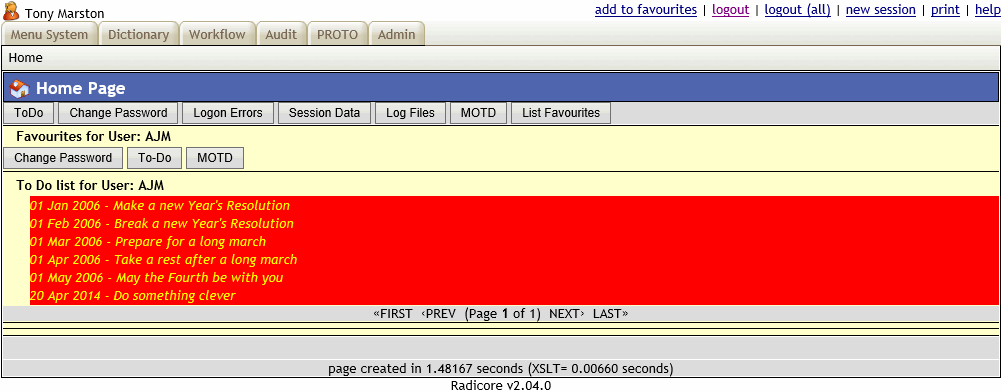
This is the first page the user sees after passing through the logon screen. It is also the page that is shown whenever the user selects an option from the menu bar instead of the navigation bar.
Each of the options in the menu bar is a TASK within the menu database, and is shown as a hyperlink. The action taken when one of these hyperlinks is selected depends on the task type:
When the current selection is a menu the area below the menu bar may be blank as there is no active proc. It is possible to fill this area with other details such as:
| Favourites | The user's favourite tasks shown as a group of buttons. Just press a button to activate a task.
This list can be maintained by pressing the List Favourites button. New tasks can be added by pressing the add to favourites hyperlink while running that task. |
| To-Do | The user's personal TO-DO list. If an entry has been linked with a task then it will be shown as a hyperlink. Just click on the hyperlink to activate the specified task.
This list can be maintained by pressing the To-Do button. Entries which has passed their due date but have not been completed will be highlighted in red. |
| Workitem details | These are generated by the Workflow Engine. If any workitems are pending they will appear as hyperlinks in one of two sections, each with its own pagination area:
|
| Button | Action |
|---|---|
| To-Do | Will allow the user to maintain his "to do" list by activating List ToDo by User. |
| Change Password | Will allow the user to change his password by activating Change User Password. |
| Logon Errors | Will allow the user to view failed logon attempts by activating List Logon Errors. |
| Session data | Will allow the user change certain session variables by activating Update Session data. |
| Batch Log Files | Will allow the user to view any log files which have been created by activating Show Batch Log Files. |
| MOTD | Will allow the user to view any messages by activating List Message of the Day. |
| List Favourites | Will allow the user to maintain his favourites by activating List Favourites by User. |
This screen also contains three areas which can be populated with text from the following files:
These areas will be repeated on every other screen except the LOGON screen which uses different files.
