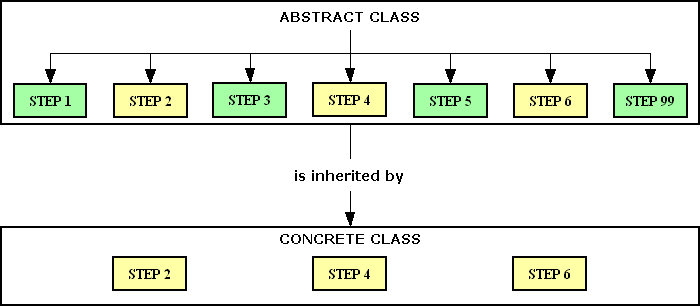
Figure 1 - the Template Method in operation
Every software developer knows that there are two basic ways of supplying an application to a customer:
While a bespoke system is designed to satisfy the requirements of a single customer, an Off-the-Shelf package is designed to be used by a number of different customers, thus sharing the costs and making it more economical for each one. As it is also pre-built it can be installed and deployed much quicker. However, not all businesses operate in exactly the same way, and their business processes may be so different that they require software applications which can deal with these differences. This makes it much harder to build a package as the designers must identify the common options which may be required by their target customers, then build these options into their software. They must also provide each customer with the ability, usually via some sort of configuration menu, to choose which options they wish to be deployed in their particular installation.
Whilst a package may offer a selection of the most common options, such as a choice between FIFO (First In First Out) or LIFO (Last In First Out) when dealing with inventory, it is not unknown for a new customer to appear with some less well known or even obscure requirements which are not catered for on the configuration menu. These changes generally fall into one of two categories:
It is therefore essential that the new customer specifies their exact requirement in great detail so that they can be compared with the capabilities of the package. It is generally accepted that unless a package can meet at least 80% of the organisation's requirements then it will not be a good fit and should probably not be considered. The burning question is how to deal with that missing 20%. Several options are possible:
Option #1 is rarely a good idea as if you change it for one customer you change it for all customers, and some of the existing customers may not be happy with the new change. If it is added as a separate module which is supposed to be dormant unless specifically activated, it may cause problems if it gets run by accident. This will require a great deal of testing to guarantee that the code is only run when it is supposed to.
Option #2 may not cause a problem with a small business which is currently using primitive software, such as a collection of spreadsheets, and they want to move to something which is more sophisticated. They will usually be more willing to limit themselves to the standard options. A customer with a well-established business who is looking to upgrade their out-of-date software may not be so willing. They may have developed their own method of working, known as its Unique Selling Point, which they would be unwilling to abandon. Training members of staff to use a new computer system is one thing, but adding in a change to well-established procedures may prove to be an obstacle.
Option #3 represents a lost opportunity for both the customer and the package vendor.
Option #4 is potentially the most advantageous solution, but that depends entirely on how the package was written. Unless it was specifically architected to deal with this option then trying to retro-fit it into an existing code base could be problematic. It requires the ability to keep any customisations completely separate from the core code, and to keep the customisations for each customer separate from those of other customers.
The techniques described in this article have been built into the RADICORE framework which was used to create the GM-X Application Suite. This enables the application to combine the benefits of both options:
The RADICORE framework was built from the ground up to build web based Enterprise Applications, also known as Back Office Applications, which connect to a relational database. It was designed as a modular system which is comprised of a number of subsystems, each with its own database and software stored in different directories in the file system. These directories follow a standard structure. The framework itself has four core subsystems - MENU, AUDIT, WORKFLOW and DATA DICTIONARY. Other subsystems can be added on as and when necessary. The original version of GM-X, called TRANSIX which was released in 2008, consisted of just 6 additional subsystems - PARTY, PRODUCT, ORDER, INVOICE, INVENTORY and SHIPMENT, but this has been expanded to cover more business areas.
This framework was built using an object oriented language on standard and well-known architectural patterns such as the 3-Tier Architecture and the Model-View-Controller. As it was specifically designed to aid in the building of database applications it has the following characteristics:
This abstract class became the backbone of my framework as it contains all the standard boilerplate code which is used by every database table class. In the GM-X application this covers over 400 tables, so that is a lot of code shared a lot of times. This abstract class then enabled me to implement the Template Method Pattern when I discovered the need to insert custom code into individual concrete table subclasses using "hook" methods. This has also enabled me over the years to make changes to the abstract class, either to upgrade the standard invariant methods or to add new "hook" methods, without having to change any of the existing subclasses.
Figure 1 below shows how the steps in the abstract class can be overridden by steps within each concrete subclass:
Figure 1 - the Template Method in operation
You will notice that a particular algorithm (process) within the abstract class is defined as a series of steps with a separate method for each step. Each of these steps is always called in the same sequence. Some of these steps (in green) are regarded as invariant (fixed) which means that they already contain implementations. Others (in yellow) are regarded as variable (customisable) which, even though they are always called, do nothing. These are designated as "hook" methods as they may be overridden in any concrete subclass in order to replace "nothing" with "something specific to this subclass".
When building user transactions I had already observed that they all followed the same pattern in that they performed one or more CRUD operations on one or more tables, so I began by building a separate Controller for a specified table or tables and a particular set of method calls. When I noticed that the only difference between similar transactions on different tables was the name of the table I decided to provide the table name in a separate component script so that the controller script which it activated could work with any table it was given. This was how I implemented dependency injection. This then enabled me to convert all my Controllers from custom-made to generic and reusable. From here it was a logical step to create a library of 45 reusable Transaction Patterns, then to amend my Data Dictionary to include the ability to generate working transactions simply by linking a pattern with a database table and pressing a few buttons. This means that after creating a new database table it is possible to create a family of forms to view and maintain the contents of that table within five minutes and without writing a line of code - no PHP, no HTML and no SQL. I do not know of any other framework in the entire world that can beat or even equal this.
The end result is that my framework provides 100% of the boilerplate code that is used in any database application. This means that a developer can spend 100% of his time working on the business rules, and you cannot be more productive than that. Here is a breakdown of the components in a typical user transaction which illustrates this:
Every subsystem consists of its own database and its own set of files in the file system under a consistent directory structure (which is initially copied from the DEFAULT directory). The advantage of this arrangement is that I can develop a new subsystem on one server, put that subsystem's directory with all of its files into a ZIP file, then install that subsystem on another server.
In order to implement the Internationalisation (I18N) feature that is available with any RADICORE application the text, screens and reports directories have a separate subdirectory for each supported language, where the default language is 'en' (English).
In any subsystem within an application that was built using the RADICORE framework the following customisation options are available:
The code to deal with these tables is supplied using pre-built Traits which effectively add them to the abstract table class.
The standard code will also ensure that any extra fields are automatically included in certain screens, including search screens, so that they appear alongside the standard data fields.
text directory.screens directory.reports directory.classes directory.Any of the standard files in the classes, reports, screens, and text directories for any subsystem can be customised. Each customised file must be placed in a separate subdirectory and the filename must include a cp_ prefix so that the standard file cannot accidentally be overwritten by a custom file.
The following customisation options were easy to implement as I could take advantage of RADICORE's directory structure. This separation of subsystems provides the following opportunities:
classes, reports, screens and text - it was easy to create a new custom-processing subdirectory within each of these to hold the customisations for that file type.custom-processing/<project_code>.custom-processing/<project_code>/<language_code>.The processing of files in the screens directory is quite straightforward - it will first look for a file with the name cp_<filename> in the screens/custom-processing/<project_code>/<language_code> directory, and if found it will load it into memory. If one is not found it will load the standard file, without the cp_ prefix, from the screens/<language_code> directory. This means that the customised file replaces the standard file.
The processing of files in the reports directory is exactly the same as for the screens directory.
The use of separate structure files for both HTML screens and PDF documents means that if it is ever required to move fields around in that structure, or to add or remove fields, then this can be achieved by creating a custom version of that structure file without having to change any program logic. This is especially useful when different clients require different versions of standard documents such as invoices or orders, or want some fields repositioned or relabelled in certain screens.
The processing of files in the text directory is slightly different as each file contains arrays of values with different keys, and only some of them may be replaced with customised versions. It will first load the standard file (without the cp_ prefix) into memory. It will then look for a file with the name cp_<filename> in the text/custom-processing/<project_code>/<language_code> directory, and if found it will merge the contents of that file with what already exists in memory instead of replacing it. This have the effect of replacing only those entries with the same key or adding new entries.
This was not as complicated to implement as I first thought when I realised that my use of the Template Method Pattern held the key. With this pattern all the standard code is supplied using invariant methods within the abstract class and custom code can be added into any of the variable "hook" methods which can be overridden in any concrete subclass. While every one of these methods is defined in the abstract class they do not do anything unless they have been copied into a subclass and filled with code. How this works is as follows:
If I had another copy of that "hook" method in an alternative place all I had to do was find a way to execute that method in that alternative place instead of the method in the subclass. I first thought about creating an alternative subclass which could be instantiated instead of the original subclass, but the more I thought about it the more problems I could see, especially when I realised that instead of simply replacing the standard method with a customised method that I might wan to run both of them, one after the other, with a choice of which one came first. So then I thought about creating an alternative object which could contain the customised methods and mulled over how it could be implemented. I saw straight away that I could implement this feature by only changing the code in the abstract table class and not any concrete subclasses. This is something I could not do if I followed the advice of those poorly trained individuals who are taught to favour composition over inheritance. I eventually decided on the use of a custom processing object which is shown in Figure 2 below:
Figure 2 - Template Method with a Custom Processing Object
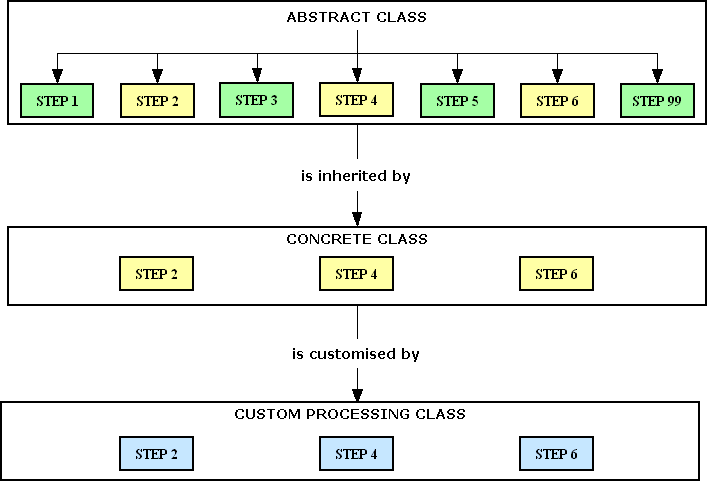
In this diagram the abstract class defines all the steps (methods) required to complete an operation. The steps in green are invariant/fixed and apply to all table classes. The steps in yellow contain the business logic for individual table classes within the package. The steps in blue are defined in a custom processing classes which may (or may not) exist in the custom processing directory for individual clients. The custom processing classes for each client are kept separate from those for other clients, thus ensuring that the wrong custom logic is ever executed for the wrong client.
The changes to the abstract class fell into two areas:
When a table subclass is initialised the standard code will look to see if a custom processing object has been defined. It does this by testing to see if a file with the name classes/custom-processing/<project_code>/cp_<class_name>.class.inc exists or not. If it does then it will instantiate it into $this->custom_processing_object.
My original approach to calling a hook method was to include the following line of code:
$fieldarray = $this->_cm_<hook_method>($fieldarray);but I changed it to the following:
$this->custom_replaces_standard = false;
if (is_object($this->custom_processing_object)) {
    if (method_exists($this->custom_processing_object, '_cm_<hook_method>')) {
        $fieldarray = $this->custom_processing_object->_cm_<hook_method>($fieldarray);
    } // if
} // if
if (empty($this->errors)) {
    if ($this->custom_replaces_standard) {
        $this->custom_replaces_standard = false;
    } else {
        $fieldarray = $this->_cm_<hook_method>($fieldarray);
    } // if
} // if
Note that, by default, it always calls the custom method first followed by the standard method. If the standard method is not required then the following line of code should be inserted into the custom method:
$this->custom_replaces_standard = true;
If it is necessary to run the standard method before the custom method then the following line of code should be inserted into the custom method:
$fieldarray = $this->calling_object->_cm_<hook_method>($fieldarray);
Note that $this->calling_object within the custom object refers back to the standard object.
Every table in the database has its own class file from which an object can be instantiated. Every table class inherits all of its standard code from the framework's abstract table class. This standard code calls certain "hook" methods at certain points in its processing flow. If a concrete table subclass contains its own version of a "hook" method then that version will be executed instead of the empty version in the abstract superclass. The standard class file for each subsystem exists in the <subsystem>/classes directory. If it is necessary to create a customised version of this table class then it should be create in the <subsystem>/classes/custom-processing/<project_code> directory with the same name as the standard file but with a cp_ prefix. The contents of this file should resemble the following:
<?php
// *****************************************************************************
// provides custom processing for class: <class_name>
// this is for project: <project_code>
// *****************************************************************************
require_once 'std.table.class.inc';
class cp_<class_name> extends Default_Table

    var $calling_object;        // reference to calling object
    var $errors = array();      // array of error messages

    // ****************************************************************************

    << insert custom methods here >>

// ****************************************************************************
} // end class
// ****************************************************************************
?>
Note that this class does not extend the subsystem's standard class as it would create duplicates of all its methods, which would result in the same code being run twice. In this way the custom object only contains those methods which it wishes to override. The reason that it extends the default abstract class is that it may wish to call some of the methods which are defined in that class.
As far as I am aware there are no other software packages in the world that are capable of offering this amount of customisation, especially not any which have been built using an open source framework. The main reason why I can keep any customisations separate from the core code, and to keep the customisations for one client separate from those for other clients, is because of the basic design decisions which I made 20 years ago:
custom-processing subdirectory.custom-processing directory is further subdivided into separate <project_code> subdirectories for each client.Easy Peasy Lemon Squeezy.
The following articles describe aspects of my framework:
The following articles express my heretical views on the topic of OOP:
These are reasons why I consider some ideas on how to do OOP "properly" to be complete rubbish:
Here are my views on the PHP language and Backwards Compatibility:
The following are responses to criticisms of my methods:
Here are some of my thoughts on database design:
Here are some miscellaneous articles:
| 20 Mar 2026 | Added Figure 1 and Figure 2 |